How to Download Audiobooks from Spotify for Free?
 By Delilah Rene
Spotify Tips
Updated on 11/06/2026
Spotify offers more than just music and podcasts. It also has a growing library of audiobooks, including bestsellers, fiction, nonfiction, and more. Eligible Premium subscribers can enjoy a set amount of audiobook listening time each month, although availability and listening limits vary by plan and region.
While Spotify supports offline audiobook listening, downloaded titles can only be played within the Spotify app. If you want to save audiobooks as regular audio files or listen on other devices, you'll need a different approach. In this guide, we'll show you how to download audiobooks from Spotify for free, explore the available options, and explain their limitations.

Part 1: How to Find Free Audiobooks from Spotify with Premium?
Spotify offers a wide selection of audiobooks, including bestsellers, fiction, nonfiction, and more. Eligible Premium subscribers can listen to titles from the audiobook catalog with a monthly listening allowance, which varies by plan and region. Spotify also includes features such as bookmarking and a Sleep Timer, making it easier to pick up where you left off or listen before bed. You can download eligible audiobooks for offline listening within the Spotify app.
Monthly audiobook listening time is included with eligible Premium Individual plans and for the plan managers of Premium Family and Duo. Other Family and Duo members can get their own listening hours through an Audiobooks+ add-on purchased by the plan manager. Additional listening time may also be available through one-time top-ups.
To find audiobooks included in your subscription, look for titles labeled "Included in Premium". You can search for a specific book or browse the Audiobooks section to discover new titles. Keep in mind that audiobook availability may vary by region and subscription plan.
Once you've found a book, open its page to listen to a preview or start playing. Spotify saves your progress, so you can return to the audiobook later without starting over.

How to Monitor Your Audiobook Listening Time?
Spotify lets you check how much audiobook listening time you have left and when your monthly allowance renews. If you run out of hours, you can purchase additional listening time through Audiobooks+ or a one-time top-up, depending on your plan and region. Here's how to check your remaining hours:
Mobile:
Step 1 Open Spotify and tap your profile picture.
Step 2 Go to Settings and privacy, then select Account and tap your Premium plan.
Step 3 Tap Audiobook listening time to see your remaining hours and renewal date.
Desktop:
Step 1 Open your browser and sign in to your Spotify account.
Step 2 Go to the Audiobook listening time page.
Step 3 Check your remaining listening hours and when they renew.

Part 2: How to Find Free Audiobooks from Spotify without Premium?
You don't need Spotify Premium to browse audiobooks. With a free account, you can search for titles, listen to previews, and access audiobooks that are offered for free. Some books require a separate purchase, but you can also find titles that are available at no cost. Here's how to look for free audiobooks on Spotify.
Step 1 Open the Spotify app or web player and select Search.
Step 2 Type "free audiobooks" into the search bar and select Audiobooks to browse the results. Check each title to see whether it is available for free.
Step 3 Open a title labeled "This audiobook is free". If a Get button is available, select it to add the audiobook to Your Library. You can then start listening in Spotify without a Premium subscription.

Can You Listen to Paid Audiobooks for Free on Spotify?
Some books also appear in Spotify's Podcasts & Shows search results, where you may find free readings, discussions, or audio adaptations. However, these aren't necessarily the same as the paid audiobook editions, and some may contain only excerpts rather than the complete book. Here's how to check what's available.
Step 1 Open Spotify and search for the audiobook you want. For example, enter "The Hunger Games" in the search bar.
Step 2 Select Podcasts & Shows to look for related audio content. Check the description, episode list, and publisher before listening. Keep in mind that a free podcast result doesn't necessarily provide access to the complete paid audiobook.

Part 3: How to Download Free Audiobooks from Spotify?
Once you get a free audiobook from Spotify, you can listen to it online or download it for offline listening but this feature is available to both Spotify Premium users. Free users are only available to download the purchased audiobooks and it is not allowed to download individual chapters. Now follow the steps below to download free Spotify audiobooks.
Step 1 Open the Spotify app or its web player on your device and choose the free audiobooks you found just now.
Step 2 Click the download button of this free audiobook and you can listen to it without an internet connection when this button turns green.

However, Spotify does not download audiobook files directly to your device. Instead, it temporarily stores the data in a cache file. Consequently, audiobooks cannot be downloaded from Spotify as MP3 files for use outside the app. In the next part, we will explain how to bypass this limitation.
Part 4: How to Download Free Audiobooks from Spotify as MP3?
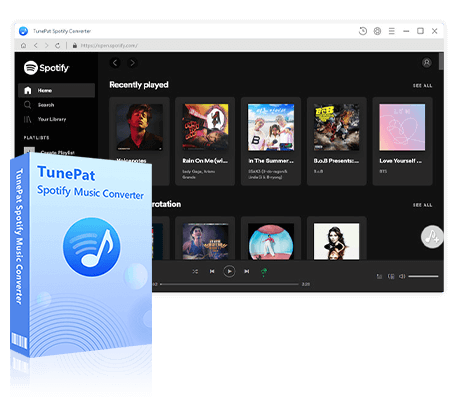
With its extensive collection, Spotify stands out as an ideal platform for audiobook enthusiasts. Nevertheless, the app's current limitations prevent users from downloading audiobooks to MP3, as all tracks are encrypted, including those available for purchase. Fortunately, there's a dependable solution available: the TunePat Spotify Music Converter. This tool offers support for downloading Spotify audiobooks to MP3, providing users with the flexibility they desire.
This program enables you to download your Spotify audiobooks to different output formats, not only MP3 but also AAC, WAV, FLAC, AIFF, and ALAC. Whether you have a free account or a Premium account, you are available to download audio from Spotify with TunePat. Moreover, it operates at up to 40X faster speed, ensuring a lossless sound quality while retaining the original ID3 tags.
TunePat Spotify Converter
TunePat Spotify Converter enables users to convert and get Spotify songs or podcasts from Spotify and then save them permanently.
Step 1 Launch the TunePat Spotify Music Converter
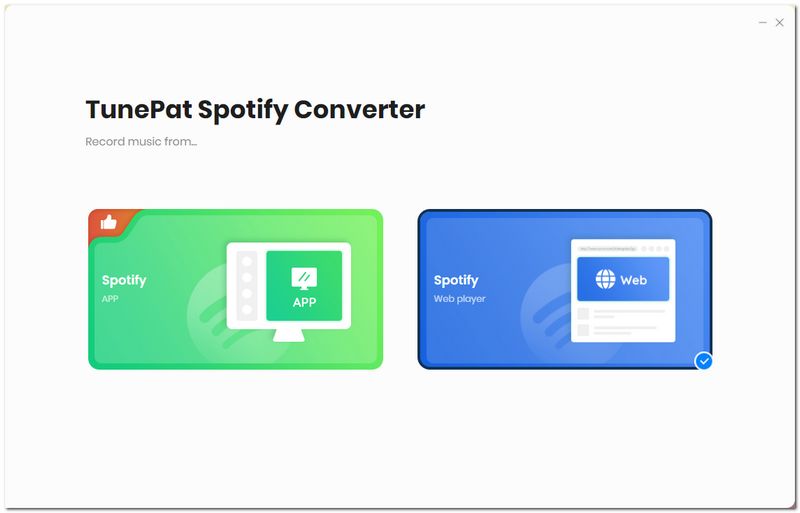
Start the TunePat Spotify Music Converter program on your PC and you will be provided with two options: Record Spotify audiobooks from App or Record Spotify audiobooks from Web player. If you choose to record audiobooks from the Web Player, you will see the built-in Spotify web player when you activate it, while the App option requires you to download the Spotify app in advance.
Step 2 Select the Spotify Audiobooks You Want to Convert
Whether you choose to record audiobooks from the Spotify app or its web player, choose the audiobook you want to convert and select the "+" button.
After that, a popup window listing all of the chapters on the current page will appear. By default, all of them will be checked. If you just want some chapters downloaded, you can choose the ones you want. After that, click the "Add" button.


Step 3 Parameter Selection in the Setting Interface
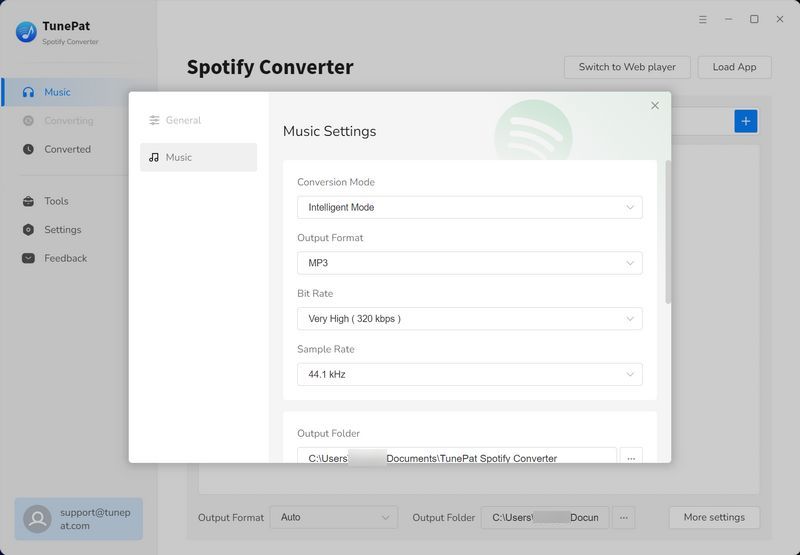
Go to the "Settings" module to change the conversion parameters, such as the conversion mode, output format choices, bit rate, sampling rate, output path, output file name, etc. You can freely adjust these settings according to your needs. Here we select "MP3" as an example.
Step 4 Convert Spotify Music to the Local Computer
Once you have finished, navigate back to the home page. If you change your mind and want to add more chapters or other audiobooks to the conversion list, simply click on "Add More" and repeat the previous steps. When you have completed the additions, click on "Convert" to initiate the conversion process.


Step 5 Play Spotify Songs without a Spotify Account
When the download is complete, you can click on the "History" button to access a comprehensive list of past downloads. Additionally, if you want to locate the converted items on your computer, simply click on the file icon next to any chapter, and it will open the local folder where they are stored.

Conclusion
Thanks to Spotify's innovative move into the world of audiobooks, users can seamlessly integrate their favorite literary works into their listening routine. Whether you're a fan of timeless classics or contemporary bestsellers, Spotify's audiobook collection has something for everyone. Embrace the world of storytelling and elevate your listening experience with the diverse array of audiobooks now available on Spotify.
With a Spotify Premium subscription, accessing and downloading audiobooks for free has never been easier. However, free accounts can also get free audiobooks easily! You must already know how to get free Spotify audiobooks after reading this article. Suppose you've discovered an audiobook you adore and wish to listen to it on your portable player. In that case, it's advisable to utilize TunePat Spotify Music Converter to download it in MP3 format. Only in this way, you can preserve it on your device indefinitely!


Delilah Rene
Senior Writer