How to Download YouTube Music without Premium
 By Delilah Rene
YouTube Music Tips
Updated on 8/25/2026
By Delilah Rene
YouTube Music Tips
Updated on 8/25/2026
YouTube Music gives users access to millions of songs, playlists, albums, and other audio content through its app and web player. While free users can stream music with ads, features such as offline listening and downloads are available with a YouTube Music Premium subscription. However, these in-app downloads are not saved as regular audio files that you can freely transfer or play on other devices.
So, can you download YouTube Music without Premium or a subscription? Yes. If you want to save YouTube Music songs as local audio files for offline listening, there are alternative ways to do so. In this guide, we'll show you how to download YouTube Music without Premium, including songs, playlists, and albums, and explain a practical way to save them in commonly used audio formats.
Part 1. Can You Download YouTube Music without Premium?
Yes. But but YouTube Music's official offline download feature requires Premium. If you want to save YouTube Music songs as regular audio files without a Premium subscription, you need an alternative downloading or conversion method.
| Tool | Stream music | Offline playback | Download music | Background playback | Ads-free listening |
|---|---|---|---|---|---|
| YouTube Music Free | ✓ Yes | ✕ No | ✕ No | Limited | ✕ No |
| YouTube Music Premium | ✓ Yes | ✓ Yes | ✓ Yes | ✓ Yes | ✓ Yes |
| TunePat YouTube Converter | ✓ Yes | ✓ After Downloaded | ✓ Yes | ✓ Yes | ✓ After Downloaded |
* What is TunePat YouTube Music Converter? Learn more from here.
What Happens to YouTube Music Downloads after Premium Expires?
YouTube Music downloads are tied to your Premium membership and are not permanent audio files. When your YouTube Music Premium membership expires, you lose access to the Premium benefits, including music downloads and offline listening.
If your goal is to save music as MP3, FLAC, WAV, or another standard audio file that remains accessible after your Premium membership ends, YouTube Music's built-in download feature does not provide that functionality. Luckily, we have found a YouTube music downloader tool which can help you download YouTube Music without subscription.
Part 2. How to Download YouTube Music without Premium
Method 1. Safe YouTube Music Downloader - TunePat YouTube Music Converter
If you want a more reliable way to download YouTube Music without Premium, TunePat YouTube Music Converter is a practical desktop solution. It lets both free and Premium users download songs, albums, and playlists from YouTube Music and convert them to common audio formats for offline listening. With TunePat, you can:
Want to see how TunePat works? Follow the steps below to learn how to download YouTube Music without a Premium subscription.
Click the "Download" button above to download the latest version, and then follow the tutorial below. With just a few simple clicks, you can complete the batch download of YouTube Music.
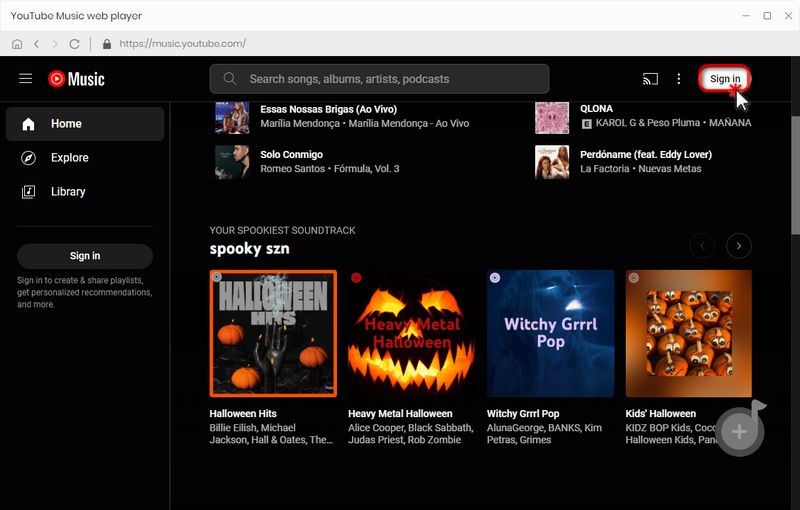
Step 1 Log in to YouTube Music with A Free or Premium Account
Open TunePat YouTube Music Converter and then you will come to a built-in YouTube Music web player. Log in to YouTube Music with a Free or Premium account. Both accounts are feasible to download songs via TunePat. You can get access to the music library after logging in.
Step 2 Customize the Output Format, Quality, and More Settings
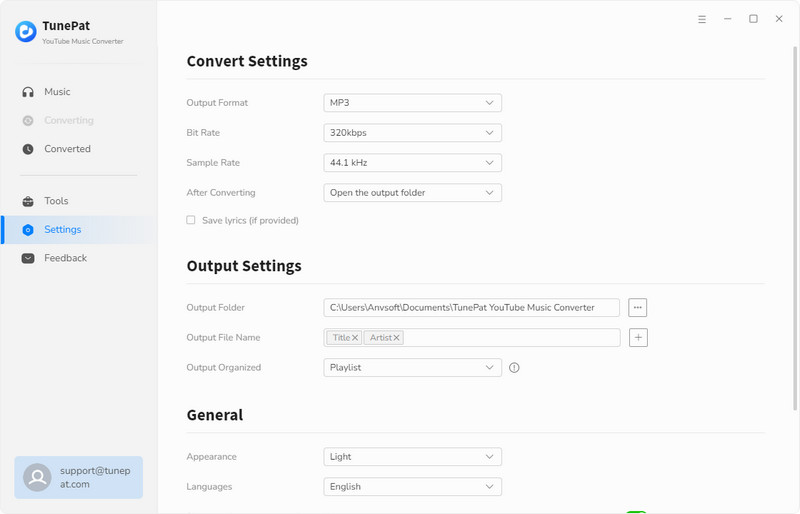
To satisfy different users, TunePat enables users to change the output format, bit rate, sample rate, output path, etc. Go to "Settings" in the low left, and you are allowed to customize the output settings by yourself. Considering the usage of the downloaded songs, do not forget to choose the compatible output format.
Step 3 Select YouTube Music to Convert
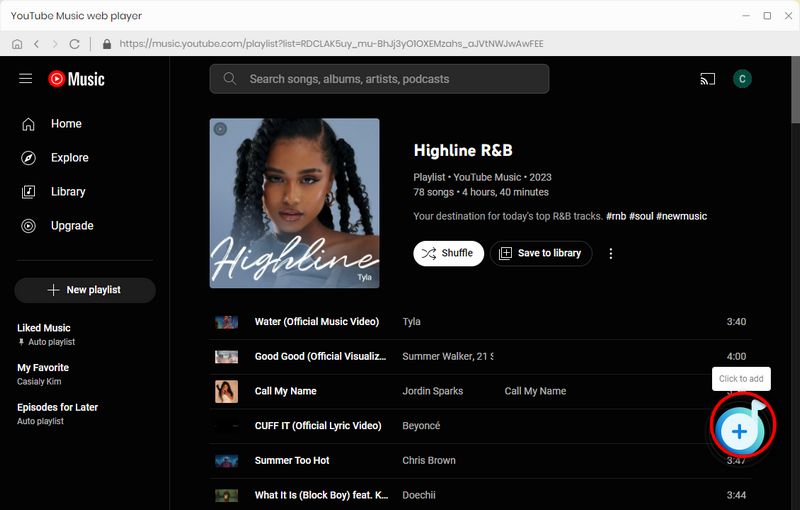
Finally, we can download the preferred songs, playlists, and albums. Open a playlist or album, to download songs from this opened playlist or album, click on the "+" button. Select the songs you need from the list, then click "Add".
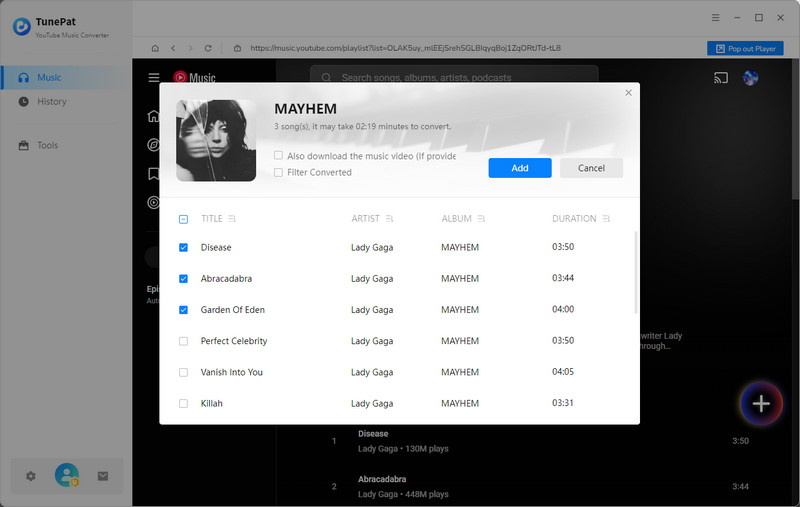
Step 4 Download YouTube Music Tracks to Common Formats
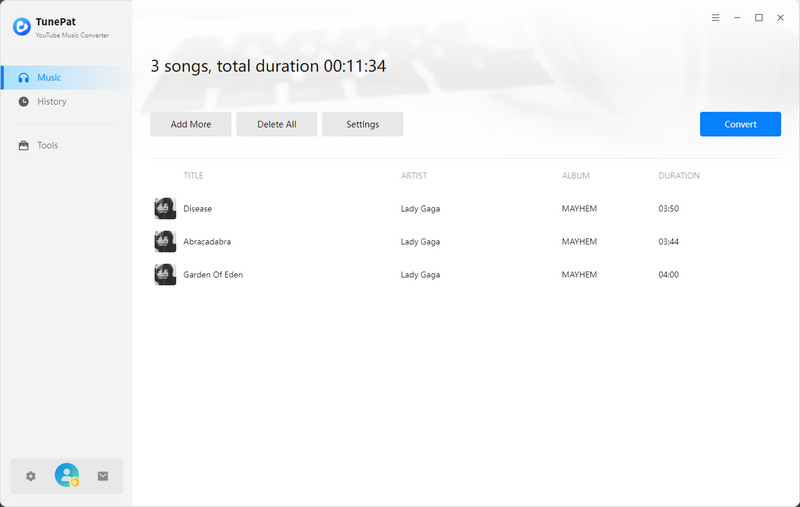
The conversion process will be launched immediately when you click on the "Convert" option here. And you will be surprised by its faster speed conversion.
🙋 Why is there another "Add More" button?
This button is tailor-made for users who need to select songs from different albums or playlists for one-time batch conversion.
Step 5 Enjoy the Playback of YouTube Music Freely
Since YouTube Music tracks are converted to common formats, you can freely transfer them to any device, share them with friends, play them via common media players, etc. It's your time to enjoy YouTube Music without limitation.
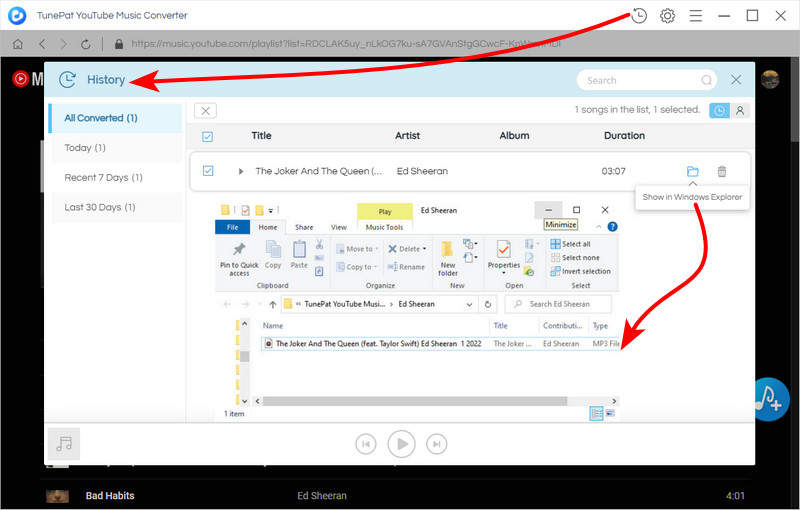
Method 2. Free Online YouTube Downloader - Y2mate
Free online YouTube music downloaderss often come with intrusive ads, misleading download buttons, and unexpected redirects. We strongly recommend using an ad‑blocker and avoiding unverified downloads. For a safer, ad-free experience, a professional desktop app like TunePat is a more reliable alternative.
If you prefer not to install any software, Y2mate is a free online downloader that can be used to save audio and video content from YouTube and other supported platforms. It works directly in a web browser, so you don't need a YouTube Music Premium subscription or a dedicated desktop program.
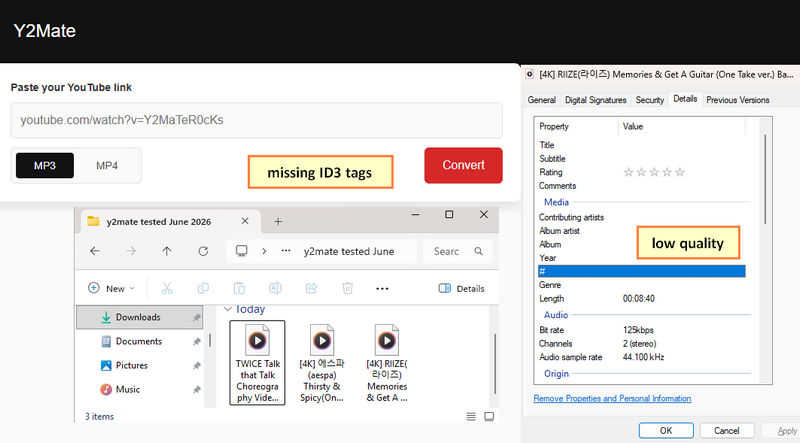
Y2mate supports downloading audio in MP3 format with bitrates from 128kbps to 320kbps, as well as video in resolutions ranging from 144p to 1080p, depending on the source. However, since it is a free online service, you may encounter advertisements, redirects, and other pop-ups during the download process.
Step 1 Open YouTube Music, find the song, album, or playlist you want to save, and copy its URL.
Step 2 Visit the Y2mate website in your browser and paste the copied link into the download box.
Step 3 Select an output format. Choose MP3 if you only need the audio. Depending on the available options, you can also select the desired audio quality or video resolution.
Step 4 Click the download button and you will see a redirect, then back to the original page, there will be the real download button. Click on it to download the mp3 music from your desired YouTube video.
Pros
-
 Free and no registration required.
-
No software installation is needed.
-
Supports common audio and video formats, including MP3 and MP4.
-
Works on desktop and mobile browsers.
Cons
-
 Unstable service with frequent parsing and download failures.
-
Ads and redirects can interrupt the download process.
-
Actual audio quality may be lower than advertised.
-
ID3 metadata is not always preserved.
-
No batch download feature.
Part 3. All-in-one YouTube Downloader vs Online Tool: How to Choose?
| Feature | TunePat YouTube Music Converter | Y2Mate |
|---|---|---|
| Free to use | Trial available | ✅ |
| Software installation | Required | No need |
| Songs, albums & playlists | ✅ | ⚠️ Mainly individual links |
| Output Formats | MP3, AAC, WAV, FLAC, AIFF, ALAC | MP3, MP4 |
| Batch Download | ✅ | ❌ |
| Audio Quality | Up to 10× speed | Varies by domain |
| Download Speed | Up to 320kbps / original quality | ⚠️ Actual quality may be lower than advertised |
| Metadata Preservation | ✅ Preserved | ⚠️ Partial or missing |
| Ads-Free | ✅ | ⚠️ Frequent popups or redirects |
Who Should Use TunePat?
- For playlist-heavy downloads and large music collections.
- When consistent audio quality and complete ID3 tags matter.
- Ideal for those seeking more formats and output customization.
- A better fit for regular downloads and a stable desktop experience.
Who Should Use Y2Mate?
- Occasional downloads of individual tracks.
- When you prefer a browser-based solution.
- No installation required for quick, on-the-go downloads.
- Simple, one-off download tasks
Downloading YouTube Music without Premium is possible, but the right method depends on your needs. Y2Mate is a convenient choice for occasional downloads when you prefer a free, browser-based solution without installing software. However, our testing found that its stability, download quality, and metadata preservation can vary across different domains.
For more reliable downloads, TunePat YouTube Music Converter offers a more complete solution. It supports songs, albums, and playlists, provides multiple output formats, preserves ID3 tags, and lets you customize how your downloaded music is organized. If you regularly download YouTube Music or want to build a well-organized local music library, TunePat is the better choice.
Whichever method you choose, make sure you download content only when you have the necessary rights or permission. For personal music management, TunePat provides a straightforward way to save your favorite YouTube Music content for offline listening.
Delilah Rene
Senior Writer