How to Download Spotify Music to MP3 in 320kbps (2026 Guide)
 By Olivia Anderson
Spotify Tips
Updated on 9/29/2026
By Olivia Anderson
Spotify Tips
Updated on 9/29/2026
If you want to download Spotify music to MP3 for more flexible offline playback, Spotify's built-in downloads do not provide standard MP3 files that can be freely transferred or managed outside the app. To save Spotify songs, albums, or playlists as MP3 files, you will need a separate conversion or download method.
To find out which methods actually work, we tested both desktop and online Spotify to MP3 tools using the same 14-track album and test environment. We compared batch download support, metadata retention, processing speed, ads or redirects, and verified audio quality, with particular attention to whether the downloaded files actually reached 320kbps.
Quick Answer: In our test, TunePat Spotify Converter was the most complete option for downloading full playlists while preserving metadata and outputting MP3 files up to 320kbps. Free online tools can work for occasional downloads, but our testing found common trade-offs such as redirects, limited batch support, missing metadata, and audio quality that did not always match the advertised 320kbps.
How We Tested: All tools were tested under the same conditions using the 14-track album Mayhem on Windows 11 and Google Chrome with a US IP address. Audio quality was checked using file bitrate information and Spek Spectrum Analyzer.
Spotify to MP3 Hands-on Test Results
| Tool | Ads / Redirects | Batch Download | Verified Audio | Metadata | Test Speed |
|---|---|---|---|---|---|
| TunePat Spotify Converter | ✓ None | ✓ Full Batch | 320kbps / Lossless FLAC* | ✓ Complete | 14 tracks: ~5 min |
| SpotiDownloader | ✕ Pop-ups / Redirects | ✓ Full ZIP | 320kbps | ⚠ Partial | 14 tracks: ~5 min |
| SpotifyMate | ✕ Risky Redirects | ✕ No True Batch | 320kbps | ⚠ Modified | 14 tracks: ~6 min |
| SpotiSongDownloader | ⚠ Few Prompts | ⚠ 2-Track ZIP Limit | ✕ Below 320kbps | ✓ Complete | Individual: 5 tracks ~1 min |
| SPOTIDOWN | ✕ Risky Redirects | ⚠ First 5 Tracks | 320kbps | ⚠ Partial | 14 tracks: ~4 min |
| Spowload | ✓ No Risky Redirects | ✕ No | ✕ Below 320kbps | ⚠ Partial | 14 tracks: ~7 min |
| SpotMate | ⚠ Frequent Ads | ⚠ First 3 Tracks | ✕ Below 320kbps | ⚠ Partial | 14 tracks: ~7 min |
| SPOTISAVER | ✓ None Observed | ✕ Failed in Test | ✕ Below 320kbps | ⚠ Watermark Added | 1 track: ~4 min |
| SpoMp3 | ✕ Redirects | ✕ Paid Only | 64kbps | ✓ Good | ~3–20 sec/track |
| Spotdown | ✕ Frequent Redirects | ✕ Batch Failed | ✕ 215–244kbps | ⚠ Partial | 14 tracks: ~3 min |
Part 1: How to Batch Convert Spotify Music to MP3 (Windows & Mac)
TunePat Spotify Converter is a simple yet powerful Spotify downloader. It can easily convert Spotify songs, albums, playlists, and podcasts to MP3/AAC/WAV/FLAC/AIFF/ALAC with lossless output audio quality while keeping the ID3 tags after conversion.
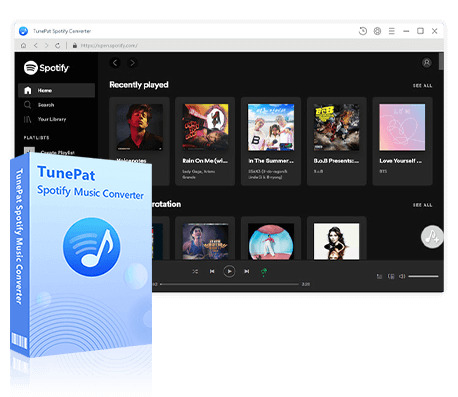
TunePat Spotify Converter
TunePat Spotify Converter enables users to convert and get Spotify songs or podcasts from the Spotify web player and then save them permanently.
Step 1 Launch TunePat and select either the "Spotify App" or "Spotify web player" option. TunePat allows both free and premium account users to convert music, though songs exported from a premium account will offer better audio quality. Please click to view this post we wrote earlier if you need to download Lossless Spotify music.
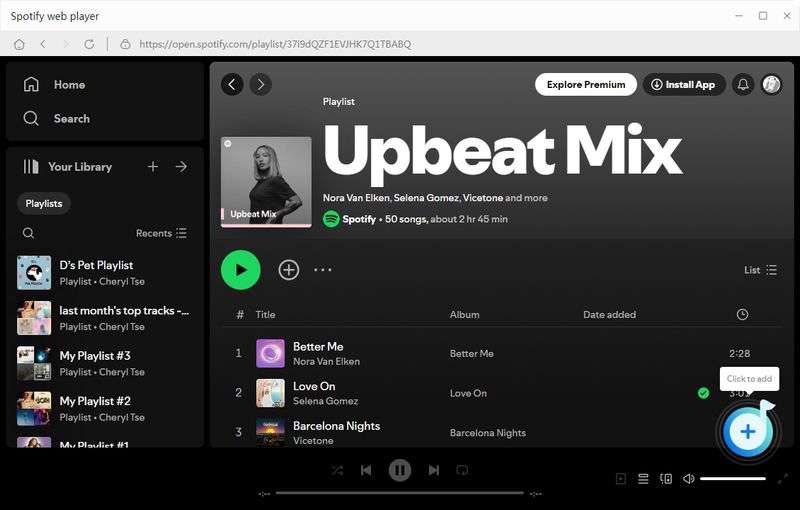
Step 2 Search for your desired song, artist, album, playlist, or podcast using the search box or browsing. When you find what you want, click the "+" button at the bottom right. TunePat will scan the tracks on the current page. Select the items to convert and click the "Add" button. The selected items will be added to TunePat and ready for conversion.
Step 3 Before downloading music, please modify the output settings. Here you can adjust various options such as conversion mode, output format, bit rate, sample rate, output folder, and filename. To download Spotify music as MP3, ensure the output format is set to MP3 during this step.
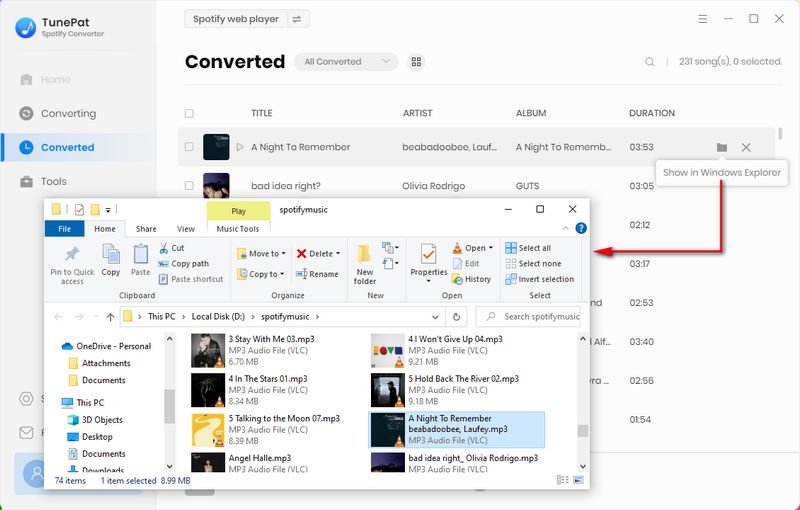
Step 4 After closing the settings window, click "Convert", and the conversion process will begin immediately. Once the conversion is complete, you can click the "History" button in the left toolbar to find the downloaded Spotify song in MP3 format with perfect sound quality.
TunePat Hands-on Test Results
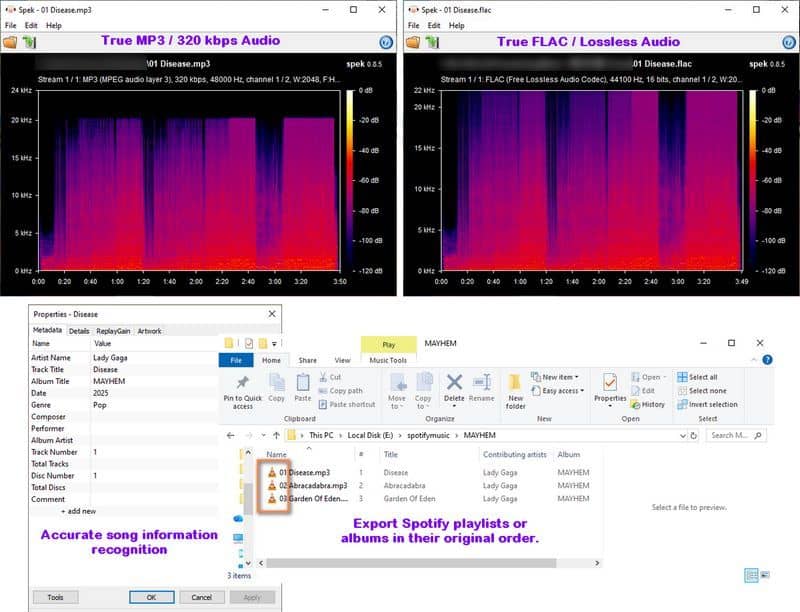
Test result: TunePat successfully processed the full 14-track test album in about 5 minutes. Link analysis took approximately 3 seconds, and all tested tracks retained their title, artist, album, artwork, track number, disc number, and year information. MP3 output up to 320kbps was available, while Spotify Premium users could also export tracks as lossless FLAC files during our test. We encountered no ads or redirects during the test.
Part 2: Online Spotify to MP3 Converters (Free Tools)
If you only need to download a few Spotify tracks without installing desktop software, a free online Spotify to MP3 converter can be a convenient option. These browser-based Spotify downloaders let you save individual songs, albums, or playlists as MP3 files, but their actual performance can vary significantly.
We tested nine online Spotify to MP3 tools using the same album and test environment, comparing batch download support, verified 320kbps audio quality, metadata retention, processing speed, and ads or redirects. Below, we take a closer look at three representative tools with different strengths and limitations, followed by concise hands-on results for the other six. These three are not ranked as the top options overall. If you want to convert a full Spotify playlist to MP3, pay particular attention to the batch download results, as several tools advertised playlist support but only allowed a limited number of tracks to be downloaded at a time.
2.1 SpotiDownloader — For Free Batch Downloads
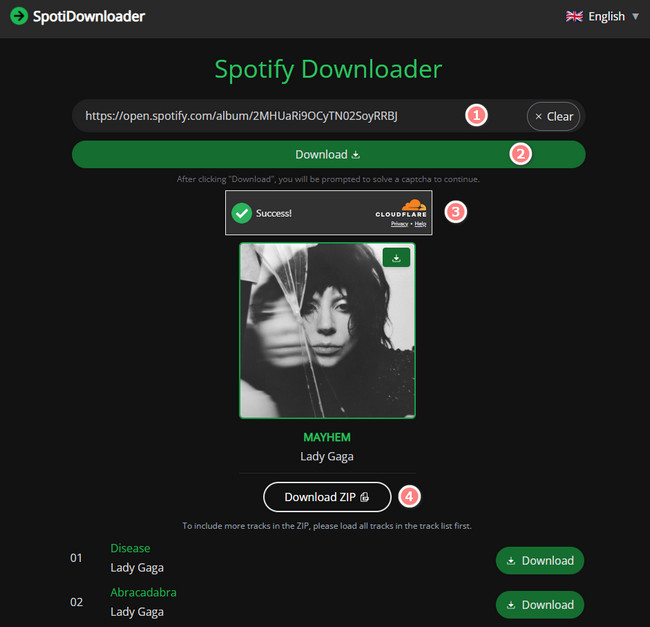
SpotiDownloader is a browser-based Spotify downloader that supports songs, albums, and playlists. To use it, copy a Spotify track, album, or playlist link, paste it into the website, and click "Download" to start processing. Once the link is parsed, you can download individual songs as MP3 files or save an entire playlist as a ZIP file.
For users who want to download a Spotify playlist to MP3 without installing software, its full-playlist ZIP option is one of its main advantages.
📕 Want to know more? Read our full SpotiDownloader review.
SpotiDownloader Hands-on Test Result [Last Tested: September 2026]
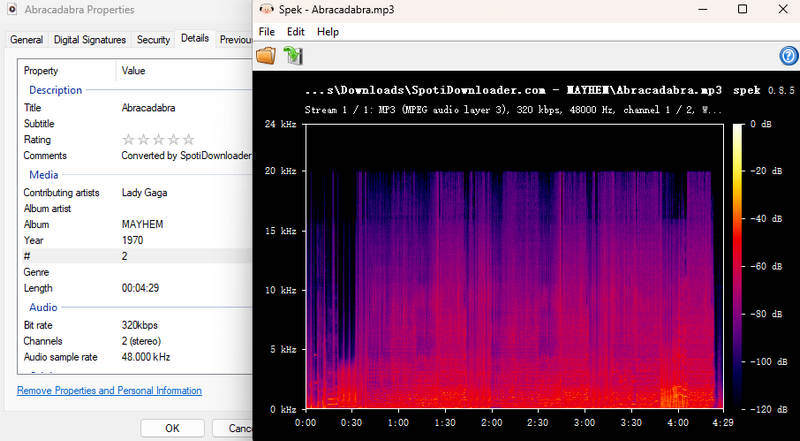
Test result: SpotiDownloader processed Spotify links in approximately 5 seconds and downloaded the 14-track test album in about 5 minutes. Full playlist ZIP downloading worked during our test, and the downloaded MP3 files reached 320kbps. However, two of the 14 tracks were missing ID3 tags and cover art, while the year information was incorrect across all tracks. We also encountered noticeable pop-up ads and frequent redirects while using the site.
2.2 SpotiSongDownloader — Good Metadata, but Limited Free Batch Downloads
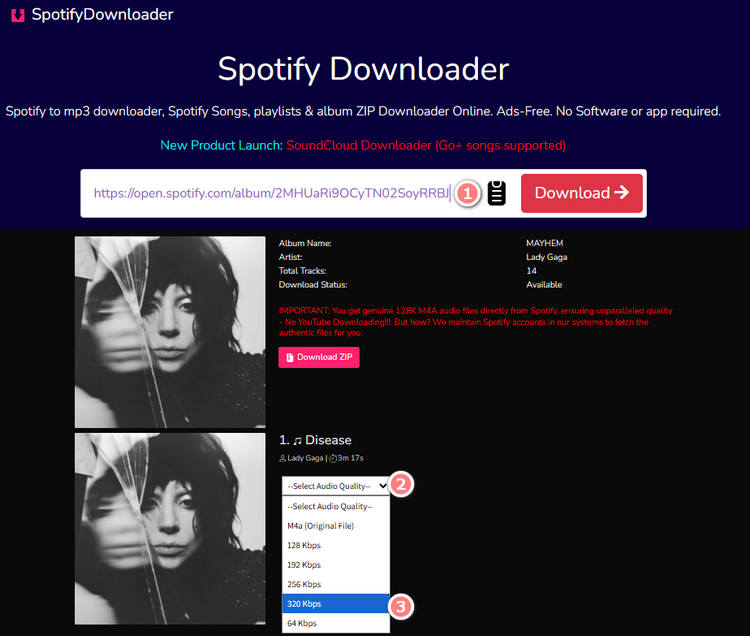
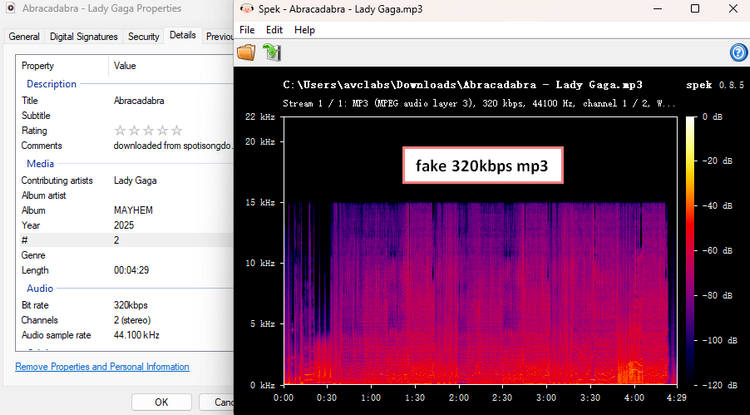
SpotiSongDownloader is an online Spotify to MP3 downloader that supports songs, albums, and playlists. It offers MP3 and M4A output and lets users select a bitrate from 64 to 320kbps. A ZIP download option is also available for multi-track content, although our hands-on test found that the free batch feature is heavily restricted.
To use this Spotify MP3 downloader, paste a Spotify URL into the website and wait for it to process the link. You can then choose the output format and bitrate and generate the download link. Without signing in, however, the ZIP option only allows two tracks from the list to be downloaded at a time.
SpotiSongDownloader Hands-on Test Result [Last Tested: September 2026]
Test result: SpotiSongDownloader preserved ID3 tags and album artwork without adding watermarks to the downloaded files. We did not encounter obvious malicious ads, although occasional prompts promoted another downloader for better audio quality. Spotify link processing took approximately 10 seconds.
The site indicates that signing in can remove the two-track ZIP limitation, but this did not work as expected in our test. After signing in, we were directed to a paid plan priced at $7.99 per month. Without subscribing, the site stopped successfully parsing new Spotify links and remained stuck on the loading screen. After signing out, link parsing worked again, but the two-track ZIP limit returned.
Although users can select 320kbps on the website, our verification showed that the actual downloaded audio did not reach the claimed 320kbps bitrate. For this reason, SpotiSongDownloader is more suitable for occasional individual Spotify MP3 downloads than for users looking for a truly free way to batch download complete playlists.
2.3 Spowload — For Individual Spotify MP3 Downloads
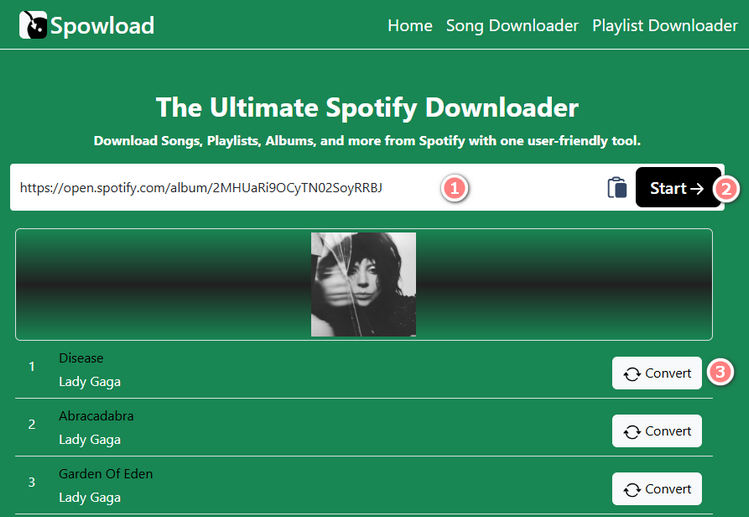
Spowload is a free browser-based Spotify to MP3 downloader that requires no registration or software installation. To download a track, paste the Spotify URL into the input box, click "Start", then select "Convert" and "Download" to save the resulting MP3 file.
Unlike some online Spotify converters, Spowload does not support batch downloading. This makes it more suitable for downloading individual Spotify songs to MP3 than complete albums or playlists.
Spowload Hands-on Test Result [Last Tested: September 2026]
Test result: Spowload processed Spotify links in approximately 3 seconds, and downloading the 14 tracks individually took about 7 minutes in total. We encountered no pop-up ads or dangerous redirects during the test. A separate webpage opened after clicking the download button, but it closed automatically after the download finished and did not redirect us to a malicious website.
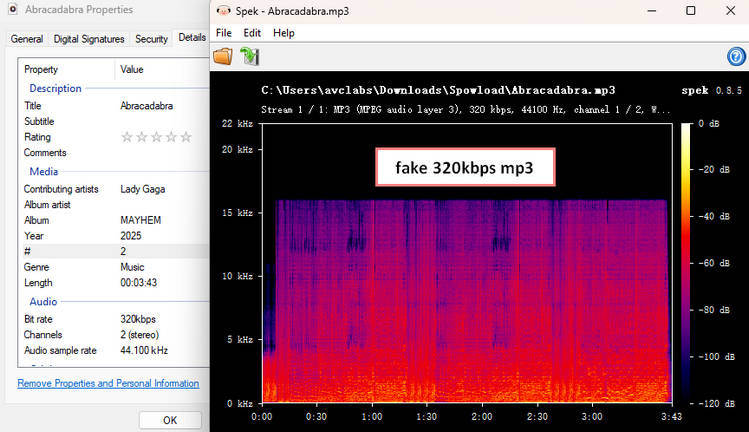
The tool does not support batch downloading, and although most metadata was preserved, cover artwork was missing. Our audio verification also showed that the downloaded files did not reach the claimed 320kbps bitrate.
Other Spotify to MP3 Tools We Tested
We also tested six other browser-based Spotify downloaders. To keep this Spotify to MP3 guide focused and easier to scan, we have summarized their most important hands-on results below rather than repeating a full feature table and download tutorial for every tool.
SpotifyMate
Test result: SpotifyMate supported Spotify tracks, playlists, and albums and processed links in approximately 3 seconds. The downloaded MP3 files reached 320kbps and retained ID3 tags and album artwork, although the website name was added to song titles. True batch downloading was not available on the original site, and downloading the 14 tracks individually took about 6 minutes. We also encountered redirects during use, including redirects to pages posing as download links.
SPOTIDOWN
Test result: SPOTIDOWN supported Spotify songs, albums, and playlists, although Spotify link parsing occasionally failed and required another attempt. Links were processed in approximately 3 seconds, and the downloaded MP3 files reached 320kbps in our verification. Most metadata was preserved, but track numbers were missing and filenames contained a website watermark.
Its batch download feature only covered the first five tracks of the album, so the remaining songs required additional downloads. In our overall 14-track test, completing the downloads took about 4 minutes. We also encountered redirects during use, including pages that mimicked download links.
SpotMate
Test result: SpotMate supported Spotify songs, albums, and playlists, but link parsing occasionally failed and required multiple attempts. Processing took about 3 seconds per link. Batch downloading was limited to the first three tracks of an album, and completing our 14-track test took about 7 minutes. Most metadata was retained except for cover artwork, while audio verification showed that the downloaded files did not reach the claimed 320kbps quality. Frequent subscription ads also affected the overall experience.
SPOTISAVER
Test result: SPOTISAVER showed no noticeable ads or redirects during our test and supported Spotify song, album, and playlist links. The site claimed to support batch downloading, but all three of our batch download attempts failed, so we could not confirm that the feature worked reliably. ID3 tags and cover art were preserved, although a website watermark was added to track titles.
Audio verification showed that the downloaded files did not reach 320kbps. In one test, downloading a single track took about 4 minutes, and the overall download success rate was low.
SpoMp3
Test result: SpoMp3 supported different types of Spotify content, including songs, albums, playlists, and podcast episodes. However, the audio quality was disappointing in our test. Although the site claims 128kbps for free downloads and up to 320kbps for paid users, songs we downloaded from different albums were only 64kbps.
Song metadata such as cover art, artist, title, and album name was retained. Download speeds were not very stable, ranging from a few seconds to around 20 seconds per song. We also encountered redirects when clicking the save button, and downloaded filenames had the website name added at the beginning. Batch downloading requires payment.
Spotdown
Test result: Spotdown supported Spotify songs, albums, and playlists and processed links in approximately 3 seconds. Although the site provided a "Download Now (All Songs)" option, every track returned a "Not matched" message during our batch test, so the songs still had to be downloaded manually.
Some metadata was missing, including track numbers and year information, and frequent redirects occurred during use. Audio quality was also inconsistent: our downloaded files ranged from approximately 215 to 244kbps rather than reaching 320kbps. Completing the 14-track test took about 3 minutes.
📕 Want to know more about Spotdown? Read our full Spotdown review.
Top 12 Free Online Spotify Downloader
Want to explore more browser-based options? Check out our guide to the best free online Spotify downloaders, with more tools, features, limitations, and detailed comparisons. Learn More >>
Part 3: FAQs About Converting Spotify Music to MP3
Q1: Can Spotify download music directly as MP3 files?
No. Spotify's built-in download feature is designed for offline listening within the Spotify app and does not export songs as standard MP3 files that you can freely copy to other devices. If you need regular MP3 files for an MP3 player, USB drive, car stereo, or other device, you need a separate Spotify to MP3 conversion or download method.
Q2: Do I need Spotify Premium to convert Spotify music to MP3?
Not always. Whether Spotify Premium is required depends on the Spotify to MP3 converter or downloader you use. Some desktop converters support both Spotify Free and Premium accounts, while many online Spotify downloaders work by processing a Spotify song, album, or playlist link without requiring a Premium account.
However, your Spotify plan can affect the source audio quality available to certain conversion methods. Spotify currently offers higher-quality options to Premium users, including Very High quality at approximately 320kbps and Lossless audio on supported content and devices.
Q3: Can I convert a Spotify playlist to MP3 in 320kbps?
Yes, but not every Spotify to MP3 converter that advertises 320kbps actually delivers the same result. In our hands-on tests, some tools produced verified 320kbps MP3 files, while others downloaded files below their advertised bitrate.
If you want to convert a full Spotify playlist to MP3 in 320kbps, also check whether the tool supports true batch downloading. Some free online Spotify downloaders only allow a few tracks to be downloaded at a time, while others do not support full playlist downloads at all. For example, TunePat Spotify Converter supported full batch conversion and MP3 output up to 320kbps in our test. Some free online tools, such as SpotiDownloader and SPOTIDOWN, also produced verified 320kbps files, but with different limitations in areas such as redirects, metadata, or batch support.
Q4: Is 320kbps the highest audio quality available on Spotify?
No. Spotify Premium now offers more than its Very High setting of approximately 320kbps. Spotify also provides Lossless audio at up to 24-bit/44.1kHz FLAC on supported content and devices. Therefore, 320kbps remains a useful choice when you specifically need widely compatible MP3 files, while lossless FLAC is more suitable when preserving higher source quality is the priority.
Q5: Is a desktop Spotify to MP3 converter better than an online downloader?
It depends on how much music you want to download and what features matter to you. A free online Spotify to MP3 downloader can be convenient for occasional songs because it requires no software installation. However, our testing found that online tools may have limitations such as ads or redirects, restricted batch downloads, incomplete metadata, and audio quality below the advertised 320kbps.
A desktop Spotify to MP3 converter is generally more suitable for full albums or playlists when you need reliable batch conversion, selectable output settings, consistent metadata retention, and more predictable audio quality. For occasional individual downloads, an online tool may be sufficient.
Part 4: Spotify to MP3 Tools No Longer Available
Online Spotify downloaders can change, stop working, or disappear without notice. During our updates, we remove tools that are no longer accessible so the recommendations above remain useful and up to date.
| Tool | Status | Issue |
|---|---|---|
| SpotiCatch | ✕ Unavailable | Returned a 404 error during our latest check |
Conclusion
There is no single Spotify to MP3 method that works best for every user. Free online Spotify downloaders are convenient for occasional use, but our hands-on tests showed clear differences in batch support, redirects, metadata retention, and actual audio quality. Some tools delivered verified 320kbps MP3 files, while others fell below their advertised bitrate or imposed limits on playlist downloads.
For users who regularly convert full albums or playlists, a desktop solution generally provides a more consistent experience. In our test, TunePat Spotify Converter offered full batch conversion, complete metadata retention, MP3 output up to 320kbps, and no ads or redirects, while Spotify Premium users could also export lossless FLAC files. If you only need a few tracks, one of the free online tools above may be sufficient, depending on which limitations you are willing to accept.
Olivia Anderson
Senior Writer