MP3Juices Not Working? 5 Safe Alternatives That Still Work
 By Olivia Anderson
Music Tips
Updated on 9/02/2026
By Olivia Anderson
Music Tips
Updated on 9/02/2026
While streaming services have gained popularity, many people still prefer to download and own their music files. This is where MP3 download sites come in handy, with MP3Juice being a popular choice for many. However, as with any widely used service, it has its drawbacks. Are you tired of frequent page jumps and an unstable downloading experience on MP3Juice? Well, you're not alone!
Many music lovers are searching for better options to satisfy their audio cravings. In this comprehensive guide, we'll explore the top 5 MP3Juice alternatives. So, please put on your headphones and let's dive into the world of free music downloads!

🔈: MP3Juice has ads and pop-ups? The quality of the MP3 songs you get varies? Want to get 320 kbps MP3 songs in batches? Download this best MP3Juice alternative to help you get MP3 music files from Spotify, Amazon Music, Apple Music, YouTube Music, SoundCloud, Tidal, and other sources at 10X conversion speed and keep complete ID3 tags: 👇
Part 1: What is MP3Juice?
🔗: https://v1.mp3juice.za.com/
Before we dive into the alternatives, let's quickly recap what MP3Juice is all about. MP3Juice is a free online tool that allows users to search for and download MP3 files from various sources on the internet. Besides that, MP3Juice also supports parsing links. If you have a video link, just paste it into the input box. It's known for its simple interface and the ability to convert YouTube videos to MP3 format. However, it's not without its issues, which brings us to our next point.
Part 2: Why Look for MP3Juice Alternatives?
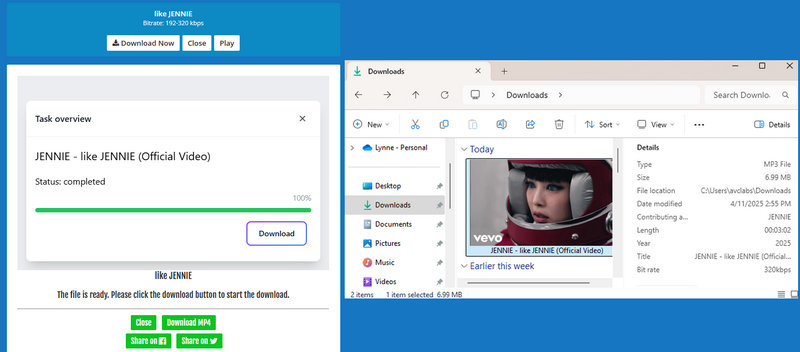
You might be wondering, "If MP3Juice works, why bother looking for alternatives?" There are several reasons, as shown below:
 Many users complain about the excessive ads and pop-ups on the site.
- MP3Juice can be buggy at times, with downloads failing or the site being unresponsive.
- While MP3Juice does the basics, it lacks advanced features like batch downloads or playlist conversion.
These issues have led many music enthusiasts to seek out better options. And trust me, there are plenty of fish in the sea when it comes to MP3 download sites! We will introduce them one by one in the following sections.
Part 3: Top 5 MP3Juice Alternatives
Now, let's get to the meat of the matter, the top 5 MP3Juice alternatives that will improve your downloading experience.
3.1 TunePat Music One
Kicking off our list is TunePat Music One, a stellar MP3Juice alternative that addresses many of MP3Juice's shortcomings. This program is not only green and safe, but also rich in features that are a breath of fresh air compared to the ad-cluttered MP3Juice. What sets TunePat apart is its rich sources of songs and output formats.
With the help of this tool, you don't have to worry about not finding your favorite songs, because it supports almost all popular streaming platforms you can think of, such as Spotify, Amazon Music, Apple Music, YouTube Music, YouTube, SoundCloud, TIDAL, Deezer, etc. And it can retain its original high sound quality as well as the ID3 tags of the songs. The cherry on top? It offers customization of output settings and batch conversion of songs that MP3Juice could only dream of. Want to convert Apple Music to MP3? Want to export SoundCloud playlists in bulk? No problem! TunePat has got you covered. Let's click the "Download" button below first.
Pros
-
 Supports nearly all major streaming platforms including YouTube, Spotify, Apple Music, Amazon Music, SoundCloud, Tidal, and more.
-
Exports in multiple formats (MP3, FLAC, WAV, ALAC, AIFF, AAC) while preserving original sound quality.
-
Conversion speeds up to 10×, ideal for large batch downloads.
-
Automatically retains complete ID3 tags including artwork, artist, album, and track info.
-
Support unlimited batch conversion.
Cons
-
Available for Windows and macOS only.
How to Use TunePat Music One to Download High-quality Songs in Bulk?
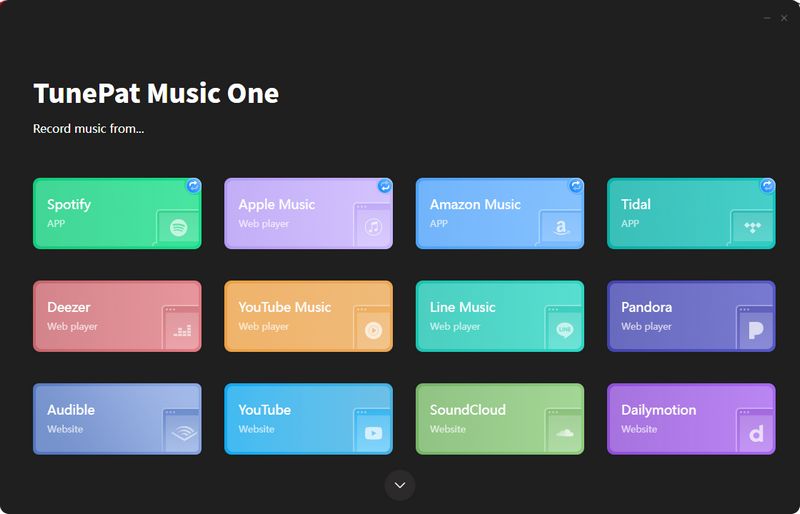
Step 1 Download and install TunePat Music One. The program supports getting songs from a variety of popular streaming platforms, all of which are listed on the main interface. Since each platform works the same way, we’ll use YouTube as an example. Click the "YouTube" tab, and a pop-up window will prompt you to sign in to your YouTube account. Please log in with your YouTube Free or Premium account.
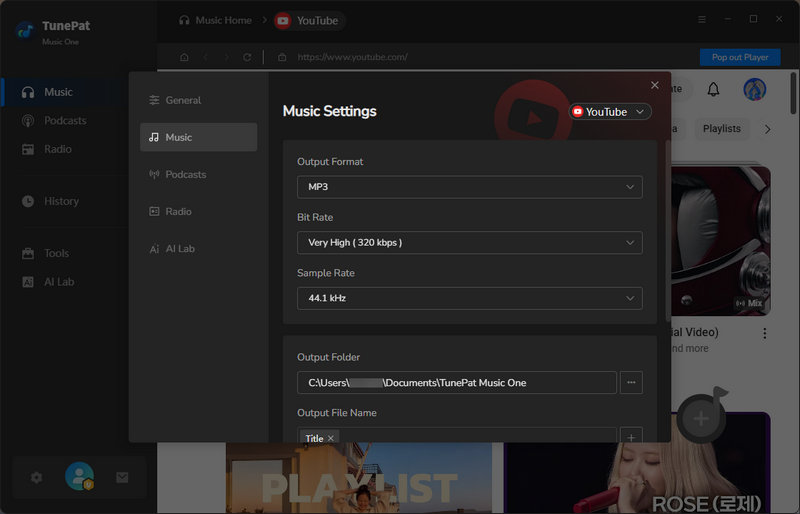
Step 2 Before beginning the conversion, open the "Settings" module. Here you can customize the output format, bit rate, sample rate, output folder, output file name, and so on. Close the window when you’re done, your changes will be applied automatically.
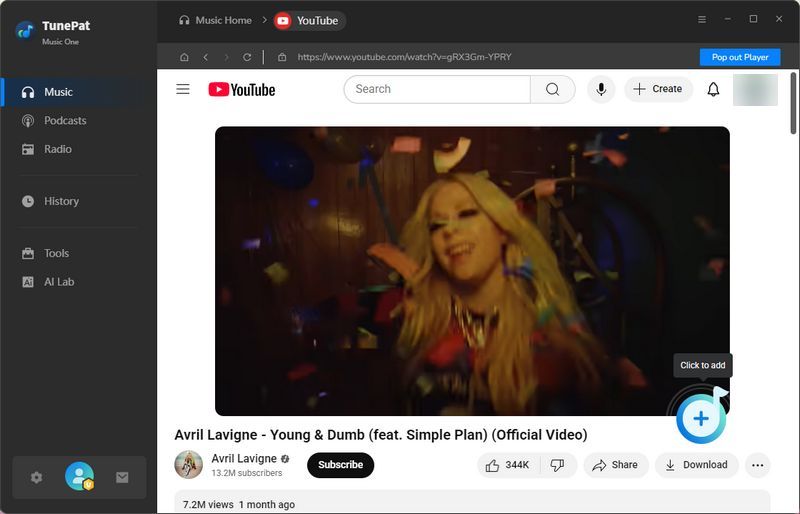
Step 3 Return to the YouTube web player window, open the video you want to download, then click "+" to parse the video. Once parsing is complete, click "Add" in the pop-up window to proceed to the next step.
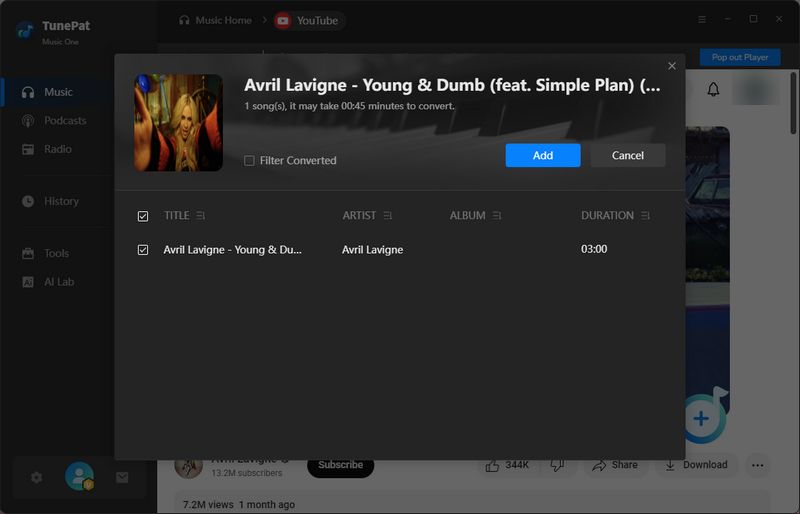
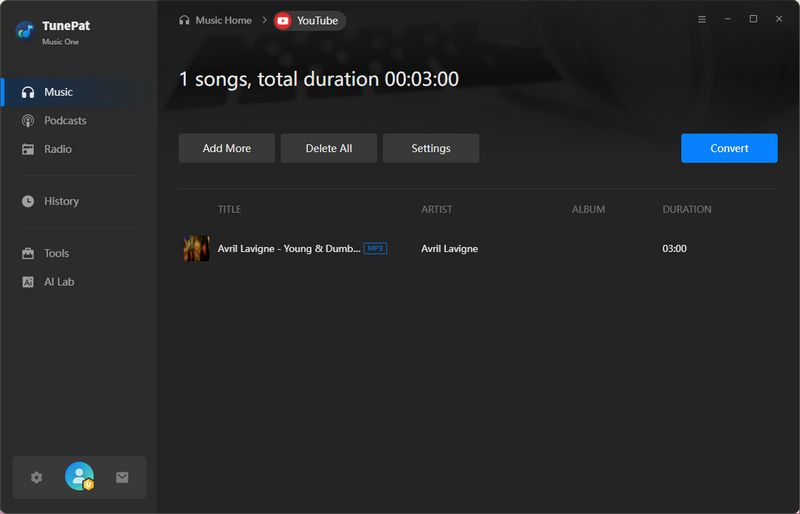
Step 4 To convert multiple YouTube videos at once, simply click the "Add More" button on this page, go back to the YouTube web player window, and repeat the parsing and adding steps. Continue until all desired videos are listed below, then click "Convert" to start the conversion process.
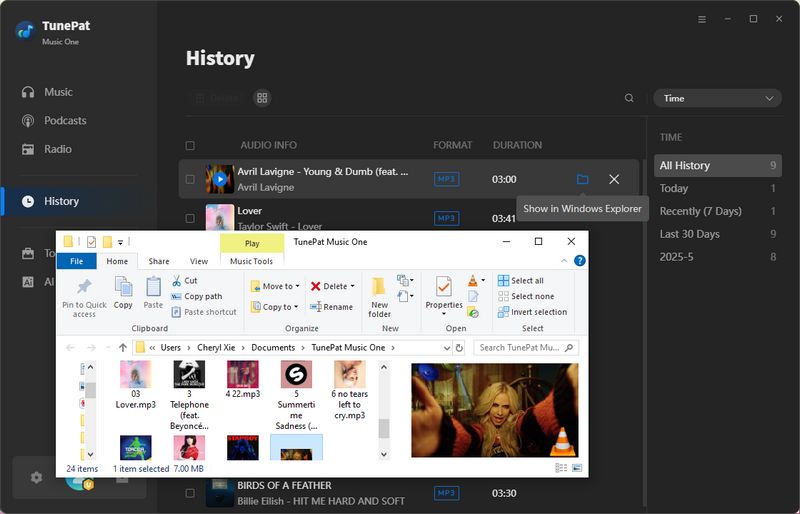
Step 5 After the conversion finishes, the output folder will open automatically. You can also view your conversion history in the "History" module. Double-click any track to play it directly, using TunePat as an offline player, or export the songs to your preferred music player.
👍 Best for:
- Users who want high-quality batch downloads from a wide range of streaming platforms.
- Those needing multi-format export and full metadata retention.
- People managing large local music libraries efficiently.
- Users who want to freely play and download content from 100+ popular podcast sites and 500+ international radio shows for offline listening.
- Those who want a free toolset including audio editing, format conversion, and AI-powered vocal/instrument separation.
🚫 Not recommended if
- You need a browser-based or mobile app solution.
- You want a completely free tool.
3.2: Okmusi
🔗: https://okmusi.com/top/
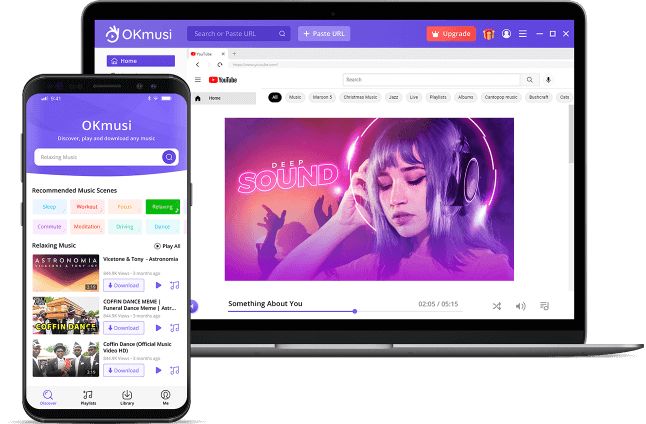
Okmusi offers a blend of free and premium features, making it a versatile choice for different types of users. OKmusi offers a free music download site with no ads and 100% free to download MP3 music. If you need to download an MP3 file, just search for the keywords or paste the URL in the OKmusi MP3 downloader. While the free version is good, the premium Okmusi app shines as an MP3Juice alternative.
Okmusi's premium app is where it differentiates itself. With over 1000 embedded sites, you can search for and download music from various sources without ever leaving the app. The batch download feature is a godsend for those looking to build their music library quickly.
Pros
-
Premium app integrates 1000+ music sites for wide coverage.
-
Batch download up to 300 songs, with up to 320 kbps quality.
-
Free ad-free online tool available.
Cons
-
Advanced features locked behind paywall.
-
Not available on iOS or Linux.
-
Only Android app supports album art downloads.
-
Free version audio quality limited to 128 kbps.
How to Download MP3 Music with Okmusi?
Step 1 Enter the name, artist, and other keywords of the music in the search box and click "Download", or paste the URL to search for the music.
Step 2 Click the "Download" button below the music title.
Step 3 Select the "320 kbps MP3" option to get the songs you need.
👍 Best for:
- Users wanting batch downloads and broad resource access.
- Those who don’t mind paying for premium features.
🚫 Not recommended if
- You need high-quality downloads on free plan.
- You use iOS or Linux devices.
- You want album art on non-Android platforms.
3.3: Aqua Tune
🔗: https://www.acethinker.com/music-downloader-5
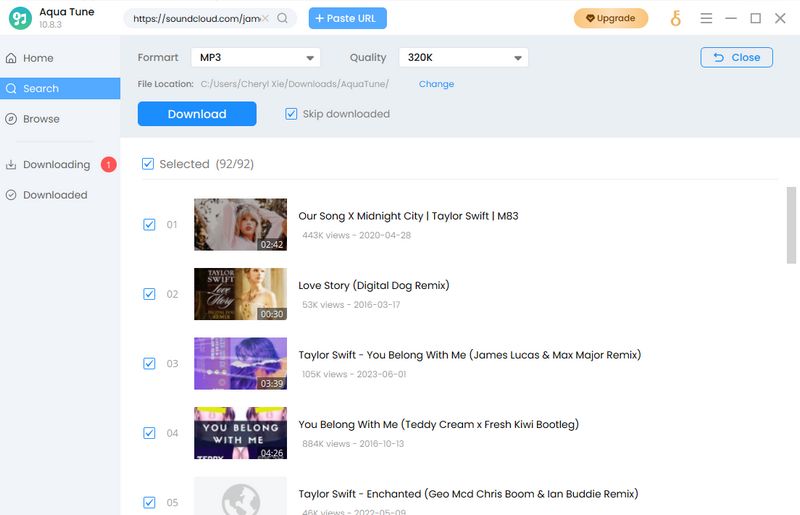
If you're tired of dealing with sketchy websites and annoying pop-ups, Aqua Tune is also one of the MP3Juice alternatives. To facilitate user access, it has provided a download tool that can be accessed online, called AceThinker Music Downloader. This online website supports downloading songs to MP3, FLAC, WAV, OGG, M4A, and other formats.
Unfortunately, this free tool only provides 5 downloads per day. If you want wireless downloads, batch downloads of entire playlists or albums, high-speed downloads, adding or modifying metadata, etc., then you need to use the desktop version of Aqua Tune and upgrade to a paid user.
Pros
-
Ad-free and virus-free.
-
Clean and ad-free user experience with support for single songs, albums, and playlists.
-
Allows editing of metadata like tags and cover art.
Cons
-
Free version limits downloads to 5 per day.
-
Download speeds can be slow and unstable.
-
Most features require paid desktop version.
How to Get 320 kbps Music via Aqua Tune?
Step 1 There are several different ways to get the songs. You can search directly for the songs you want, or visit the platform you are interested in, such as SoundCloud, follow the instructions to log in, and find the songs you want to convert.
Step 2 If you visit the platform directly, you can see a blue download button in the lower right corner after opening a list. Click this button. Then you will get all the songs.
Step 3 Select the quality and download the songs in MP3 format. If you need to convert in batches, you can find the Bulk Download button in the upper right corner to download them all at once.
👍 Best for:
- Users who occasionally download music and prefer a clean UI.
- Those needing metadata editing features.
🚫 Not recommended if
- You need fast, bulk downloading.
- You prefer a fully free and unlimited tool.
3.4: Loader.to
🔗: https://en.loader.to/4/
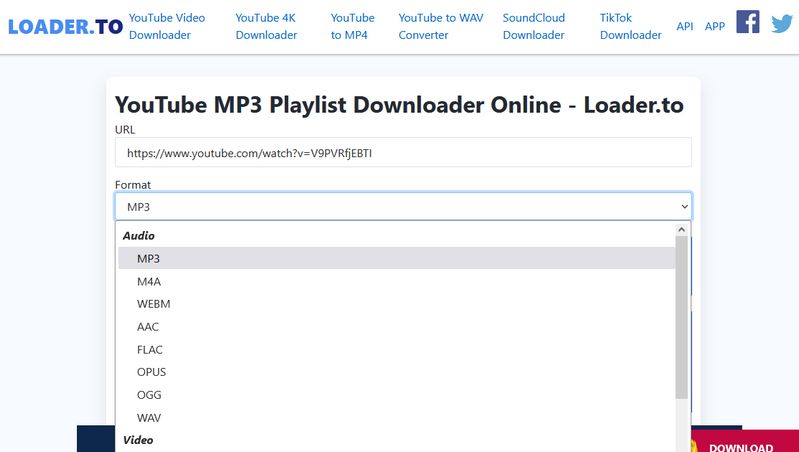
Loader.to is a free YouTube playlist downloader that offers a straightforward, no-frills approach to MP3 downloads. It's a good MP3Juice alternative for those who appreciate simplicity. While Loader.to might not have all the bells and whistles of other options, it allows users to quickly access and download their favorite videos to common audio or video formats.
Pros
-
Completely free, no registration required, accessible via web browser.
-
Supports multiple output formats including MP3, MP4, WEBM, AAC.
-
Simple interface: paste link and convert.
Cons
-
Ads and redirects can be intrusive and sometimes unsafe.
-
Batch downloads often not supported without third-party software.
-
Download stability varies, and metadata support is limited.
📕 You might also be interested in: Full Loader.to Review
How to Use Loader.to Site to Export YouTube to MP3?
Step 1 Copy the link of the YouTube video to the website and select the output format in advance, such as MP3, M4A, AAC, FLAC, OPUS, etc. Then click Download to parse it.
Step 2 Ignore the new page that pops up and return to the original page, where you will see the information of the YouTube video to be downloaded. Click the "Download" button next to it.
👍 Best for:
- Users needing quick, single-track downloads without installation.
- Those wanting a free online conversion tool.
🚫 Not recommended if
- You require reliable batch downloads or playlist management.
- You are concerned about ads and security risks.
- You want full metadata preservation.
3.5: SpotDL Spotify Downloader
🔗: https://spotdl.io/v2
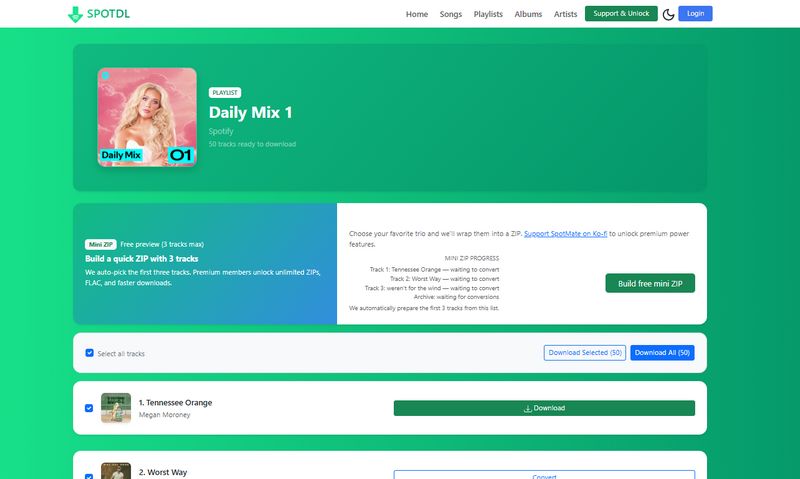
SpotDL Spotify Downloader is a free online Spotify downloader that allows users to download individual tracks, playlists, or full albums from Spotify without registration. It is often used as an alternative when MP3Juices is unstable or no longer works reliably.
Pros
-
Supports downloading Spotify tracks, playlists, and full albums.
-
Delivers up to 320 kbps audio quality, suitable for offline listening.
-
Automatically preserves complete ID3 tags, including artwork, artist, album, and track info.
Cons
-
The free version limits downloads to three songs per session.
-
Unlimited playlist or ZIP downloads require a paid plan starting at $3.
-
Some user data may be collected, which could be a concern for privacy-focused users.
How to Use SpotDL Spotify Downloader to Download MP3?
Step 1 Paste a Spotify song, playlist, or album link into SpotDL and click "Start".
Step 2 hoose the tracks you want, then click "Convert" and "Download" to save them locally.
👍 Best for:
- Users who want to download Spotify playlists or full albums.
- Users looking for a more structured and reliable MP3Juices alternative.
🚫 Not recommended if
- You need unlimited free downloads without restrictions.
- You are highly sensitive to privacy or data collection.
- You only want to download one or two songs quickly.
Part 4: FAQs About MP3Juices & MP3Juices Alternatives
Q1: Why is MP3Juices not working anymore?
A: MP3Juices often becomes unstable due to copyright enforcement, domain changes, or blocked access in certain regions. This is why many users look for safer and more reliable alternatives.
Q2: Is MP3Juices safe to use?
A: MP3Juices itself does not host files, but frequent ads, redirects, and fake download buttons may expose users to security risks. Using trusted alternatives is generally safer.
Q3: What is the safest MP3Juices alternative?
A: Desktop tools like TunePat Music One offer a safer, ad-free experience, while some online tools may still carry ads or limitations.
Q4: Can MP3Juices alternatives download playlists or albums?
A: Most free web tools only support single-track downloads. Playlist or batch downloads usually require desktop software or premium plans.
Q5: Are MP3Juices alternatives free?
A: Some alternatives are free for light use, but more advanced needs such as playlist downloads, lossless audio, or faster speeds often require a paid solution. Choosing between free and paid tools depends on how often and how deeply you download music.
Conclusion
MP3 conversion tools like MP3Juice have some common problems, the most obvious of which is the inevitable ads, which lead to potential risks. Moreover, for music lovers, it is a waste of time not to be able to batch convert songs, even if MP3Juice is free. That's why we have summarized the top 5 MP3Juice alternatives in this article. In addition to choosing other reputable online tools, you can also choose some completely ad-free desktop ones. Of course, the most eye-catching one is TunePat Music One.
As an all-in-one audio converter, we have to admit that it has the advantage of providing diverse functions. Users can quickly and batch get playlists, albums, podcasts, and other content from popular streaming platforms, and then save them to the local computer. These songs retain the song information you need and perfect sound quality, and you can enjoy the music in your favorite software and devices at any time.
Olivia Anderson
Senior Writer