How to Get Tidal Student Discount?
Tidal, the popular music streaming platform known for its high-quality audio and exclusive content, offers a student discount that allows students to enjoy all the benefits of Tidal at a reduced price. In this article, we will guide you through getting a Tidal student discount, from understanding Tidal's plans and prices to verifying your student account through SheerID. In addition, we will also introduce a perfect solution to download Tidal songs for offline playback without Tidal Student Plan.

Part 1. About Tidal Plans and Prices
Before delving into the Tidal student discount program, let's familiarize ourselves with the current plans and prices TIDAL offers. TIDAL provides different subscription options, including Individual, Family, Student, Military, and First Responder plans. Regardless of the plan you choose, TIDAL charges on a monthly basis.
With a TIDAL subscription, users can access a vast library of over 180 million songs and enjoy features such as ad-free listening, unlimited skips, offline playback, and high-quality audio streaming. Unlike the previous HiFi and HiFi Plus tiers, TIDAL now provides lossless and Hi-Res FLAC audio through its main subscription plan, along with immersive audio options like Dolby Atmos Music.
Here are the main subscription options:
• Individual - $11.99 per month, offering access to TIDAL's full music catalog, lossless audio, Hi-Res FLAC, and Dolby Atmos Music.
• Family - $19.99 per month, allowing up to 6 family members to share a subscription.
• Student - $6.99 per month for eligible students.
TIDAL also offers discounted plans for eligible military members and first responders. To get a student membership, users need to verify their university information through TIDAL's verification process. Eligibility verification may be required periodically.
Part 2. How to Sign Up for a Tidal Student Account?
To take advantage of the 50% off Tidal student discount, you must verify your student status through SheerID, a trusted verification platform Tidal uses. Follow these steps to get your student discount:
Step 1 Visit the Tidal website:
Go to the Tidal website (www.tidal.com) and sign in to your account.
a. If you don't have an account, create one by providing the necessary details. Navigate to the student discount page: Go to the student discount page once logged in. You can usually find a link to this page in the website's footer or under the "Plans" section.
b. If you are already a Tidal member and wish to apply the discount to your active subscription, you can log in at account.tidal.com. You must click on subscription and then scroll down to select Student Discount.
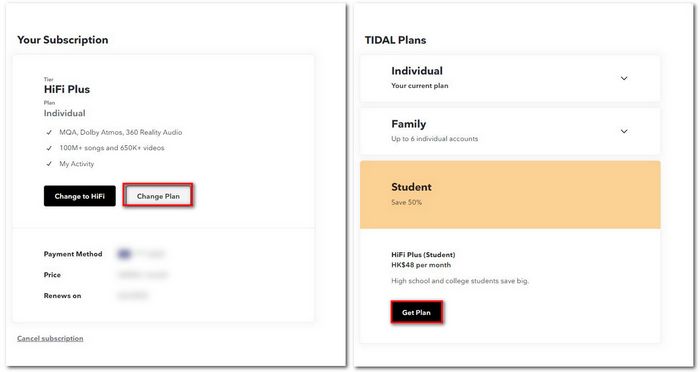
Step 2 Verify your student status:
On the student discount page, you will be prompted to verify your student status through SheerID. Click on the "Verify with SheerID" button to proceed.
Step 3 Provide necessary information:
SheerID will require some information to verify your student status. This may include your name, educational institution, and email address. You may also need to upload a document as proof of your enrollment, and an official enrollment letter, class schedule for the current term, registration or tuition receipt, and Transcript are needed.
Step 4 Complete the verification process:
After submitting the required information, SheerID will review your details and confirm your student status. This process usually takes a few minutes, but it may take longer in some cases. Once your verification is successful, you will receive a confirmation message.
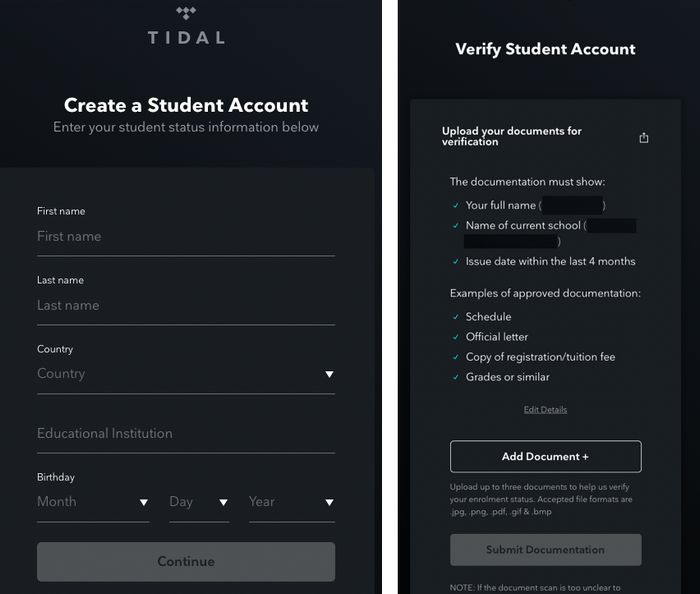
Step 5 Enjoy your student discount:
With your student account verified, you can now enjoy the benefits of Tidal at the discounted student price. Log in to your Tidal account and see the reduced pricing options available. Choose the plan that suits you best and proceed with the payment process to start enjoying Tidal's extensive music catalog and exclusive content.
Part 3. How to Download Tidal Music without Tidal Student Account?
As described in the previous section, signing up for a Tidal student account is not difficult as long as you are eligible. But when you graduate, you lose this benefit. If you want to continue using Tidal, you must use the original price to subscribe. But if you are in the US, congratulations. You may consider using Tidal's ad-sponsored free version launched in November 2021 specifically for the US region. Those who use the free plan have access to Tidal's full catalog, but the bitrate for streaming music is only 160 kbps at the highest, and there is no offline playback.
These restrictions may not be acceptable to some people. So can we find a perfect solution? Of course! TunePat Tidal Media Downloader is your first choice. With the help of this tool, even if you are using a Free account, you can easily get songs and save them locally. If you are after high sound quality, it is also very simple. You need to use this tool to export your favorite Tidal playlist before your Tidal Student Plan or Tidal Free Trial expires. Then, the songs can retain the HiFi sound quality. Let's take a look at the breakdown steps together.
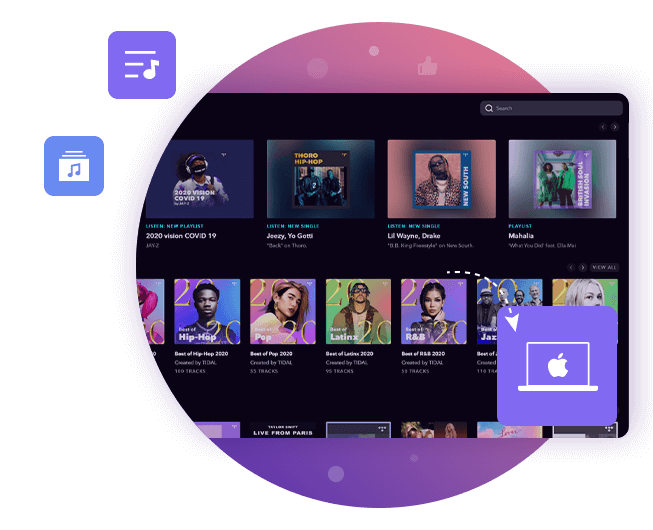
TunePat Tidal Media Downloader
TunePat Tidal Media Downloader enables users to download all Tidal contents to MP3 or other common formats.
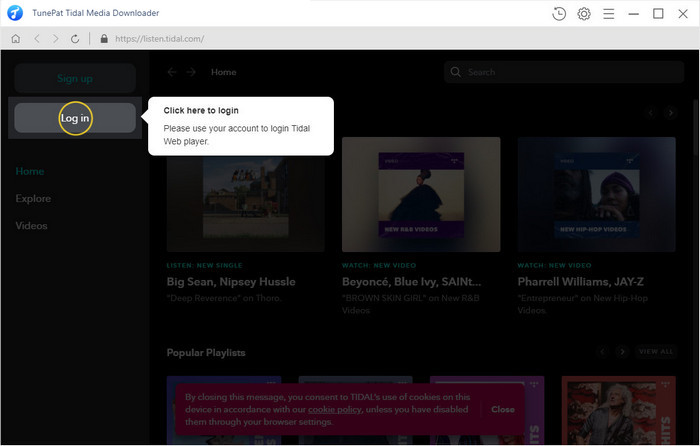
Step 1 To access the Tidal library using TunePat's web player, simply click the "Open Tidal Web Player" button and follow the instructions displayed on the screen to reach the login interface. Once you have successfully logged into your Tidal account, you will be able to access its library.
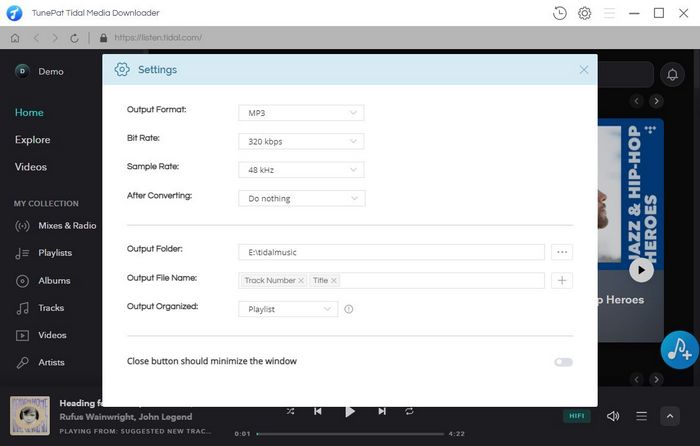
Step 2 Prior to selecting a Tidal song, we recommend customizing the output parameters according to your preferences. To do so, click the "Settings" button located in the top right-hand corner of the screen. This will open a settings window where you can choose the desired output format, sound quality, output path, output file name, and other relevant parameters as required.
You can change the following contents:
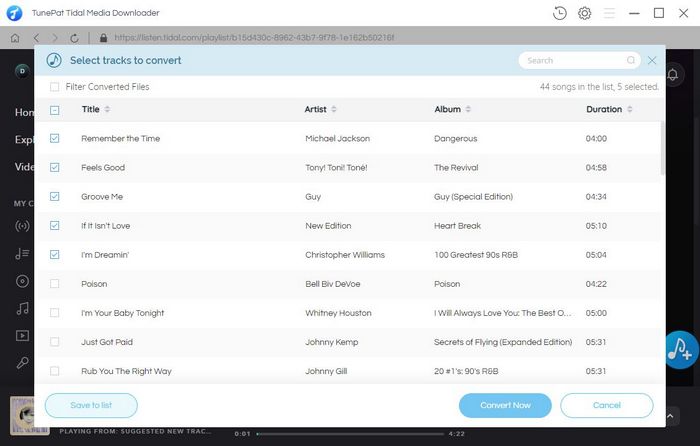
Step 3 To convert songs from Tidal, find and open the specific song, album, or playlist you wish to convert and click the "+" button. TunePat will then load automatically, allowing you to manually select the desired titles for conversion. Once you have made your selection, simply click "Convert" to initiate the conversion process immediately.
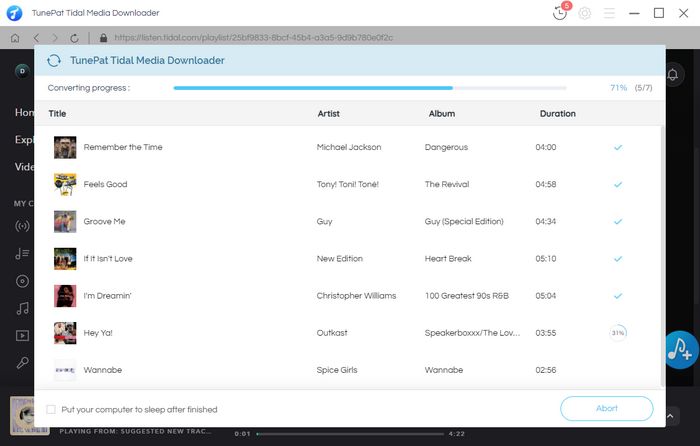
The converted songs will be saved in the output folder you previously specified. These songs can be transferred to and then streamed on your preferred portable devices at any time, without requiring an internet connection or the need to download the Tidal app.
Conclusion
The Tidal student discount program offers a fantastic opportunity for students to access premium music streaming at a reduced price. By verifying your student account through SheerID, you can unlock the benefits of Tidal HiFi or Tidal HiFi Plus, depending on your preferences. Remember to review the eligibility requirements and provide accurate information during verification to ensure a smooth and successful application. With the Tidal student discount, you can elevate your music listening experience while staying within your student budget.
Not only that, but this article also introduces a universal method - using TunePat Tidal Media Downloader to save Tidal music for offline playback. Whether you can no longer register a student account or use a free account, it is applicable! Click the button below to download! Don't miss this great opportunity and enjoy high-quality music with Tidal today!