CnvMP3 Review: The Ultimate YouTube to MP3 Converter?
 By Olivia Anderson
Music Tips
Updated on 8/21/2026
By Olivia Anderson
Music Tips
Updated on 8/21/2026
In 2026, tools that allow users to enjoy online videos and music offline remain highly popular. CnvMP3 is one of the most widely used YouTube to MP3 converters available today. But is it really worth the hype? In this comprehensive CnvMP3 review, we'll take a closer look at its features, audio quality, safety, limitations, and the best alternatives worth considering.
Part 1: What is CnvMP3?
CnvMP3 positions itself as a free, easy-to-use, and ad-free converter that allows users to download YouTube videos as MP3 or MP4 files. With the promise of high-quality audio output and support for various platforms beyond YouTube, it's no wonder that many are turning to this tool. But does it live up to these claims? Let's take a look at the main features of CnvMP3.
User Interface: One of the first things you'll notice about CnvMP3 is its intuitive user interface. The main page features a simple input field where you can paste your YouTube URL or URLs from other sources, along with clear options for choosing between MP3 and MP4 formats. The conversion process is straightforward, with just a few clicks required from start to finish.
Supported Platforms: While CnvMP3 is primarily marketed as a YouTube converter, it is compatible with many other platforms. Users can convert and download content from YouTube, TikTok, Instagram, Facebook, Twitter, Reddit, and Twitch.
*Note: Want to get songs from Spotify, Apple Music, Tidal, YouTube, etc. with high sound quality? Download this best CnvMP3 alternative. 👇

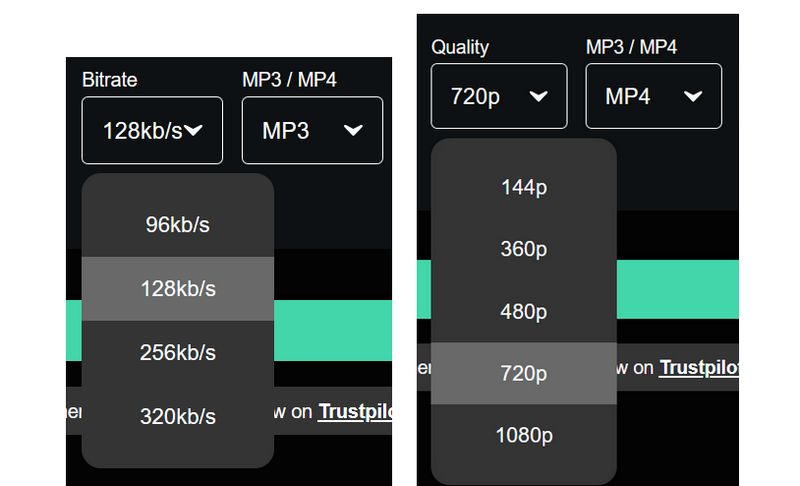
Output Formats and Quality Options: CnvMP3 offers two main output formats, MP3 and MP4. For MP3 conversion, users can choose different bit rates: 96kbps, 128kbps, 256kbps, and 320kbps. The MP4 option allows downloading videos in various resolutions, depending on the quality of the source video, up to 1080p.
Part 2: How to Use CnvMP3?
The process of converting a YouTube video to MP3 or MP4 is remarkably simple. We will take MP3 as an example here to show how to use CnvMP3.
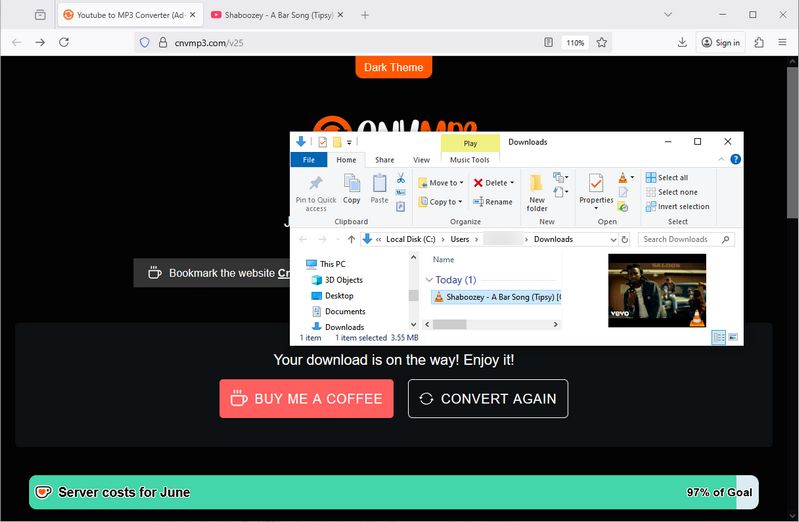
Step 1 Copy the URL of the YouTube video you want to convert. Then, paste the URL into the input field on CnvMP3's homepage.
Step 2 Select "MP3" as your desired output format. You also need to choose your preferred audio quality, such as "320kb/s".
Step 3 Click the "Convert" button and wait for the conversion to complete, then click "Download" to save the MP3 file.
❗ CnvMP3 can only convert one song at a time? Do you have a large number of songs to download? The answer is here! Use this powerful one-stop converter. 👇
Part 3: Pros and Cons of CnvMP3
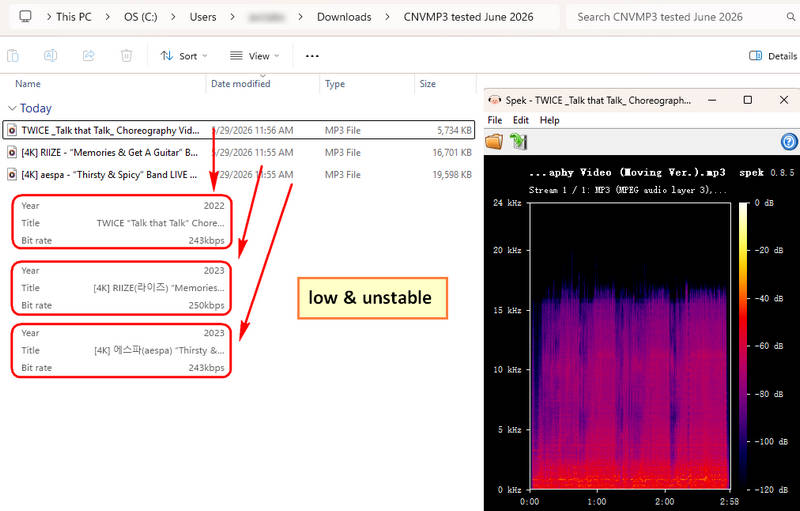
From our testing, we found that although CnvMP3 allows users to select 320kbps audio quality and successfully export the converted files, the actual output quality does not match the advertised bitrate. In most cases, the downloaded MP3 files were exported at around 200+kbps or even closer to 128kbps, rather than true 320kbps quality. This may be because YouTube is not a dedicated music platform and prioritizes video quality over audio quality. As a result, even YouTube Premium users can only access AAC audio up to 256kbps. However, since YouTube's audio and video quality are connected, a small number of high-definition videos may still provide audio bitrates of around 300kbps.
Beyond audio quality issues, some Reddit users have also reported regional access restrictions and conversion failures, mentioning that the website was unavailable or limited in certain countries. Meanwhile, several Trustpilot reviewers questioned whether they had accessed the official website, with some users warning about unexpected redirects to suspicious third-party pages.
Pros
-
 User-friendly and ad-free interface.
-
No registration is required.
-
Supports multiple platforms.
Cons
-
 Limited output options, with MP3 as the only available audio format.
-
Lacks advanced features such as batch downloading, custom file naming, and audio trimming.
-
Based on our testing, the actual audio quality does not reach the advertised 320kbps.
-
Online tools may pose privacy risks; avoid providing personal information or downloading executable files from unknown sources.
-
Limited to videos up to 3 hours long.
Part 4: The #1 Best CnvMP3 Alternative
To address the aforementioned shortcomings of CnvMP3, including potential accessibility issues during peak hours and slow conversion speeds. Next, we will introduce 3 reliable alternatives to CnvMP3.
Among the multitude of music download converters, TunePat Music One stands out as the ideal alternative to CnvMP3 which perfectly addresses its shortcomings. This all-in-one audio converter supports an impressive range of platforms, far exceeding other conversion tools or online download services.
This green, secure, and professionally maintained converter, is regularly updated by a dedicated team. It supports batch exporting audio content from popular platforms including YouTube, YouTube Music, Spotify, Apple Music, SoundCloud, Tidal, Amazon Music, and other sources. It handles various content types such as songs, albums, playlists, podcasts, radio programs, music videos, etc. Beyond its extensive compatibility, TunePat offers a user-friendly experience with personalized customization. It supports multiple common audio formats including MP3, FLAC, M4A, WAV, etc. Users can preset output preferences according to their needs by selecting preferred audio quality, output file names, and file organization methods.
With this tool, you can effortlessly batch process and export your favorite tracks to local files while preserving original sound quality and crucial ID3 tags. Despite its rich functionality, the operation remains remarkably simple, with no technical expertise required. Below are the detailed steps:
TunePat Music One
TunePat Music One is an all-in-one converter that can support any music streaming platform.
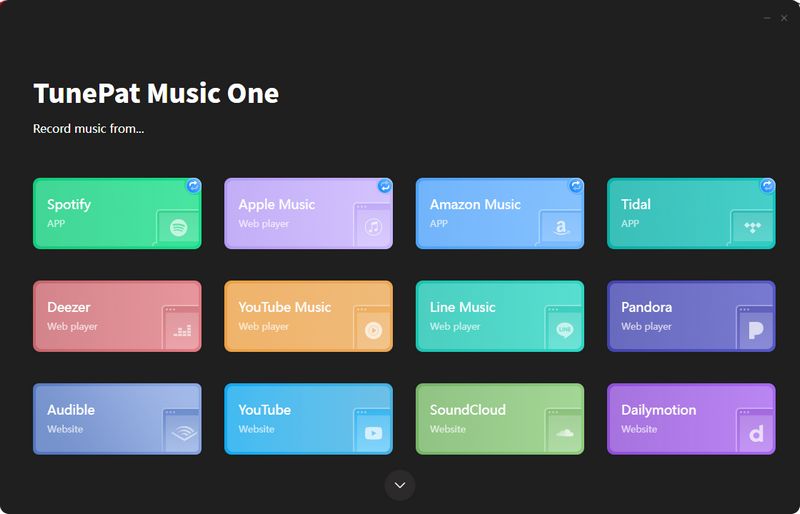
Step 1 Install and launch TunePat. On the main interface, you'll see all supported music sources for conversion. You can click the "Add Other Source" button to manually add websites. Below we'll demonstrate how to batch export songs from YouTube: Click the "YouTube" tab, then follow the prompts to complete your YouTube account login.
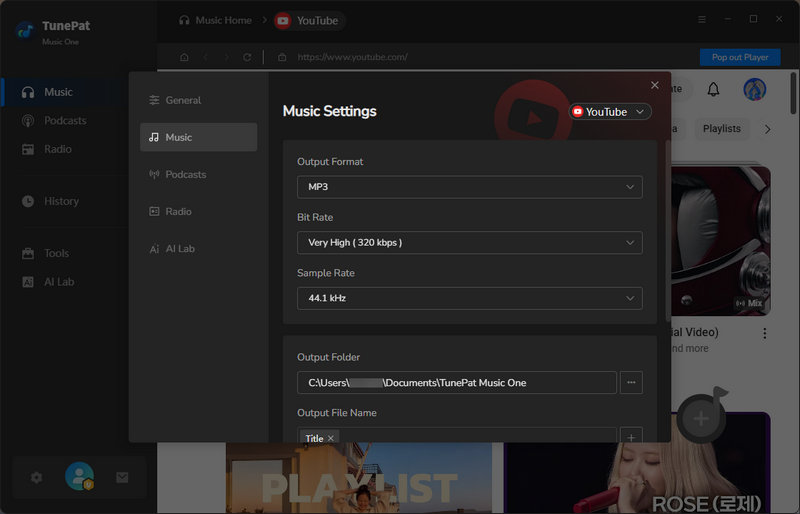
Step 2 Before searching for songs to convert, go to the "Settings" panel to configure the necessary output parameters. Here, you can customize the output format, bit rate, sample rate, output folder, output file name, and more.
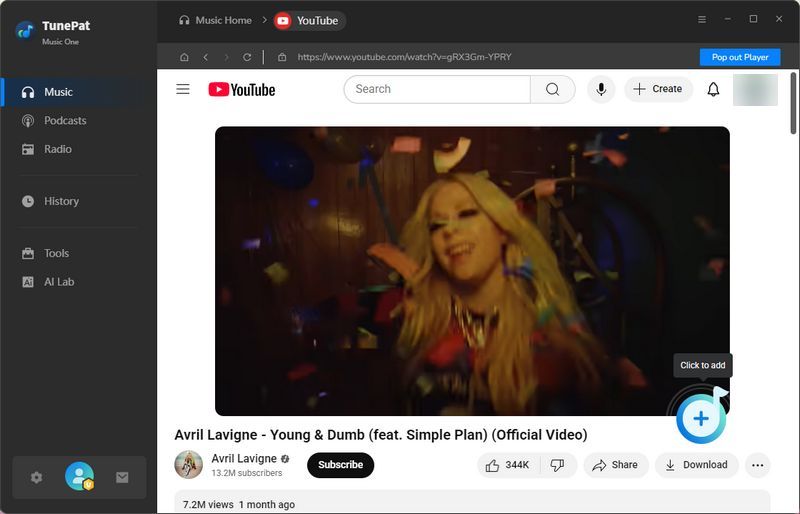
Step 3 After completing the settings, close the current window. Then, go to the YouTube library and open the video you want to convert to audio files. Click "+" in the bottom-right corner, and TunePat will automatically begin parsing. Once parsing is complete, the results will appear in a pop-up window. Click "Add" to proceed to the next step.
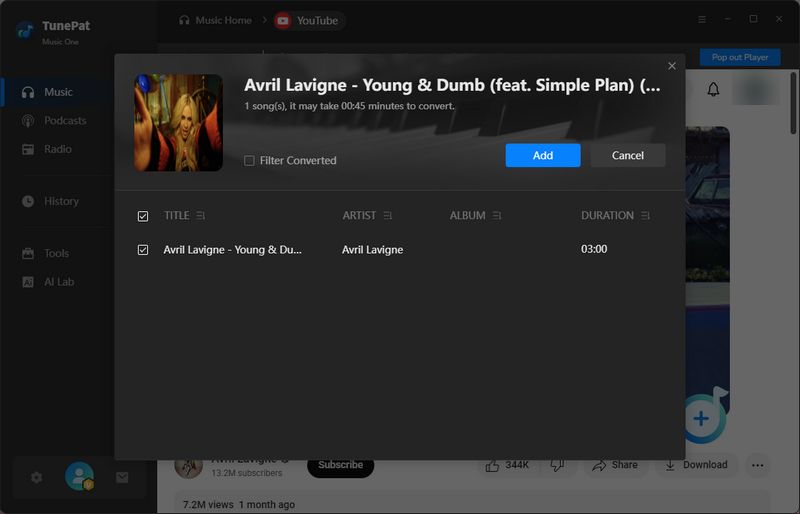
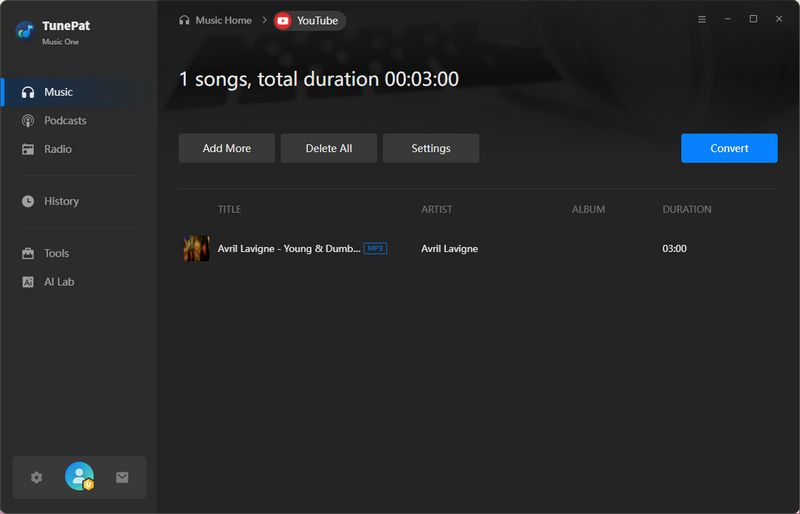
Step 4 How to batch convert YouTube to MP3 or other common audio formats? On this page, please note! Click the "Add More" button to return to YouTube and continue opening the videos you want to convert, repeating the parsing steps above. After adding all items you wish to convert, click "Convert" to begin the conversion.
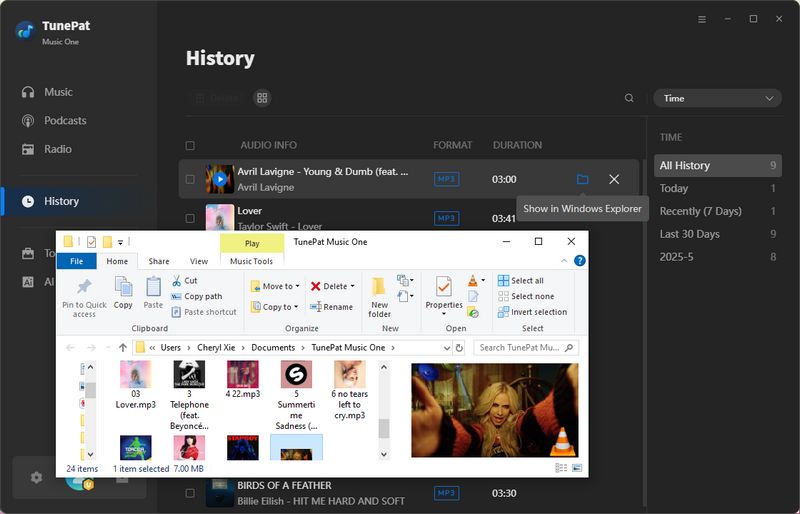
Step 5 Wait patiently for the conversion to complete. You can view and play all converted songs in the program's "History" module, or directly access the newly converted content in your local output folder to drag and play in your preferred media player. If needed, transfer to other devices for playback or storage, such as smartphones or USB drives.

Pros
-
Compatible with all major streaming services including YouTube, Spotify, Apple Music, Amazon Music, SoundCloud, Tidal, plus numerous other platforms.
-
Enables batch conversion of songs.
-
Convert tracks to various formats including MP3, FLAC, WAV, ALAC, AIFF, or AAC while maintaining original audio quality.
-
Processes diverse audio content such as songs, playlists, albums, podcasts, audiobooks, radio, etc.
-
Automatically retains complete track information including song titles, artists, album artwork, etc.
-
Experience accelerated processing speeds up to 10X faster than standard converters, ideal for handling large music libraries efficiently.
Cons
-
Available for Windows and macOS computers only.
Part 5: Free CnvMP3 Alternatives
Besides this best CnvMP3 alternative mentioned above, there are some other free choices.
5.1: Free YouTube to MP3 Online Downloaders
From the CnvMP3 review above, we can see that CnvMP3 is primarily known as a YouTube converter. YouTube is one of the world's largest video-sharing platforms, so in recent years there has been an explosion of various YouTube to MP3 downloaders. Most of these converters can be quickly and conveniently accessed through web browsers, helping users save their favorite YouTube videos in MP3 format.
However, the performance of these converters varies significantly. We've previously tested and reviewed the top 10+ free YouTube to MP3 Download sites, among which Loader.to and EzMP3 showed particularly good performance and can serve as viable alternatives to CnvMP3.
Below, we'll use Loader.to as an example to briefly explain its operation steps along with its advantages and disadvantages.
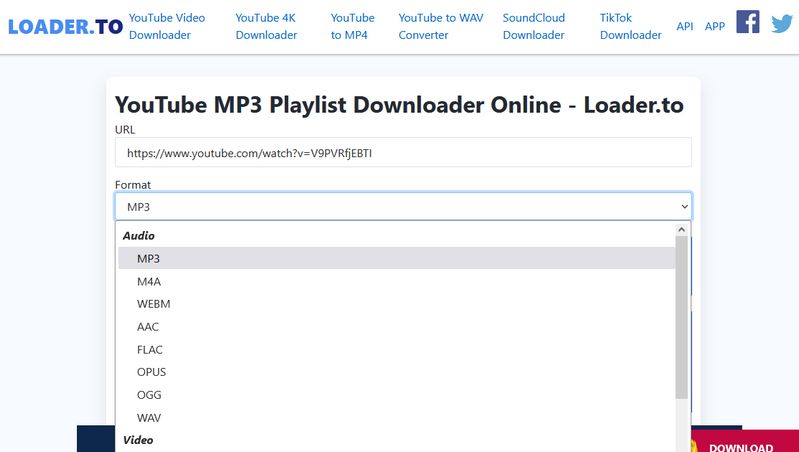
Step 1 Go to YouTube and copy the link of the video you want to convert. Then, paste the copied URL into the search bar on Loader.to.
Step 2 Choose your favorite output format, like MP3, M4A, FLAC, WEBM, OGG, etc.
Step 3 Click "Download" to begin processing. After parsing, click the "Download" option again to save the file to your device.
📕 You might also be interested in: Full Loader.to Review
Pros
-
Free and no registration needed.
-
Multiple audio formats, such as MP3, M4A, WEBM, AAC, FLAC, OGG, WAV, etc.
Cons
-
Contains pop-up ads at the bottom and redirects to other pages after clicking download, which may pose virus risks. Click with caution ⚠ (Use this safer MP3 Downloader.)
-
Batch conversion of playlists is not supported.
-
May fail during high-traffic periods.
-
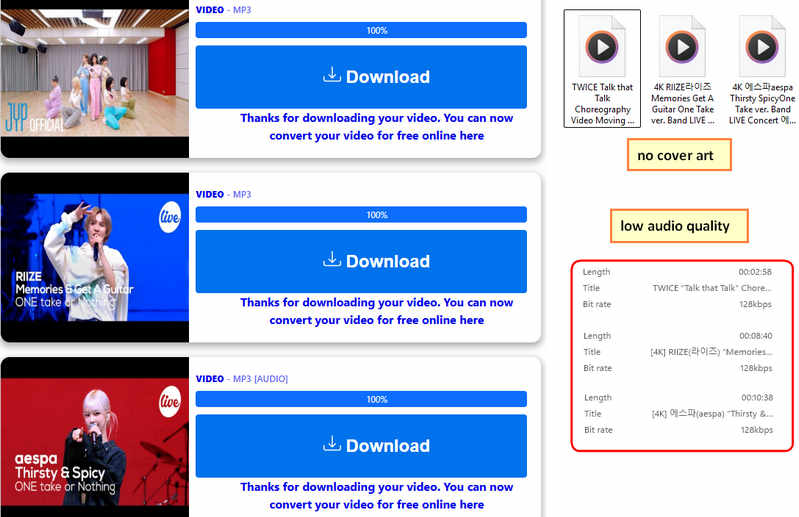
Actual testing revealed that the advertised claim of "preserving 320kbps audio quality" was false; in fact, only 128kbps audio quality was preserved across the three files we tested.
5.2: MP3Paw - Free MP3 Download Site
MP3Paw is an online service where you can search for and download MP3 music for free. It works much like a music search engine, gathering music from different sources on the web and showing available download links. You don't need to create an account, and the site has a clean, straightforward interface that works right in your browser.
Step 1 Enter the song or artist name in the search bar.
Step 2 Browse the results and identify the correct match.
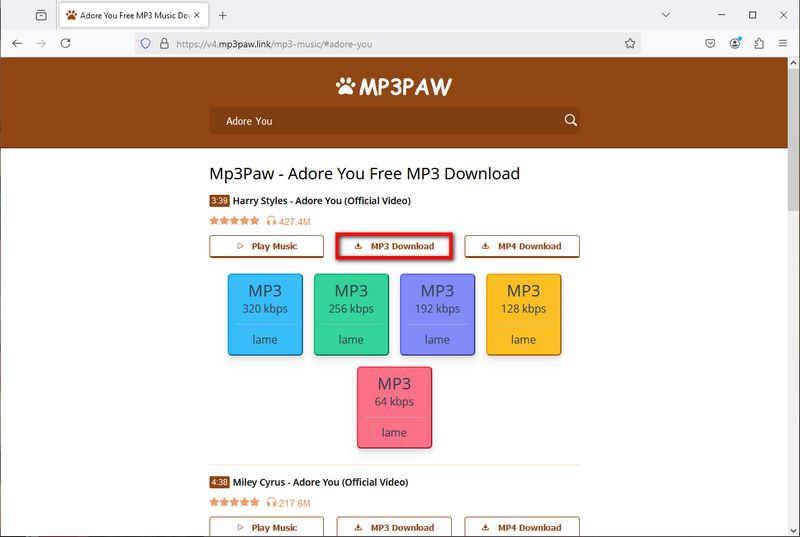
Step 3 Click "MP3 Download" > "Select the target audio quality (such as 320 kbps)" > "Download now" to save the file.
📕 You might also be interested in: MP3Paw Free Music Download: Safety & Best Alternatives
Pros
-
Free to access with a simple interface.
-
No sign-up or account is required.
-
Offers music from a variety of genres.
Cons
-
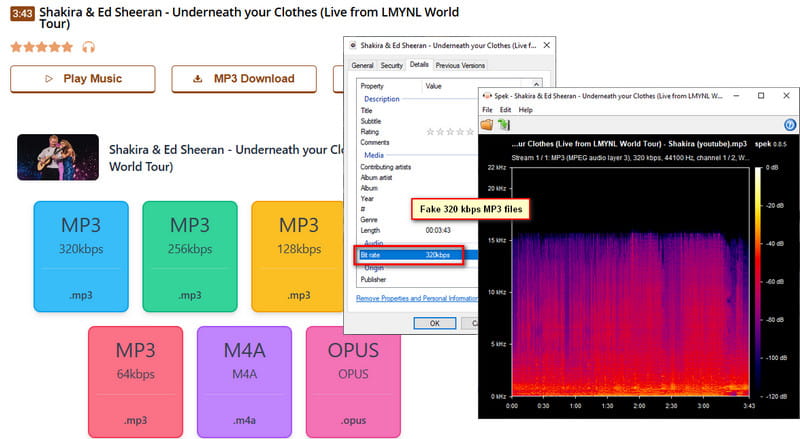
Some tracks may show 320 kbps but have a lower actual bitrate.
-
Some links may be unavailable or stop working.
-
Ads and unexpected redirects can be distracting.
-
Doesn't offer extras such as custom playlists.
Part 6: FAQs About CnvMP3
Q1: Is CnvMP3 completely free?
A: Yes. CnvMP3 is free to use and does not require any subscription or payment to convert videos to MP3. However, the website may display ads to support its service.
Q2: Do I need to create an account to use CnvMP3?
A: No. CnvMP3 does not require registration or account creation. You can use it directly in your browser by pasting a supported video link and starting the conversion.
Q3: Are there usage limits of CnvMP3?
A: CnvMP3 does not clearly state a daily conversion limit. However, each video is limited to a maximum length of 3 hours, and batch conversion is not supported. This means you need to process files one by one when downloading multiple videos. If you want to download playlists or albums in bulk, try TunePat Music One.
Q4: Can I use CnvMP3 on my mobile device?
A: Yes. CnvMP3 works on mobile browsers without requiring an app installation. However, converting longer videos or managing multiple downloads may be less convenient on a smaller screen compared with using a desktop browser.
Q5: Why does my MP3 file have low quality even after selecting 320kbps?
A: Selecting 320kbps does not always mean the final MP3 will have true 320kbps quality. The output depends on the original audio source, and CnvMP3 cannot improve audio that has already been compressed. If the source quality is limited, the converted file will keep those limitations.
Conclusion
In this CnvMP3 review, CnvMP3 proves to be a useful tool for converting YouTube videos and content from other platforms to MP3 or MP4 formats. Its strengths lie in its simplicity and ad-free experience. However, for advanced users who want to stably output high-quality songs, need batch downloads, or more advanced customization functions, its shortcomings cannot be ignored.
But you don't need to worry. As we've explored, there are several alternatives to CnvMP3 available. Apart from the free plan, the best-performing one is TunePat Music One. This powerful converter can meet the needs of almost all users. It not only supports batch conversion, the conversion speed can be up to 10X, but also supports many popular platforms. What are you still hesitating about? Download one now and give it a try!

Olivia Anderson
Senior Writer