TunePat Apple Music Converter Review 2026: Should You Buy It?
 By Olivia Anderson
More Tips
Updated on 10/28/2026
By Olivia Anderson
More Tips
Updated on 10/28/2026
Looking for a way to save Apple Music tracks for offline listening? TunePat Apple Music Converter can convert songs, albums, and playlists into formats such as MP3 and FLAC. But how well does it work in practice, and is it worth paying for?
In this TunePat Apple Music Converter review, we test its conversion speed, audio quality, and ease of use, as well as its pricing and free trial limitations. We'll also compare it with alternative Apple Music converters to see how it stacks up against the competition.
- Part 1. What Is TunePat Apple Music Converter?
- Part 2. How We Tested TunePat Apple Music Converter
- Part 3. TunePat Apple Music Converter Hands-On Test Results
- Part 4. TunePat Apple Music Converter Pricing and Free Trial
- Part 5. TunePat Apple Music Converter Alternatives: How Do They Compare?
- Part 6. FAQs About TunePat Apple Music Converter
Part 1. What Is TunePat Apple Music Converter?
TunePat Apple Music Converter is a Windows and Mac app that lets you convert Apple Music songs into formats such as MP3, AAC, WAV, FLAC, AIFF, and ALAC. You can choose to convert music through the built-in Apple Music web player or the music app on your computer, using iTunes on Windows or the Music app on Mac.
You can add individual songs, entire albums, or playlists and convert them in batches. TunePat also lets you choose output settings, customize file names, and sort downloads into folders. This makes it easier to play converted tracks in other media players, listen to Apple Music offline, and keep your music library organized.
Part 2. How We Tested TunePat Apple Music Converter
For the full-track performance tests, we used TunePat's registered version to convert one complete album and a mixed-artist playlist through its Apple Music web player. Both batches were converted to MP3 at 320 kbps on the same Windows computer.
| Test Item | Details |
|---|---|
| Software Version | 3.4.3.7998e8db54b1e2857d6a |
| Test Computer | Windows 10 Pro, 64 bit, Version 22H2; Intel Core i3-8100 at 3.60 GHz; 8 GB RAM |
| Album Sample | MAYHEM by Lady Gaga; 17 tracks, approximately 66 minutes |
| Playlist Sample | Dance Pop Hits, first 10 tracks; approximately 30 minutes |
| Music Source | Apple Music Web Player |
| Output Settings | MP3 at 320 kbps |
| File Naming | Track Number + Title |
| Folder Organization | Album for the album test; Playlist for the playlist test |
| Test Date | October 28, 2026 |
We evaluated conversion speed, success rate, audio quality, metadata preservation, and ease of use. We also checked the output files using MediaInfo and Spek. Network speeds varied between the two tests, which may have affected conversion times, so the results reflect our actual experience and may differ under other network conditions.
Part 3. TunePat Apple Music Converter Hands-On Test Results
We tested TunePat with 27 Apple Music tracks to see how it handled conversion speed, output quality, and everyday use. Here's what we found.
Conversion Speed and Success Rate: How Did TunePat Perform?
We started by converting Lady Gaga's MAYHEM album, which contains 17 tracks with a total playing time of approximately 66 minutes. The conversion took about 13 minutes, from 11:54 AM to 12:07 PM, equivalent to roughly 5.1× real time speed.
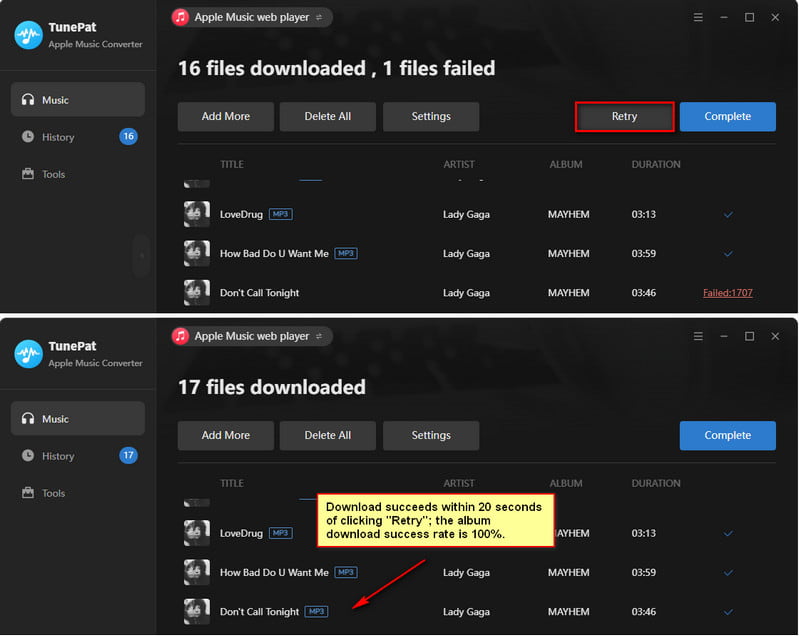
16 tracks converted successfully on the first attempt. One track failed, but after we clicked Retry, it finished downloading in about 20 seconds. We couldn't confirm the cause of the initial failure, but the retry worked without having to restart the entire batch. All 17 tracks were eventually converted.
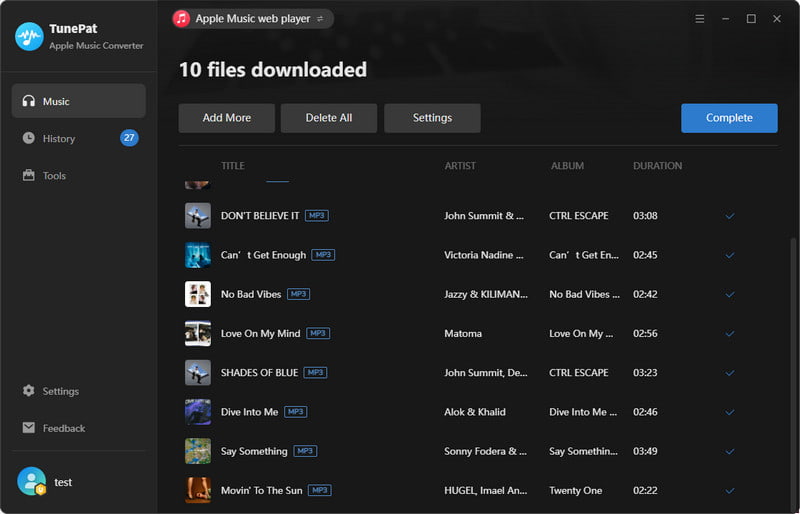
Next, we converted the first 10 tracks from Apple Music's Dance Pop Hits playlist. These songs featured different artists and albums, with a combined playing time of approximately 30 minutes. The conversion started at 12:23 PM and finished in about 3 minutes, reaching roughly 10× real time speed. All 10 tracks converted successfully without any retries.
Here's a summary of both tests:
| Test | Tracks | Duration | Conversion Time | Result |
|---|---|---|---|---|
| MAYHEM | 17 | 66 min | 13 min + 20 sec retry | 17/17 |
| Dance Pop Hits | 10 | 30 min | 3 min | 10/10 |
| Total | 27 | 96 min | ~16 min 20 sec | 27/27 |
The playlist test was faster than the album test, but network speeds varied between the two sessions, which may have affected the results. We therefore can't attribute the difference to TunePat alone or assume every user will get the same conversion speed.
We also noticed that the downloaded playlist tracks didn't follow their original Apple Music order. We'd kept the filename format set to Track Number + Title from the album test. If you want to keep playlist tracks in their original order, select Playlist Index in the filename settings and combine it with Title or another field. Otherwise, the files may appear in a different order when sorted by filename.
Audio Quality and Metadata: What Did We Find?
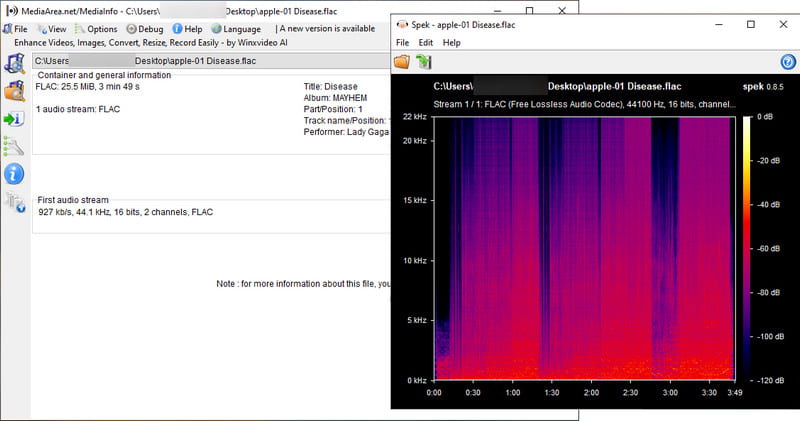
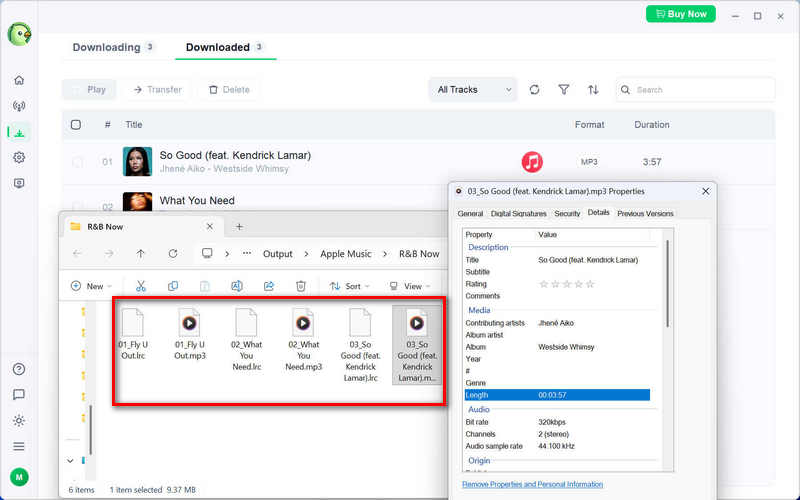
We checked all 27 converted tracks and confirmed that they matched the songs we selected from Apple Music. MediaInfo showed that all files were encoded as MP3 at the selected 320 kbps bitrate, and we also used Spek to inspect their frequency spectrums.
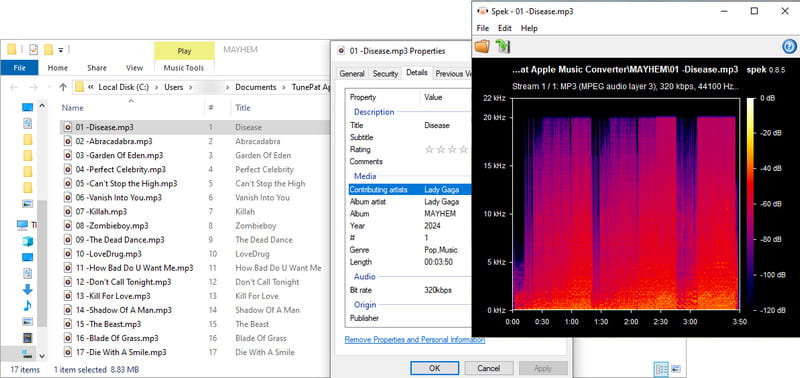
We also checked the song titles, artists, album names, release years, and cover artwork. The key metadata was preserved correctly, so you won't have to manually fix these details for the tracks we tested. If you regularly convert full albums or playlists, this makes it easier to keep your music library organized.
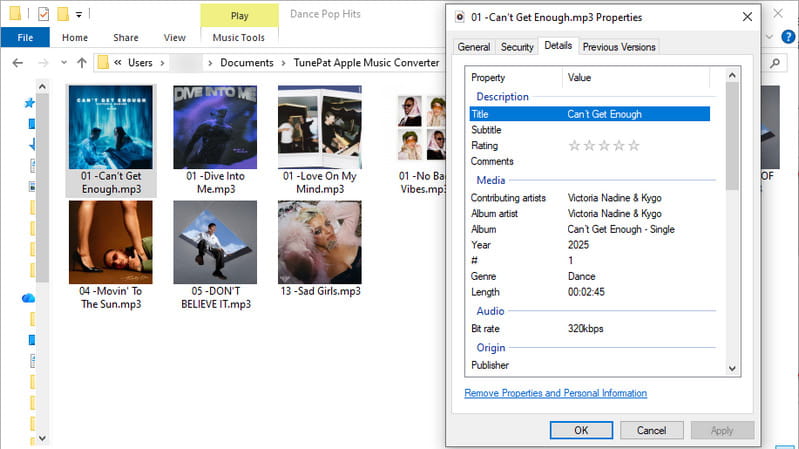
We also tested TunePat on a Mac, converting Apple Music tracks to FLAC. When we checked the output in Spek, the files showed a higher frequency range than our 320 kbps MP3 files. If you want to preserve Apple Music's Hi-Res Lossless audio in ALAC format, TunePat can do that too with the right output settings. Our guide to downloading lossless Apple Music explains how to set it up.
Ease of Use and File Organization
TunePat was straightforward to use during our tests. You can browse Apple Music through its built-in web player, select individual songs, albums, or playlists, and add them to the conversion queue. The Add More option lets you prepare several albums or playlists for batch conversion. You can also customize filenames and folder organization, saving time on sorting if you regularly convert music in batches.
These features give TunePat an advantage over some free Apple Music to MP3 converters, particularly browser-based tools that only process one link at a time. TunePat also offers light and dark themes and supports multiple interface languages.
We also checked public user feedback for issues beyond our own tests. An older Trustpilot review mentioned occasional conversion failures, missing artwork, and playlist refresh problems. These reports relate to an earlier version, so we can't assume the same issues still affect the current release. In our tests of TunePat Apple Music Converter version 3.4.3, all 27 tracks were eventually converted, and the key metadata and artwork were preserved.
TunePat Apple Music Converter Pros and Cons
So, what did we like about TunePat, and where does it fall short? Here's a quick look at its main pros and cons.
Pros
- Batch conversion for Apple Music tracks, albums, and playlists
- Reached approximately 10× real-time speed in our playlist test
- 320 kbps MP3 & Lossless format output verified with MediaInfo
- Preserved key metadata and cover artwork of Apple Music
- Custom filenames and folder organization
Cons
- Free trial converts only the first minute of each song
- One track needed a retry in our album test
- Conversion speed can vary with network conditions
Part 4. TunePat Apple Music Converter Pricing and Free Trial
TunePat offers quarterly, annual, and lifetime licenses. All three offer the same features, so the main differences are the price and payment terms.
Pricing and License Options:
| License | Price | Monthly Equivalent | Payment | Best For |
|---|---|---|---|---|
| Quarterly | $29.95 | ~$9.98 | Every 3 months | First-time users who want a short commitment |
| Annual | $44.95 | ~$3.75 | Every year | Regular users looking for a lower monthly cost |
| Lifetime | $89.90 | Depends on usage period | One-time payment | Long-term users who want to avoid renewals |
If you're new to TunePat, the quarterly plan lets you try the full version without committing to a longer subscription. If you expect to use it for more than two years, the lifetime license offers better long-term value than renewing the annual plan. Prices and promotions may change, so check TunePat's official store for the latest offer before buying.
Free Trial: What Can You Convert?
TunePat's free trial lets you try the software before buying, but there's a catch: it only converts the first minute of each song. That's enough to get a feel for how the converter works and check the output, but you'll need a paid license to convert full-length songs and albums.
Part 5. TunePat Apple Music Converter Alternatives: How Do They Compare?
If you've been looking into TunePat Apple Music Converter, you've probably come across alternatives like ViWizard, TuneFab, and MusicFab. We tested all three on Windows in October 2026 to compare their free trials, conversion performance, output quality, and ease of use. Most tests used the same PC as our TunePat review, while TuneFab was also tested on a second computer.
Here's how they compared in our tests.
| Converter | Music Source | Available Output Formats | Free Trial | Test Result | Output Quality & Metadata | Price (Year / Lifetime) |
|---|---|---|---|---|---|---|
| TunePat | Web Player; iTunes / Music app | MP3, AAC, WAV, FLAC, AIFF, ALAC | First 1 min/song | 27/27 trial clips converted | MP3 320 kbps; artwork and key tags preserved. | $44.95 / $89.90 |
| ViWizard | Web Player | MP3, M4A, WAV, FLAC, AIFF, M4B | First 30 sec/song | 6/6 trial clips converted | M4A, ~260 kbps to over 300 kbps; artwork and basic tags preserved. | $44.95 / $80.95 |
| TuneFab | Web Player | MP3, AAC, WAV, FLAC, AIFF, ALAC | 3 full songs | 3/3 full tracks converted | MP3 256 kbps; artwork and key tags preserved. | $79.95 / $99.95 |
| MusicFab | Web Player | MP3, M4A, WAV, FLAC, OPUS | 3 full songs | 3/3 full tracks converted | MP3 320 kbps; album artwork missing. | $65.99 / $89.99 |
Testing note: Free-trial conditions varied: TunePat and ViWizard were tested with limited clips, while TuneFab and MusicFab converted full tracks. TunePat's trial output was consistent with our earlier registered-version tests in audio quality and metadata. Prices reflect offers checked in October 2026 and may change.
A Closer Look at the TunePat Apple Music Converter Alternatives:
ViWizard Apple Music Converter
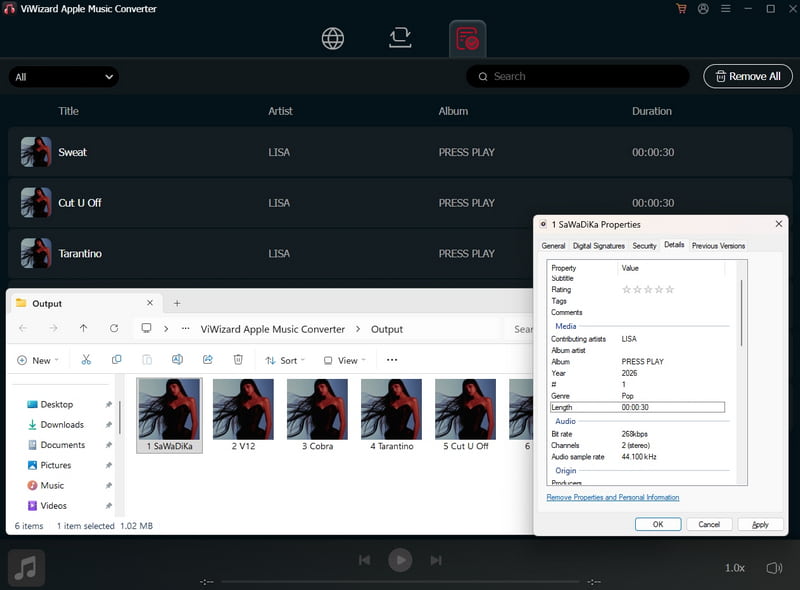
We tested ViWizard version 5.1.1, which converts songs through the Apple Music web player. It required us to sign in with an Apple ID before loading music, and the login process took quite a while. The free trial only allows the first 30 seconds of each song to be converted. We also found the output settings somewhat difficult to locate because they were hidden in a menu at the top right.
Our first conversion attempt was unsuccessful, with all four tracks failing even after a retry. This may have been related to a network issue, although we couldn't confirm the cause. When we tested ViWizard again, however, all six tracks were successfully converted within the trial's 30-second limit.
For the second test, we selected the Recommended output option, which produced M4A files with bitrates ranging from around 260 kbps to over 300 kbps. The files also retained key metadata, including album artwork, song titles, and album names. If you prefer 320 kbps MP3 files, you can select that format and bitrate in the output settings.
TuneFab Apple Music Converter
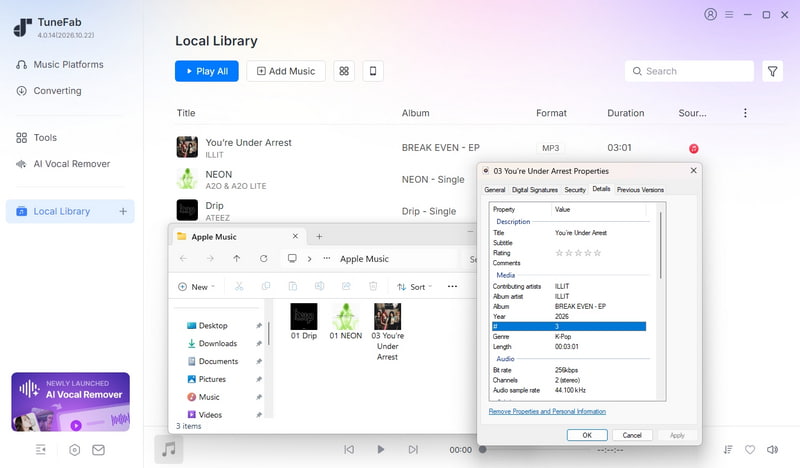
We tested TuneFab version 4.0.14, which installed as part of its all-in-one music converter. It let us browse Apple Music without signing in, and the output settings were easy to find in both the conversion window and the toolbar.
Our first test didn't go as expected. TuneFab said we'd already used the free trial allowance, even though we hadn't converted any songs. However, when we tried it on another Windows PC, the trial worked. TuneFab advertises three full song conversions per platform, and we successfully tested its free trial with Apple Music and Spotify.
We left the output quality set to the default Original option, and the converted Apple Music songs were saved as MP3 files at 256 kbps. The files also retained their album artwork and key metadata, including song titles, artists, and album names. Overall, TuneFab performed reasonably well in our second test. Although it comes as an all-in-one program, you can purchase a license for Apple Music alone. However, that license is noticeably more expensive than the other Apple Music converters in our comparison.
MusicFab Apple Music Converter
We tested MusicFab version 2.0.0.1. Like TuneFab, it installed as an all-in-one program, but Apple Music required us to sign in before loading songs. One thing we liked was having the output settings right in the song selection window. However, output customization was more limited for formats other than M4A, and adding tracks to the queue didn't automatically open the queue window.
MusicFab's free trial worked as advertised in our test, allowing us to download three full songs for free. We successfully converted all three tracks to MP3 at the default 320 kbps setting, with speeds reaching around 10×. After each conversion, a popup showed how many free downloads remained. The main drawback was that the downloaded MP3 files didn't retain their album artwork.
Which Apple Music Converter Should You Choose?
Based on our tests, TunePat Apple Music Converter is the best fit if you regularly convert full albums or playlists, want to keep your music files organized, or need lossless audio output. Unlike the three alternatives we tested, TunePat supports both the Apple Music web player and the desktop Music app on Mac or iTunes on Windows. This gives you more flexibility in choosing your music source, including when you want to preserve lossless audio using formats such as ALAC. Its annual license is also more affordable than TuneFab's and MusicFab's, while the lifetime plan offers a practical option for long-term use.
If you want to download complete songs for free before buying, MusicFab Apple Music Converter is worth considering. Its trial let us download three full songs, although the MP3 files didn't retain their album artwork. TuneFab Apple Music Converter may suit users who want an all-in-one program for multiple music services, but its single-platform license costs more than TunePat's, and its trial didn't work on our first test PC. ViWizard Apple Music Converter is an option if you mainly want to check short audio clips before purchasing. It successfully converted six 30-second trial clips in our follow-up test, but full-length song downloads require a paid license.
Part 6. FAQs About TunePat Apple Music Converter
Q1. Is TunePat Apple Music Converter Safe to Use?
A: Yes. We checked TunePat Apple Music Converter with VirusTotal and Google Safe Browsing, and neither flagged any security threats in our checks. We recommend downloading the software directly from TunePat's official website to avoid potentially unsafe third-party installers.
Q2. Does TunePat Apple Music Converter Really Work?
A: In our registered-version tests, TunePat successfully converted all 27 Apple Music tracks to MP3 at 320 kbps. One song needed a retry, but the rest converted without issues. We also checked the output files and confirmed that the key song information and album artwork were preserved in the MP3 files we tested.
Q3. What Should I Do If TunePat Fails to Convert a Song?
A: If a song fails to convert, try the Retry option first. During our album test, one track failed initially but converted successfully after a retry that took about 20 seconds. If the problem continues, check your internet connection, make sure you're using the latest version of TunePat, or try switching between the Apple Music web player and iTunes or the Music app.
Q4. Does TunePat Require an Apple Music Subscription?
A: Not necessarily. TunePat can search for and convert some songs without signing in to Apple Music or having a subscription. However, the music may come from other available sources, so the converted version might not always match the original Apple Music track. Some songs may also require you to sign in with an active Apple Music subscription to access them.
Q5. Can TunePat Apple Music Converter Work Without the Apple Music App?
A: Yes. TunePat has a built-in Apple Music web player, so you don't need to install iTunes or the Music app to convert songs. If you prefer, you can also use the desktop music app as your source on Windows or Mac. The available output options may differ depending on which source you choose.
Final Verdict: Is TunePat Apple Music Converter a Good Choice?
TunePat Apple Music Converter performed well in our tests. All 27 tracks were eventually converted, and the key song information and album artwork were preserved in the MP3 files. Its main drawback is the free trial, which converts only the first minute of each song, so you'll need a paid license to convert full-length tracks. If you regularly convert albums or playlists, TunePat is a practical option to consider. You can start with the free trial to see how it works on your computer before deciding whether to buy a license.



Olivia Anderson
Senior Writer