Download Freefy Music for Free – Offline Listening Guide
 By Olivia Anderson
Music Tips
Updated on 9/04/2026
By Olivia Anderson
Music Tips
Updated on 9/04/2026
In today's digital age, music lovers are constantly seeking ways to access their favorite tunes without breaking the bank. Enter Freefy, a platform that's been making waves in the free music streaming world. But what exactly is Freefy, and how can you use it to download Freefy music for offline listening? In this comprehensive guide, we'll explore everything you need to know about Freefy. Let's read on!
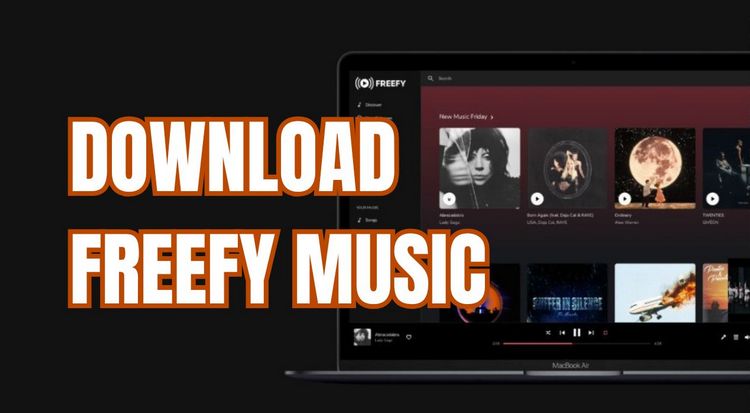
Part 1: What is Freefy and How Does it Work?
Freefy is a free music streaming platform that lets users listen to a large music catalog without paying for a subscription or hearing audio ads between songs. It was created as a free alternative to paid music services, giving users a way to enjoy music without turning to pirated apps.
So, how does Freefy provide its music for free? Freefy brings music from different sources together in a single platform, allowing users to search for and stream songs without paying for a subscription. It also offers features such as playlists, radio stations, and a personal library, making it a convenient alternative to traditional paid music services.
Key features of Freefy include:
It's worth noting that while Freefy doesn't play audio ads between songs, ads may still appear on the platform. For example, the Android app is currently labeled "Contains ads" on Google Play.
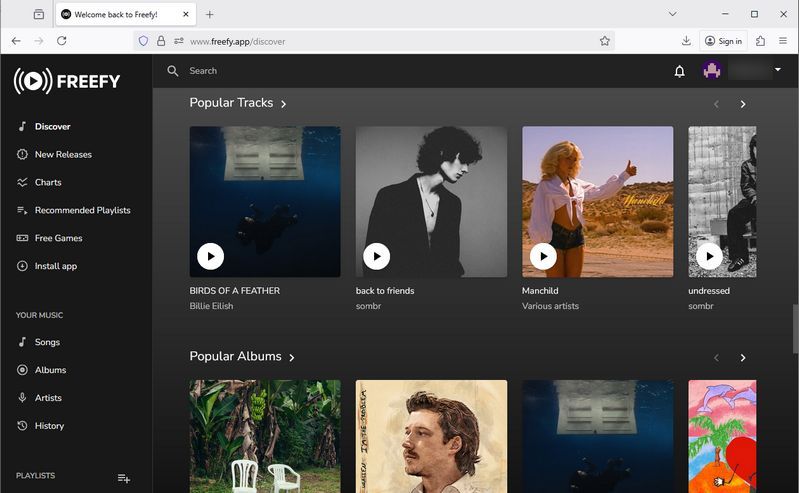
Part 2: How to Download Music from Freefy?
Now, let's get to the main question: Can you download music from Freefy for offline listening? Freefy is mainly designed for streaming, and it doesn't appear to offer a direct option to save individual songs as MP3 or other standard audio files. However, its official documentation mentions offline content and download-related features on some platforms, so the experience may vary depending on the device you use.
If you want to keep music as regular audio files for offline playback, you'll need an alternative solution. One option is to use reliable third-party software like TunePat Music One to download music from supported streaming platforms. You can download it using the buttons below. We'll explain how it works in Part 4.
Looking for a way to save your favorite music for offline listening? The tools below can help you download songs quickly and in bulk from supported music platforms. The Android app supports Spotify downloads, while the desktop app can download music from Spotify, YouTube, YouTube Music, Amazon Music, Tidal, Apple Music, and more, and save it in common audio formats. 👇
Part 3: Pros and Cons of Using Freefy
Like any music streaming service, Freefy has its own advantages and limitations. Here's a quick look at the main pros and cons:
Pros
-
 Completely free to use.
-
No audio ads between songs.
-
Access to a large music library.
-
Create and share playlists.
-
Available on web, Android, and iOS.
Cons
-
 No direct option to save songs as MP3 or other standard audio files.
-
May display visual ads within the app or website.
-
Quality and availability of tracks may vary.
-
Some features may vary depending on the platform.
Part 4: Best Alternatives to Download Freefy Music for Listening Offline
As mentioned earlier, Freefy primarily lets users stream music online for free. While it offers offline-related features on some platforms, it does not appear to provide a direct way to save individual songs as MP3 or other standard audio files. Offline playback can be especially useful when you're in an area with a poor signal, traveling abroad, or dealing with limited mobile data.
But don't worry. Below, we'll introduce the 3 best ways to download Freefy music for offline listening, with options for both desktop and Android users. The steps are simple and easy to follow!
4.1 Download Freefy Music with Music One (Desktop)
When it comes to downloading Freefy music, TunePat Music One is a convenient choice. This all-in-one music downloader and converter allows users to download songs from popular streaming services such as Spotify, Apple Music, YouTube, Amazon Music, Tidal, YouTube Music, Deezer, SoundCloud, and more. You can save tracks in common audio formats, including MP3, AAC, WAV, FLAC, AIFF, and ALAC, for offline playback.
Unlike Freefy, which is primarily designed for streaming, TunePat Music One gives you more control over your downloaded music files. You can customize output settings, file names, and folder organization to keep your music library neatly organized. It also preserves ID3 tags, including artist, title, album, track number, year, disc number, and artwork. Batch conversion is supported as well, allowing you to process entire playlists or albums at once, which is especially useful for large music collections.
Below, we'll walk you through the detailed steps to download Freefy music with TunePat:
TunePat Music One
TunePat Music One is an all-in-one converter that can support any music streaming platform.
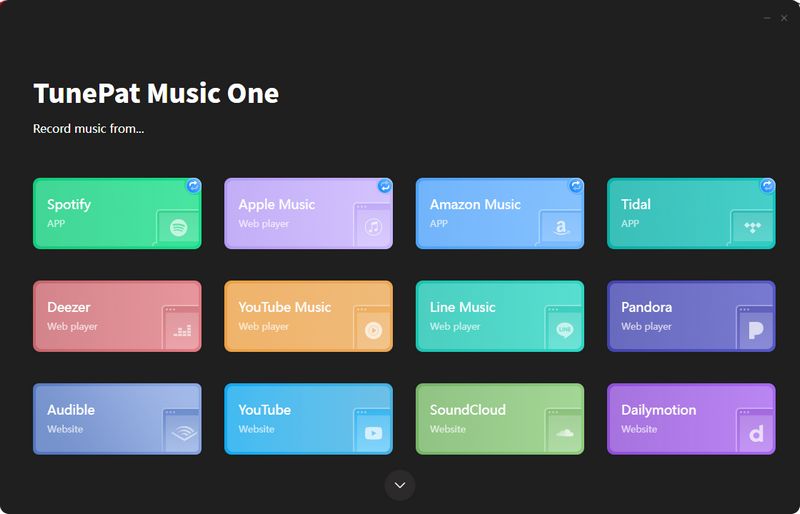
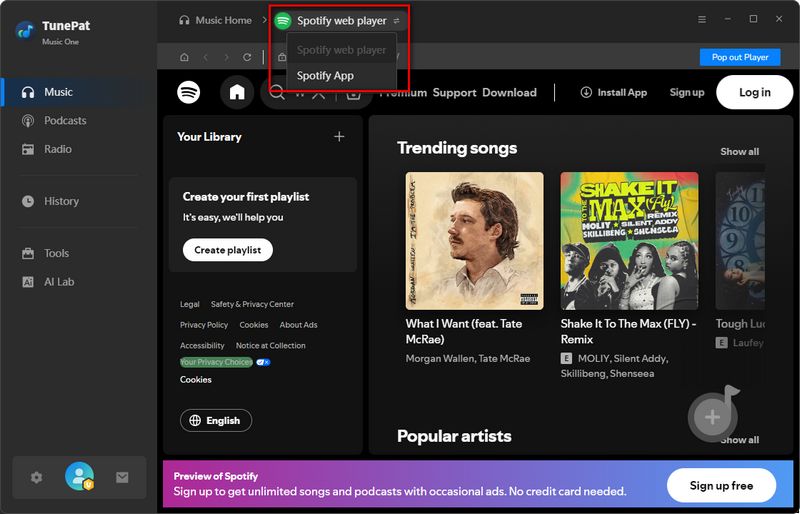
Step 1 Begin by installing and launching TunePat Music One on your computer. The application's homepage will show all available streaming platforms. For this guide, we'll focus on Spotify. Simply click the "Spotify" tab to proceed.
You'll see options to access music through either the "Spotify app" or "Spotify web player". Choose your preferred method and log in using your Spotify credentials. Both free and premium accounts are supported for this process.
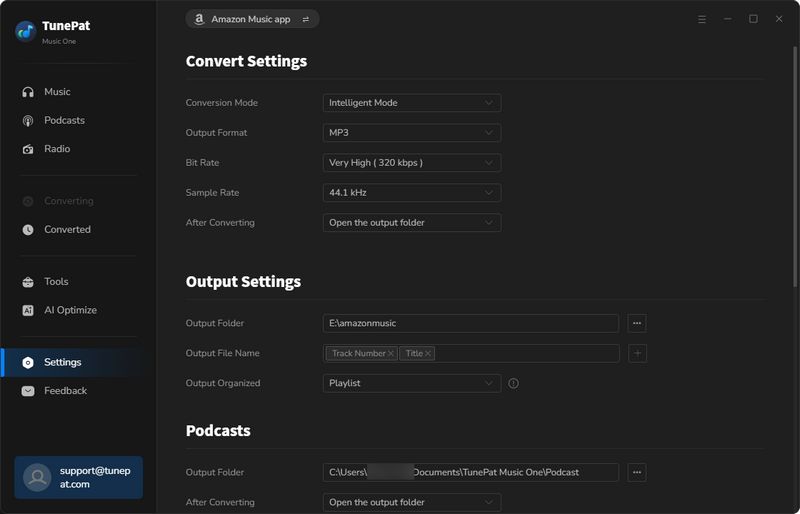
Step 2 Click on the "Settings" menu before starting conversions. Adjust parameters such as file format, bit rate, sample rate, output folder, output file name, and others. Please refer to the playback device or player you plan to use for the output format. Due to compatibility and memory size, we recommend converting to MP3 format in most cases. We will also use the "MP3" format as an example here.
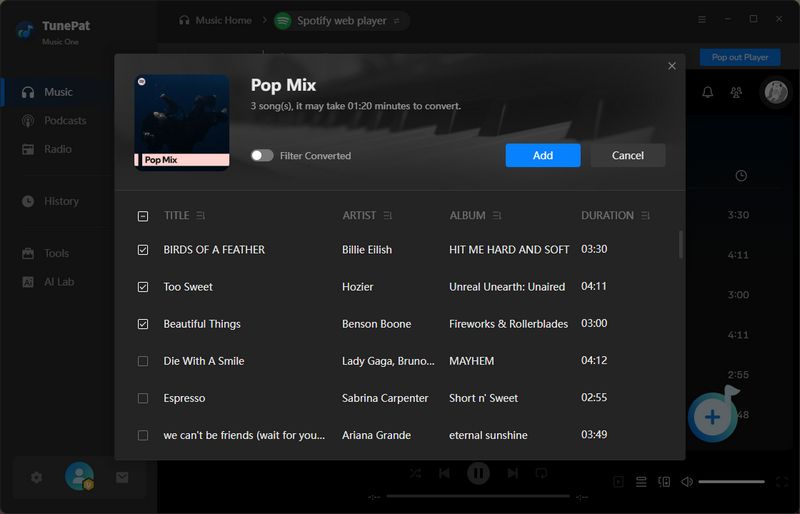
Step 3 Now, return to your Spotify library and browse for the songs you want to download. Click "+" to prepare each track for conversion. After the analysis completes, confirm your choices by selecting "Add" in the pop-up window.
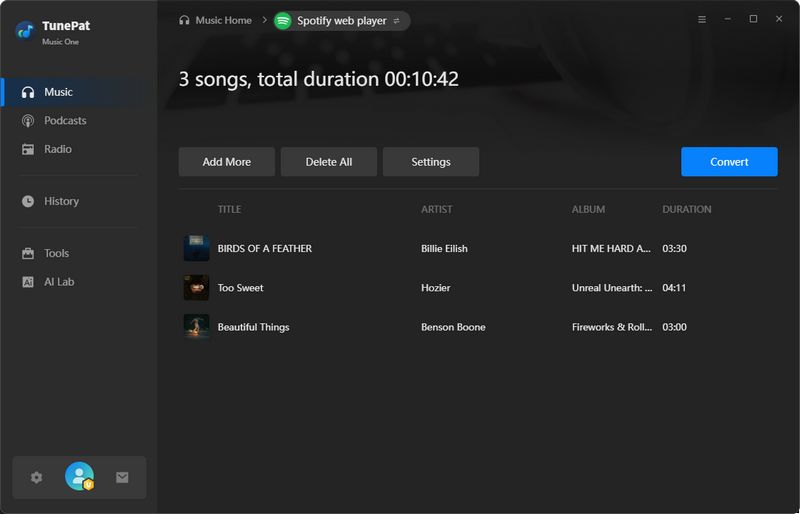
Step 4 For individual conversions, click "Convert" to begin.
To process multiple playlists or albums at once:
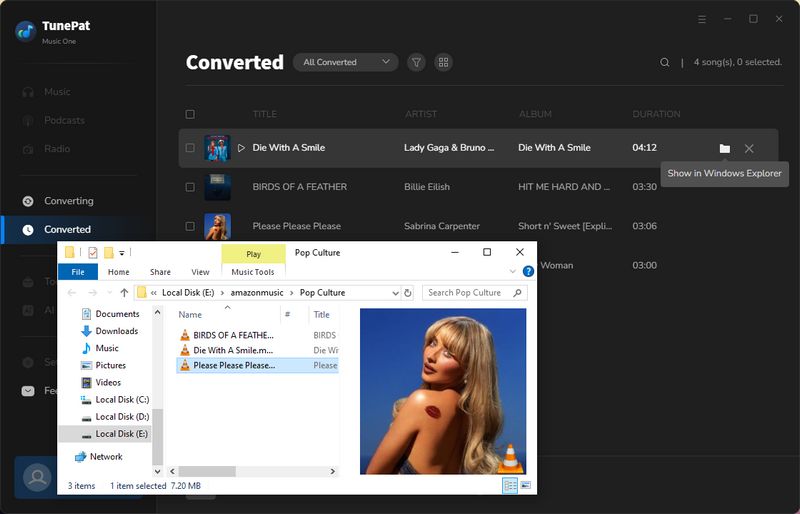
Step 5 Once the download is complete, go to the "History" tab in the bottom menu to view your download history. Click any song title to start playing. The Spotify MP3 files are now ready for offline playback across all devices.
Pros
-
Supports downloading songs from multiple platforms, including Spotify, Apple Music, Amazon Music, SoundCloud, Tidal, YouTube Music, etc.
-
Works with various audio types, including music, playlists, albums, podcasts, audiobooks, and radio.
-
Exports tracks to MP3, FLAC, WAV, ALAC, AIFF, or AAC formats to meet different needs.
-
Supports batch processing with conversion speeds up to 10X faster.
-
Saves track information, including title, artist, album art, artwork, and more.
-
Functions as a standalone offline music player.
Cons
-
Available for Windows and macOS users only.
4.2 Enjoy Freefy Music Offline with Spotify Downloader APK
As mentioned earlier, Freefy is available on both desktop and mobile devices, including Android. If TunePat Music One is a convenient desktop option, the TuneCable Spotify Downloader APK is another choice for Android users who want to download Freefy music for offline listening.
As its name suggests, this APK is designed specifically for downloading and converting songs from Spotify. It supports fewer streaming services than Music One, but it offers a simple way to save Spotify music for offline listening. Unlike unofficial Spotify Premium APKs, it is a dedicated music downloader that doesn't require a modified Spotify app.
Below, we'll walk you through how to use this tool to quickly download Freefy music.
Step 1 Install and Run TuneCable Spotify Downloader APK
Download the TuneCable Spotify Downloader APK, then open the file and tap "Install" to install the app. If a security warning appears, follow the on-screen instructions to continue. After installation, tap "Open" to launch the app and choose "Allow" when prompted to enable notifications.
Step 2 Add Spotify Tracks to TuneCable and Start Downloading
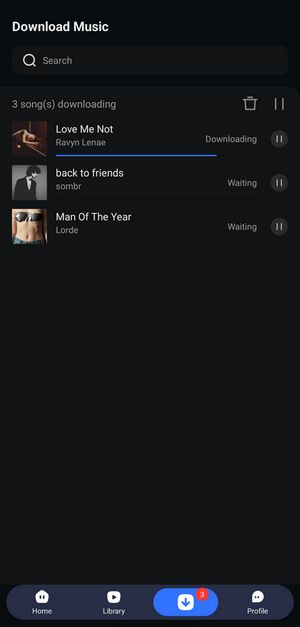
Open TuneCable Spotify Downloader and tap "Login Spotify" in the top menu to sign in to your Spotify account.
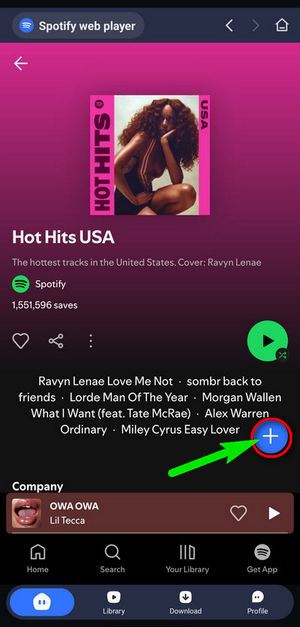
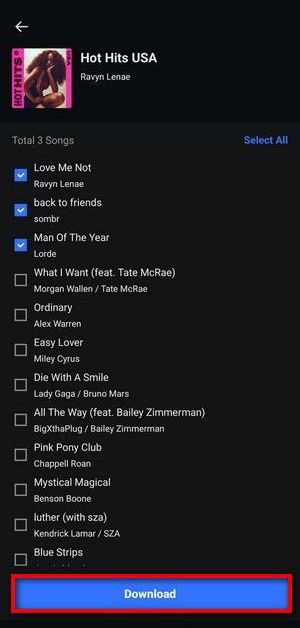
Go back to the "Home" page and open the album or playlist you want. Tap the "+" button to scan the available tracks. On the next screen, select the songs you want to download and tap "Download".
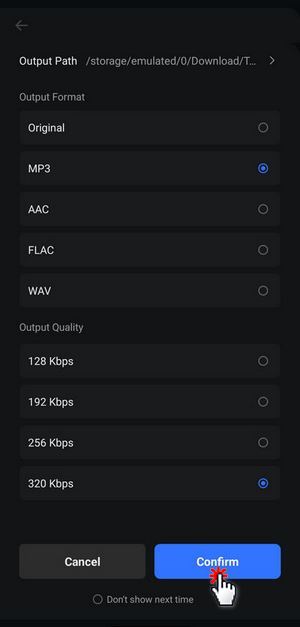
Check the output format and audio quality settings before starting the download. Once everything is set, tap "Confirm" to begin downloading.
Step 3 Convert Spotify Files to MP3 for Android
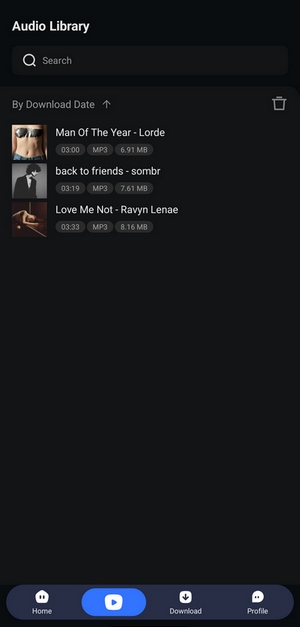
When the download is complete, tap the "Library" tab in the bottom menu to see your downloaded songs. Tap any track to play it.
Pros
-
Virus-free with no bundled malware
-
User-friendly interface with zero advertisements
-
Batch downloads albums, playlists, podcasts, audiobooks, radio, and more from Spotify.
-
Preserves original sound at up to 320 kbps.
-
Works with Spotify Free accounts.
Cons
-
Only supports downloading Freefy music from Spotify.
4.3 Download Freefy Music via the MP3Quack Site
Note: In our most recent tests, MP3Quack gets stuck loading and fails to process the file properly. We're not sure whether this is a temporary server issue or another problem with the site. If you run into the same issue, the download may not complete.
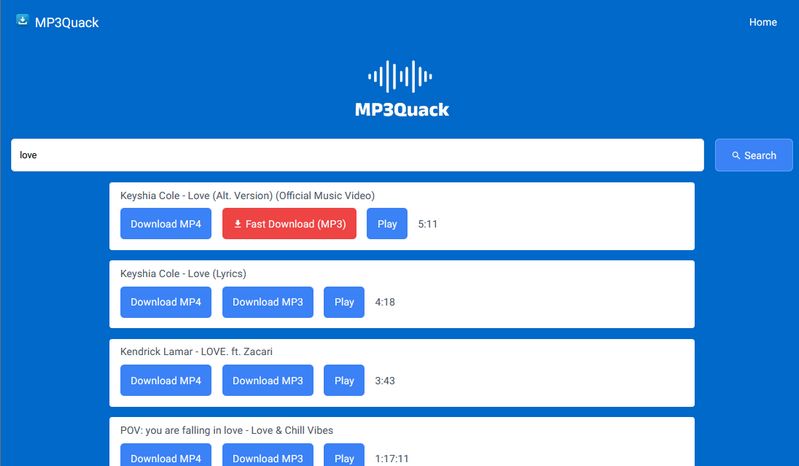
Besides desktop programs and Android tools, you can also use online music download sites to save songs, such as the popular MP3Quack. The site allows users to search for and download MP3 songs for free, making it another option for those who want to download Freefy music for offline listening. Since it is web-based, there's no software to install, and the process is quite straightforward. Here are the detailed steps:
Step 1 Enter the song title, artist name, or other relevant information in the search bar.
Step 2 Browse the search results and select the version you need.
Step 3 Click the "Download MP3" button, then choose the "Fast Download (MP3)" option. The MP3 file will then be saved to your device (computer, smartphone, tablet, etc.).
Pros
-
Free music downloads with no cost.
-
Instant access without account creation.
-
Accessible from any device, using a browser.
Cons
-
Frequent pop-up ads with potential security risks.
-
Inconsistent audio quality (may be low or incomplete).
-
Risk of malware from unverified sources.
-
No guarantee of latest song versions.
-
Unstable service with sudden access loss.

Top 10+ Best Free MP3 Download Sites
Want to learn more about free MP3 download sites? Are you still struggling with high monthly subscription fees? This tutorial details the features and usage of each free MP3 download site. Learn More >>
Conclusion
Freefy presents a good option for music lovers seeking a free, ad-free listening experience. While it offers a vast library of music and user-friendly features, the lack of an official download option is an important consideration.
But you don't need to worry, the TunePat Music One we recommend is a perfect alternative. You can easily and quickly download and save your favorite songs from streaming media such as Spotify, YouTube Music, Amazon Music, Tidal, etc. for offline playback. These songs are no longer restricted to a specific app. There's no need to maintain an active subscription to ensure access. With such a cost-effective option, what are you waiting for? Click "Download" below to try it out now!



Olivia Anderson
Senior Writer