12 Best Free MP3 Download Sites in 2026 (Safe & Fast)
 By Dereck Martin
Music Tips
Updated on 10/8/2026
By Dereck Martin
Music Tips
Updated on 10/8/2026
With the popularity of streaming services, we can play our favourite songs anytime and anywhere. But are you also distressed about the monthly and annual subscription fees? You can't even download music to MP3 format for offline listening. So you may search for some free MP3 download sites online that can download music to MP3 for free. To avoid the hidden risks, this article will introduce you to the features and usage tutorials of each free MP3 download site in detail. Finally, we will compare them in different aspects. Let's continue reading!
Most Recommended MP3 Downloader: TunePat Music One 🔥
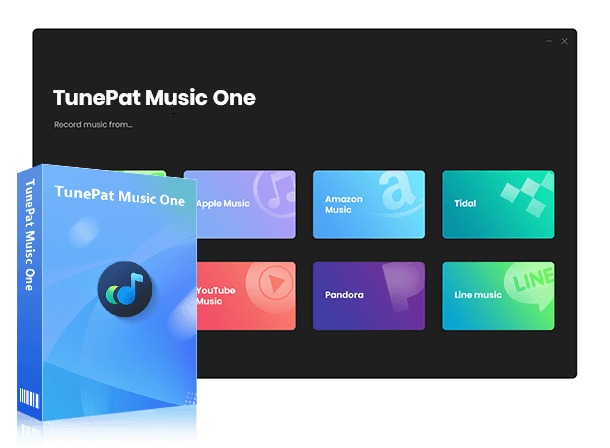
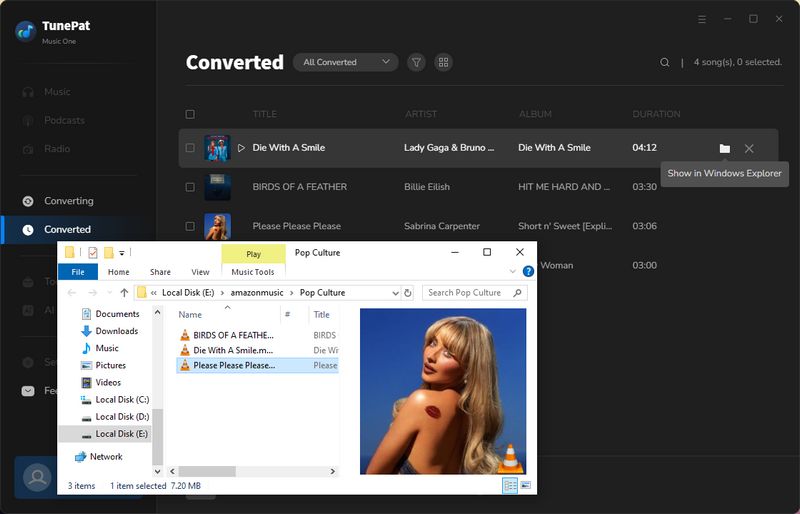
First and foremost, we recommend TunePat Music One, a professional MP3 downloader and converter. Its key advantages include broad platform compatibility, versatile output formats, high-speed downloading without quality loss, and extended content support. Specifically, TunePat allows music downloads from popular streaming services like Spotify, Apple Music, YouTube, Amazon Music, Tidal, and Deezer. It also supports multiple audio formats such as MP3, AAC, WAV, FLAC, AIFF, and ALAC. Notably, it preserves original sound quality and complete ID3 tags while operating at up to ten times the normal speed. Beyond music tracks, albums, and playlists, the tool can also download Spotify audiobooks, Spotify podcasts, Spotify music videos, YouTube Music videos, etc.
TunePat Music One
It is an all-in-one converter that can support any music streaming platform.
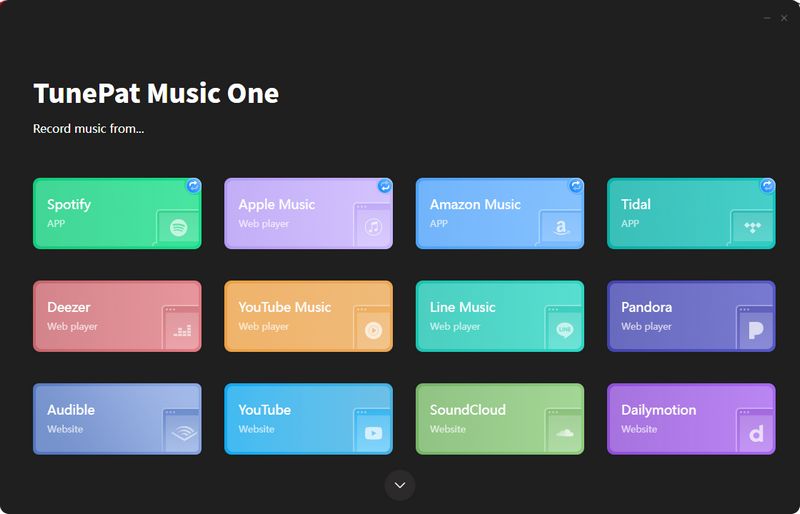
Step 1 Please click the download button of the corresponding system above to download the program to your computer. Then, please double-click to start it, and you will see the following interface. This article will take Spotify as an example to introduce how to use TunePat Music One to download MP3 music. Please click "Spotify" here.
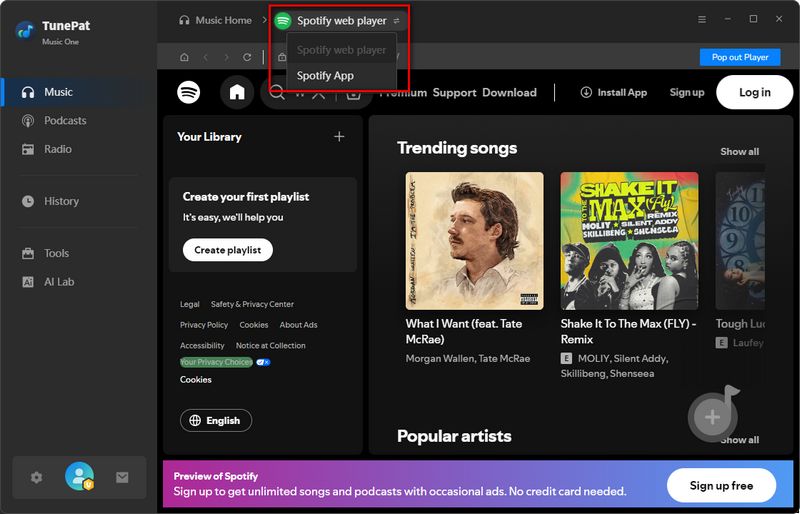
Step 2 You will see the embedded Spotify web player in TunePat. To make it outside, tap on "Pop out Player". If you wish to download Spotify music from the Spotify app, please click the "Spotify web player" button above to change the audio source. No matter where you convert music, remember to log in to your Spotify account.
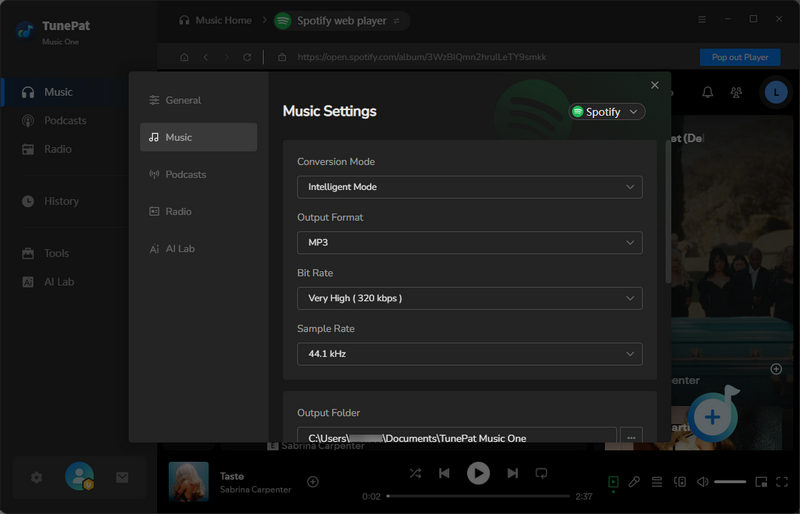
Step 3 Before converting Spotify music to MP3, let's change the settings first. If it is your first time using TunePat, then all the settings are default. Click the settings icon, and a window will pop up. Please change the Output Format to MP3. You can also modify the Conversion Mode, Bit Rate, Sample Rate, and other settings. Please modify these according to your preferences.
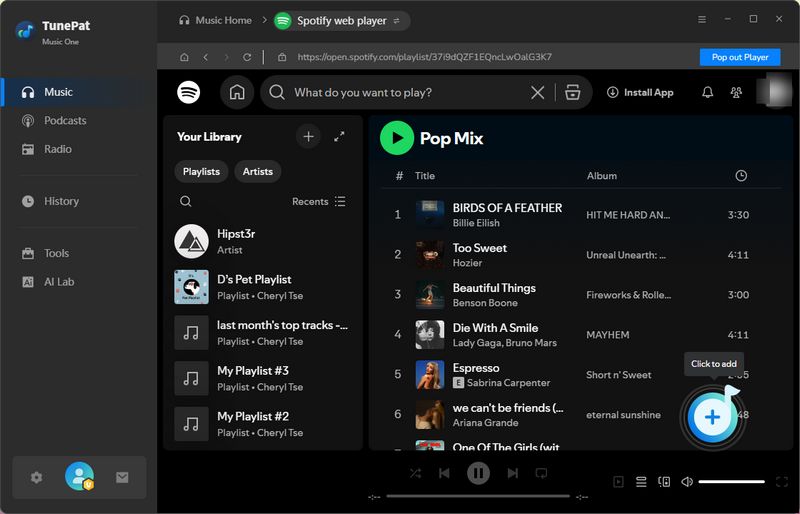
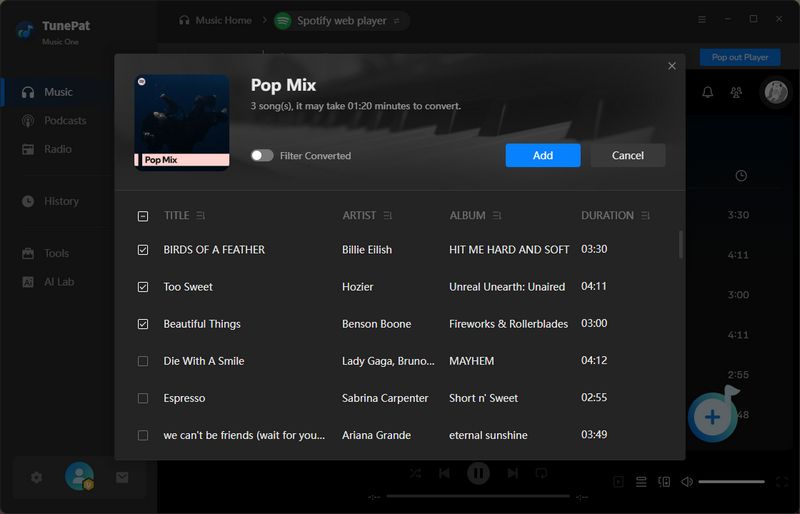
Step 4 Now go back to the Spotify web player or app. You can browse your favorite Spotify tracks, albums, and playlists, and click the blue button in the bottom right corner. TunePat will parse these songs. Tick off the songs you do not want and click "Add" to add them to TunePat.
Tips: If you download music from the Spotify app. There are two more ways to add Spotify Music to TunePat. The first is to drag and drop the music to the "Drag the music here" area on the TunePat interface. The other is to copy the link of the Spotify Music into the blue box and tap on the "+" button for analysis.
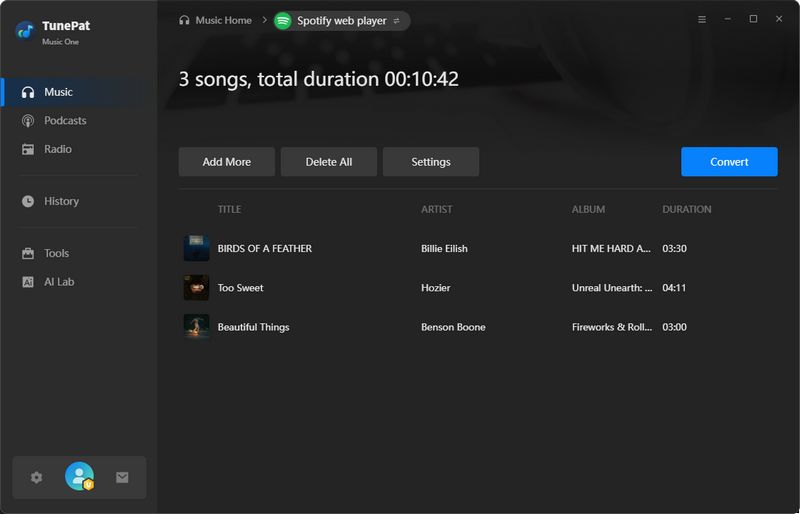
Step 5 At this point, you can convert the music. However, if you want to add more songs, you can click "Add More" and repeat the previous steps to add songs from more albums. If you forget to change some settings, you can click "Settings" again at this step. After everything is done, click "Convert" to start the conversion. After a while, TunePat will convert all the music. You can click "History" on the left to view it.
| Rating | Ads-free | Batch Download | Output Format | Bit Rate | ID3 Tags | Supported Sources | |
|---|---|---|---|---|---|---|---|
| TunePat Music One | ★★★★★ | ✅ | ✅ | MP3, FLAC, WAV, M4A, ALAC, AIFF, MP4 | 320 kbps MP3/ Lossless | Title, Track Number, Disc Number, Artwork, etc. | Spotify, Apple Music, SoundCloud, YouTube, etc. |
Part 1: Top 6 Free MP3 Download Sites
#1 MP3 Juices - Download MP3 Songs for Free
MP3 Juices is an online website where users can download MP3 songs for free. Users can then preview the songs and download them to their devices. There are also some security risks when using MP3 Juices. The website is cluttered with numerous ads, and if users click on them by accident, they may expose their devices to potential danger. In addition, the downloaded songs have a low sound quality of only 108kbps.
Step 1 Open MP3 Juices on your browser. Here you can choose to copy and paste the URLs of videos or simply enter the song titles.
Step 2 When the results come out, you can listen to the song first. After listening, you can directly click "Download MP3" or "Download MP4".
Step 3 You will then be redirected to an ad page. Please stay on the current page and click "Fast Download (MP3)" again. Then the song will be downloaded to your device.

In a previous article, we provided a complete overview of MP3Juices, analyzed its advantages and disadvantages, and offered 5 best alternatives when MP3Juices is not working. 👉 Top 5 MP3Juice Alternatives for Free Music Downloads
#2 MP3 Quack - Free MP3 Download Sites
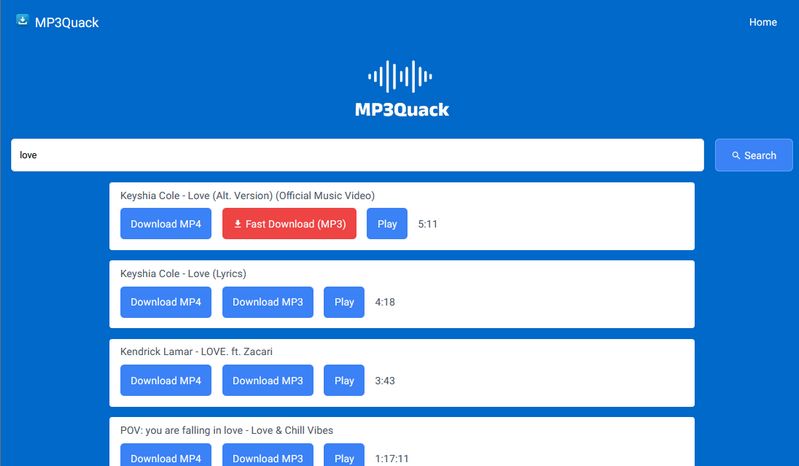
MP3 Quack was a popular free MP3 download site that allowed users to search for songs and download them for offline listening. It offered a large selection of music, including popular songs, remixes, live performances, and other tracks. However, our tests found inconsistent audio quality, frequent redirects, and other issues that affected the download experience.
Latest status: In our latest check in October 2026, MP3 Quack is currently inaccessible and shows a "This site can't be reached" error. We previously tested the site in June 2026 and found inconsistent download results and frequent redirects.
Step 1 Open MP3 Quack in your browser and search for a song, artist, or album.
Step 2 Browse the available results and select the version you want to download.
Step 3 Click "Download MP3" and then select "Fast Download (MP3)" to start the download.
#3 MyGOMP3 - Free MP3 Songs Downloader
MyGOMP3 helps you download the latest songs, albums, and track lists in MP3 or MP4 format. However, you cannot download songs from albums and playlists in batches, but only one by one. You can also preview the songs before saving them. MyGOMP3 can download music at up to 320kbps.
Step 1 Find the song you want by searching for the artist, album, song title, or by copying the URL.
Step 2 Then you can play or download the songs. To download YouTube Music to MP3, select "Download MP3".
Step 3 Choose the bit rate you wish to download.

Hands-on Test Results
[Last Updated: June 2026] In our tests, frequent redirects began after the page parsed the song. Almost every click resulted in a redirect. The webpage also prompted users to subscribe to a free trial. However, given the website's instability, we do not recommend subscribing. Like some other tools, the audio quality is not truly 320kbps; it is boosted from a lower-quality source. Furthermore, the downloaded files do not save ID3 tags and contain garbled characters in the filenames.
#4 BigMP3 - Fast & Free MP3 Downloader
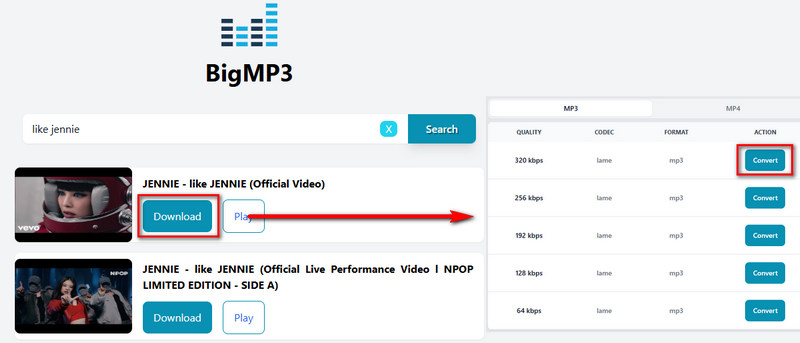
To download music to MP3 for free, you can also try BigMP3, a popular online downloader. BigMP3 provides users with various audio quality download options, including 64 kbps, 128 kbps, 192 kbps, 256 kbps, and 320 kbps. Users can choose the best quality for their device. Users can easily find the songs they want to download by just entering the name of the song, artist, or any keyword they want.
Step 1 Open BigMP3 on your browser and enter the name of the track you want.
Step 2 Click "Search". You will get the available tracks.
Step 3 Click "Download" to choose the output format and bit rate to download YouTube Music to your devices.
Hands-on Test Results
[Last Updated: June 2026] In our latest BigMP3 test in 2026, we found that while the page still had no ads, every click on a button resulted in a redirect, and downloads failed because clicking the download button would then redirect. We do not recommend using this tool now, as it's impossible to determine if it has ceased maintenance. In such cases, we suggest using the regularly maintained and updated professional desktop tool, TunePat Music One.
#5 Tubidy - View & Download Popular MP3 Songs
Tubidy is a free download website that advertises MP3 downloads up to 320 kbps as well as higher definition MP4 downloads. It has a clean interface, and users can search and download songs directly without registration.
Step 1 First, please open Tubidy in your browser. Then, directly enter the name of the song you want to download in the search box. Please browse the search results to find the version you want to download.
Step 2 When you click the song title, it will redirect to a new page. Please stay on the current page. Scroll down to choose the bit rate and format you wish to download.
Step 3 After you click it, it will load. When it completes, tap on "Download".

Hands-on Test Results
[Last Updated: June 2026] During testing, we found that unlike other tools, Tubidy does not allow searching by pasting URLs. You can only search by song name, which may lead to downloading a different version of the track. A unique feature is the menu in the upper right corner, where you can view popular content or select your mood. The website then lists different playlist categories for you to choose from and download directly. Tubidy also recommends some videos for download. Regarding audio quality, we found that even when selecting 320kbps download, the audio is simply upsampled from a low quality source. It does not provide true 320kbps quality.
#6 MP3ify - Extract MP3 Files from Videos
MP3ify is an online MP3 music downloader that is easy to use, even for computer novices, and has no ads. However, free users face some limitations. For instance, they can only download YouTube videos shorter than ten minutes and are limited to three downloads per day. The highest audio quality for free users is 128kbps. Users can either enter search terms or paste a YouTube URL. We did not purchase a paid subscription during our testing, so we cannot confirm whether subscribing would bring significant improvements.
Step 1 Open the MP3ify website in your browser. Then you can directly enter search items like song titles and artist names. Or, you can copy the YouTube URL to get the exact version of the song.
Step 2 Wait for the website to load, then select the bitrate and output format to download YouTube Music.

Part 2: Top 3 Free YouTube to MP3 Download Sites
In addition to the keyword-based free MP3 download sites, another popular category is dedicated YouTube to MP3 converters. Here, we list the top three most widely used options.
| Tool | Ads-free | Batch Download | Format | Bit Rate | ID3 Tags / Metadata |
|---|---|---|---|---|---|
| Y2Mate | ✅ | ❌ | MP3/MP4 | 125kbps | Song titles only |
| CNVMP3 | ✅ | ❌ | MP3/MP4 | Selectable 320 kbps, but downloaded MP3 is 236 kbps | Title, artist, year, cover art |
| EzRip | ✅ | ❌ | MP3/MP4 | Upsampled from 128kbps, not genuine 320kbps | Title, artist, etc. |
#1 Y2Mate - Free YouTube to MP3/MP4 Download Site
Y2Mate is a free online website that allows you to download YouTube videos in MP3 or MP4 format. Users only need to copy the video's URL to download the file to their device. Y2Mate has a simple interface and is easy to use, but after testing, the MP3 audio file can only be downloaded at a bit rate of 125kbps, and the ID3 tags only retain the title.
Step 1 Click Y2Mate to open it on your browser. Then, please copy the URL of the YouTube video you wish to convert.
Step 2 Paste the URL into the search box of Y2Mate.
Step 3 Choose the output format you want (MP3/MP4) and click "Convert". Then click "Download".
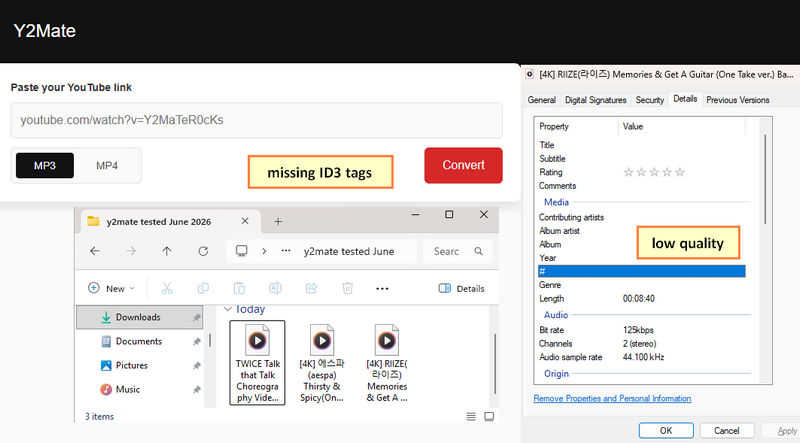
We conducted hands-on testing of Y2Mate, evaluating its download speed, audio quality, security risks, and metadata accuracy. For a complete review, including pros and cons and best alternatives, please see our detailed guide: Y2Mate Review: Safe or Risky?
#2 CNVMP3 - Download Music to MP3 for Free
CNVMP3 is an online downloader that supports downloading from multiple platforms such as YouTube, TikTok, Instagram, Facebook, X (Twitter), Twitch and Reddit. It has a very simple interface and easy steps to operate. CNVMP3 is completely free and ad-free. Users can choose the quality of the audio they want to download, but after testing, even when 320kbps is selected, the downloaded file is still only 236 kbps.
Step 1 Open CNVMP3 and paste the copied YouTube URLs into the search box.
Step 2 Select the sound quality and output format, and click "Convert".
Step 3 Without any special operation, CNVMP3 will automatically download YouTube Music to your devices.
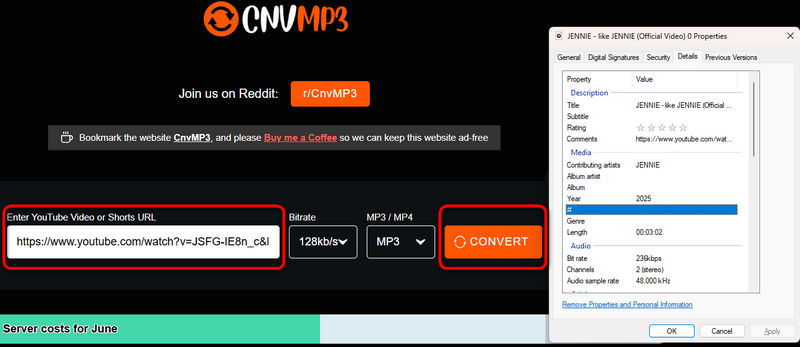
We tested CnvMP3 thoroughly, covering audio quality, safety, actual limitations, and whether the hype holds up. Check out our comprehensive review for the full breakdown and the best alternatives: CnvMP3 Review: The Ultimate YouTube to MP3 Converter?
#3 EzRip - Ad-Free YouTube to MP3 Downloader
EzRip (also known as EzMP3) is a simple and easy-to-use tool for converting YouTube videos to MP3 audio files. It offers a clean and ad‑free experience, and allows you to trim audio clips before downloading. Although the tool claims to let users select a bitrate from 64kbps up to 320kbps, professional spectrum analysis reveals that it merely upsamples low‑quality sources to 320kbps, rather than downloading genuine 320kbps audio.
Step 1 Copy the URL of your desired YouTube video and paste it into the input box. Then, select your audio quality and choose "Save".
Step 2 Click "Convert", and once processing is complete, simply hit "Download MP3" to save your file.
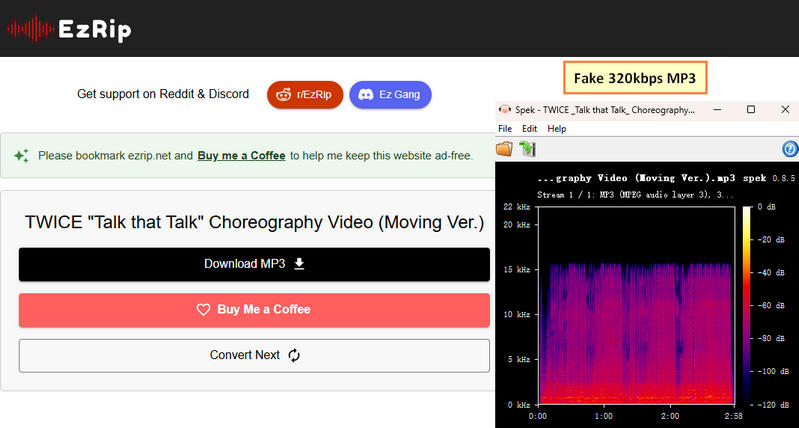
We put EzMP3 to the test, evaluating its features, ease of use, pros and cons, and real‑world performance. Check out our full review for this MP3 download tool and more powerful alternatives: EzRip Review & Top Alternatives
Part 3: Top 3 Online Spotify to MP3 Download Sites
When thinking of the most popular music streaming services, Spotify is often the first name that comes up. Unsurprisingly, many users look for ways to download Spotify tracks as MP3 files. While countless online tools promise to do this, we've tested the options and curated a shortlist of reliable converters that actually work.
| Tool | Ads-free | Batch Download | Bitrate | Metadata | Support Spotify Audiobooks and Podcasts |
|---|---|---|---|---|---|
| Spotifymate | ✅, but redirects | ❌ | 320kbps | ✅ | ❌ |
| Spotidown | ✅, but redirects | ❌ | 320kbps | ✅ | ❌ |
| Spowload | ✅ | ❌ | Fake 320kbps | ❌ | ❌ |
#1 Spotifymate - Free Online Spotify Downloader
Spotifymate is one of the free online Spotify downloaders. Users can download Spotify music in MP3 format by simply copying Spotify songs or albums without the need for an account. Spotifymate is completely free to use and there is no limit to the number of downloads. Although Spotifymate recognizes album URLs, it does require a subscription to download entire albums in bulk.
Step 1 First, you can copy the URL of the Spotify tracks or albums. Then, please open Spotifymate on your browser.
Step 2 Then you can paste the copied URL into the search box. Then Spotifymate will automatically load the cover of the song.
Step 3 Click "Download Mp3", and Spotifymate will automatically download Spotify music to your devices.

We conducted a detailed hands-on test covering audio quality, download speed, and metadata support. For the full results, see our in-depth comparison guide: SpotifyMate Review & Alternatives to SpotifyMate
#2 Spotidown - Spotify MP3 Playlist Downloader
Spotidown allows users to download high quality 320 kbps MP3 songs from Spotify. Simply copy the URL of a song, album or Spotify playlist, paste it into the Spotidown website and Spotidown will automatically identify the songs.
Step 1 Open Spotidown in your browser. Find the desired track, album or playlist on Spotify and copy its URL.
Step 2 Paste it into the search box and click "Download".
Step 3 If you download a single track, just click "Download Mp3"; if you want to download an entire album, you will have to download the tracks one by one.

Hands-on Test Results
[Last Updated: June 2026] During our hands‑on test of this free MP3 download site, the page itself was clean and free of any ads. However, we did notice that the site triggered several redirects during the download process, which was a bit annoying. On top of that, once the files were downloaded, we found that the website had added its own name to each file title. There is also no way to batch download multiple tracks at once. Overall, the site is easy on the eyes, but the redirects and file-naming quirks are definite drawbacks.
#3 Spowload - Free Spotify MP3 Download Site
Spowload is dedicated to providing free MP3 song download services. As an online tool, you can easily access this free online Spotify downloader on any device. It supports identifying Spotify songs, albums, and playlists, and allows you to save Spotify music as local files.
Step 1 Copy the URL of the Spotify songs, albums, and playlists you want to download. Access the Spowload website via your browser. Paste the URL into the search box and click "Start".
Step 2 Click "Convert" > "Download" and Spowload will start loading the song. After loading, click "Download" again. Then you have successfully downloaded free MP3 songs.

Hands-on Test Results
[Last Updated: June 2026] In this test of a Spotify to MP3 downloader, we found that although there were no ads on the page, buttons and prompts asking users to donate appeared frequently. This affected the user experience to some extent. However, this is also a way for the website to make a living. When parsing content, it handles playlist and album links, but manual downloading is required for each track. Batch downloading is not supported. Although the downloaded MP3 files are displayed as 320kbps, the actual download speed is far below that level. Furthermore, the downloaded files lack metadata and album art.
📕 Also read: Other Free Online Spotify Downloader
Part 4: Top 3 Free Apple Music to MP3 Downloaders
If your music journey doesn't revolve around YouTube or Spotify, and you're all-in on Apple devices, chances are Apple Music is your service of choice. However, downloading music from Apple Music as MP3 files isn't built-in; it requires external tools. We've tested and compiled a list of practical converters that can help. Explore the viable options below and pick the tool that matches your requirements.
| Tool | Batch Download | Bitrate | Ads-free | Metadat Retained |
|---|---|---|---|---|
| AAPLmusicDownloader | ✅, but for Premium users | 320kbps | ✅ | ✅ |
| APLMate | ❌ | 320kbps | ❌ | ✅ |
| Apple Music Downloader | ❌ | 130kbps | ✅ | ❌ |
#1 AAPLmusicDownloader - Simple Apple Music MP3 Download Site
AAPLmusicDownloader is one of the free MP3 download sites for Apple Music songs. Here, you can download Apple Music tracks, albums, and playlists to MP3/M4A formats. Users can download music with a quality of up to 320 kbps without paying.
Step 1 Open the Apple Music app or web player, find the Apple Music track, album, or playlist, and copy its URL.
Step 2 Paste the URL into the input field on AAPLmusicDownloader. And click "Download".
Step 3 Click "Generate Download Link" and select the download format and audio quality.
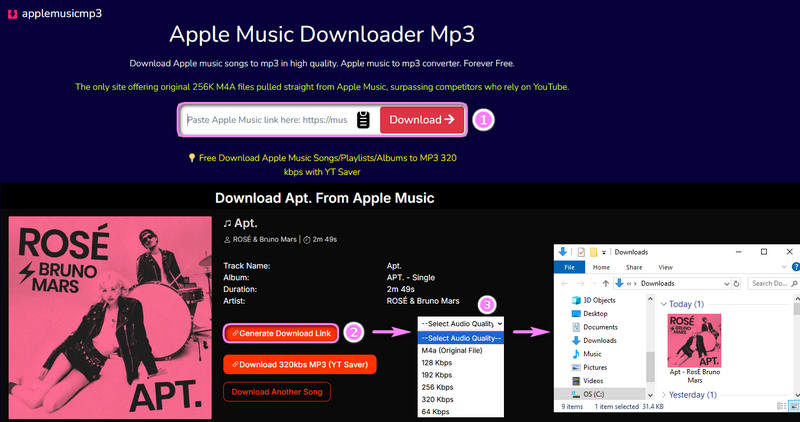
Hands-on Test Results
[Last Updated: June 2026] Based on my testing of this Apple Music to MP3 site, there were no obvious pop‑up ads or redirects during use. The overall user experience was quite smooth. To keep the free page running, the website includes ads for some desktop tools. You can decide whether to download and use them as needed. It parses links to single tracks, non‑private playlists, and albums. However, free users can only download the first two tracks from any multi‑track playlist or album. There is no batch download function for free users. All of these features require payment. Downloaded files retain ID3 tags and album art, and the audio quality reaches the expected 320kbps. This is a good, safe tool, but the free tier is fairly limited.
#2 APLMate - Online Apple Music Converter
APLMate is also one of the free MP3 download sites that supports Apple Music songs, albums, and playlists. It's free to use, but with ads. You can download high-quality Apple Music in MP3 format and listen to it offline. To download the Apple Music tracks, you will need to copy and paste the links from Apple Music.
Step 1 Paste the shared URL into the input box of the APLMate, then tap on "Download".
Step 2 Wait for the songs to load. And click "Download Mp3" to download Apple Music to MP3.
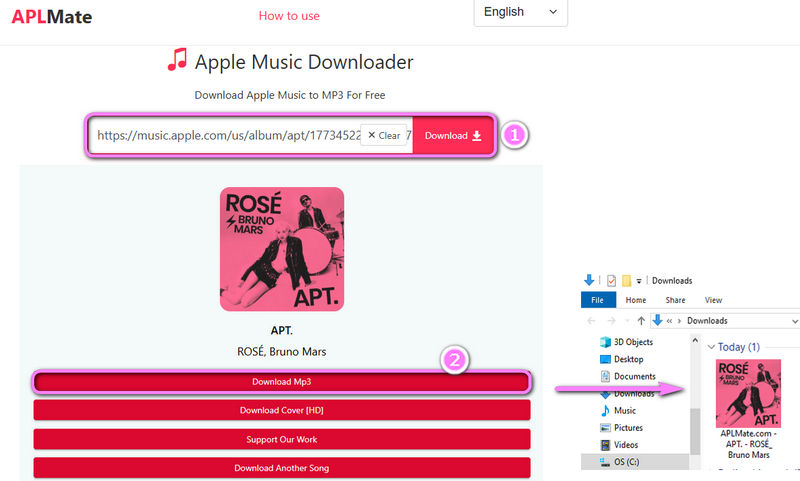
Hands-on Test Results
[Last Updated: June 2026] During the test of this MP3 download site, we encountered numerous redirects and rather prominent ads. Some ads even occupied a large portion of the page, which posed a high risk of accidental clicks, leading you to unsafe websites where dangerous files might be downloaded. As for the program itself, it can parse playlist and album links, but it lacks batch download functionality. While it can download true 320kbps MP3s, it fails to retain basic ID3 tags and album art. Furthermore, the downloaded file titles contain website extensions. Overall, this is a fairly average tool. It works, but it has some clear drawbacks.
#3 Apple Music Downloader - Free Apple Music to MP3 Converter
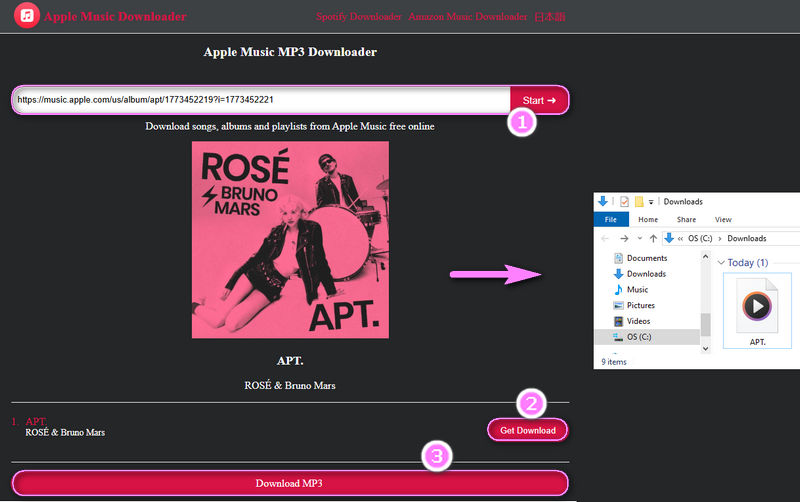
Apple Music Downloader is a website dedicated to converting and downloading Apple Music to MP3. Apple Music Downloader supports parsing Apple Music songs, albums, and playlists. But it cannot batch download. Users need to manually download each song in the album. Let's see how to use Apple Music Downloader to download Apple Music to MP3.
Step 1 To use Apple Music Downloader, open it in your browser. Then, please paste the URLs of Apple Music.
Step 2 Click "Start", and the website will load these songs. When it's over, please click "Get Download" to download Apple Music.
Hands-on Test Results
[Last Updated: June 2026] During testing, we found the website to be completely free and ad-free. Therefore, in terms of sound quality, Apple Music Downloader is slightly inferior to other free MP3 download websites. The downloaded MP3 files have a bitrate of only 130kbps. Furthermore, the downloaded files do not contain ID3 tags or album art, and song titles include only the name, not the artist. This tool is only suitable for single, emergency use; long-term use may cause some inconvenience.
📕 Also read: Other Free Apple Music to MP3 Converters
Part 5: FAQs About Free MP3 Download Sites
Q1: Is downloading free MP3 songs safe?
A: Downloading free MP3s from reputable websites is generally safe, but some websites may display intrusive ads, pop-ups, or contain harmful files. To ensure safety, avoid clicking on suspicious links, keep your antivirus software updated, and only use trusted sources.
Q2: Which site is best for high-quality 320kbps MP3 download?
A: Some free MP3 download websites claim to offer up to 320kbps, including platforms mentioned in this article. However, actual sound quality depends on the downloaded file. Some websites re-encode lower quality audio; if you are very particular about sound quality, use a professional tool like TunePat Music One.
Q3: Can I download entire playlists from free MP3 download sites?
A: Generally, no. Most online websites only support downloading tracks, and the few that support playlists or albums usually require a subscription. Instead, we recommend using TunePat Music One. As a professional downloader, it can handle multiple playlists at once.
Q4: How can I download legally free music?
A: You can download legally free music from websites that provide royalty-free tracks or music released under open licenses. Before downloading, always check the website's terms of use and copyright policies to ensure the music can be legally downloaded and used.
Conclusion
In this guide, we've compared a wide range of MP3 download platforms, highlighting their key features, limitations, and real-world performance.
If you're looking for free MP3 music download sites for cell phones, online tools can be a convenient option for occasional downloads. For users who prioritize audio quality, it's important to note that while several sites featured in this article claim to offer 320kbps MP3 downloads, the actual audio quality can vary significantly between services. If you need stable performance, batch downloads, complete ID3 tags, and genuine high-quality audio, TunePat Music One remains the most comprehensive solution.
Dereck Martin
Staff Writer