
As one of the Pandora fans, are you considering converting Pandora Music tracks to MP3 formats? Once the songs from Pandora Music are saved in common MP3 formats, you will never lose them.
Pandora Music was founded in 2000 initially intending on a music recommendation. Soon, over the next year, the founders felt that something was wrong. To make it right, they moved toward investment in music streaming. Thanks to their unique vision and keen insight, Pandora has become more and more popular since then. In no time, it's well-known by people around the world. That's a brief story of this old and famous streaming music service.
Pandora has gathered a large number of loyal users owing to its precise music streaming service. However, as one of the Pandora fans, are you considering converting Pandora Music tracks to MP3 formats? Once the songs from Pandora Music are saved in common MP3 formats, you will never lose them. That's why you need to focus on the discussion in this article regarding how to download and convert songs, albums, playlists, and podcasts from Pandora Music to FLAC formats with lossless audio quality.
Pandora offers several subscription options, including Free, Plus, and Premium plans. The main differences between these plans are related to ads, on-demand playback, skips, and offline listening features.
1. Pandora Free:
You can access Pandora's music and podcast library for free with ads. However, playback features are limited, and offline listening is not available.
2. Pandora Plus:
Pandora Plus provides an ad-free listening experience for personalized stations, along with additional features such as more skips and offline listening for selected content.
3. Pandora Premium:
Pandora Premium unlocks full on-demand access, allowing users to search, play, create playlists, and download music for offline listening within the Pandora app.
However, Pandora's offline downloads are only available inside the Pandora app and cannot be exported as local audio files. If you want to save Pandora songs permanently or enjoy them on other devices, converting Pandora Music to FLAC is a more flexible solution.
Pandora Music Free users do not have permission to download songs. If you are a free user, you'd better get a Pandora Premium plan to unlock unlimited offline listening. And you can only get access to all content in the Pandora Music library on an ad-supported basis. Only Pandora Premium supports ad-free listening.
However, even if you become a Pandora Premium user to be able to download offline, and ad-free listening, it does not solve all problems. When you need to listen to songs out of Pandora service, transfer Pandora songs to other devices, share your favorite playlists with family and friends, or import Pandora songs to various DJ software, you will find that just a Pandora Premium plan is not enough. And you can't solve these problems through any official solutions.
To get a thorough solution, TunePat Pandora Music Converter was born. It's designed for all types of Pandora Music subscriptions, even the free users, to convert the songs from Pandora Music to MP3, AAC, FLAC, WAV, AIFF, and ALAC formats. This is the final plan for you to keep Pandora albums or playlists without time limitations.
Why should I convert Pandora Music to a FLAC format? FLAC (Free Lossless Audio Codec) is a musical file format that offers bit-perfect copies of CDs but at half the size. It is compatible with many phones (including the iPhone -- with an app), portable music players (PMP) including the PonoPlayer, and hi-fi components. FLAC files are available for roughly the same price as the equivalent MP3 in online stores and sound much better. With TunePat Pandora Music Converter, we can easily download and convert songs, albums, playlists, and podcasts from Pandora Music to FLAC formats. And this program will amaze you with a batch download, 10x faster speed conversion, and lossless audio quality output. It's time to check the detailed steps. Let's move to the next step. Download and install this TunePat Pandora Music Converter and start. It deserves a try.
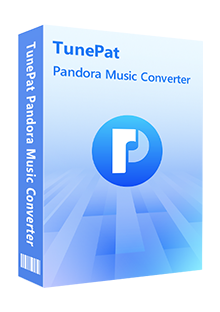
TunePat Pandora Music Converter
 Download Songs, Albums, and Playlists from Pandora Music at a 10X faster speed.Convert Pandora Music tracks to MP3, AAC, WAV, FLAC, AIFF, or ALAC formats.Keep ID3 tags and preserve original audio quality.Pandora Free &Plus &Premium accounts are feasible.No need to install Pandora Music app.
Follow the detailed steps below to get a bunch of downloads at one time. After downloading Pandora Music tracks to common FLAC formats, we will get rid of all restrictions.
Step 1 Run TunePat Pandora Music Converter on Windows or Mac
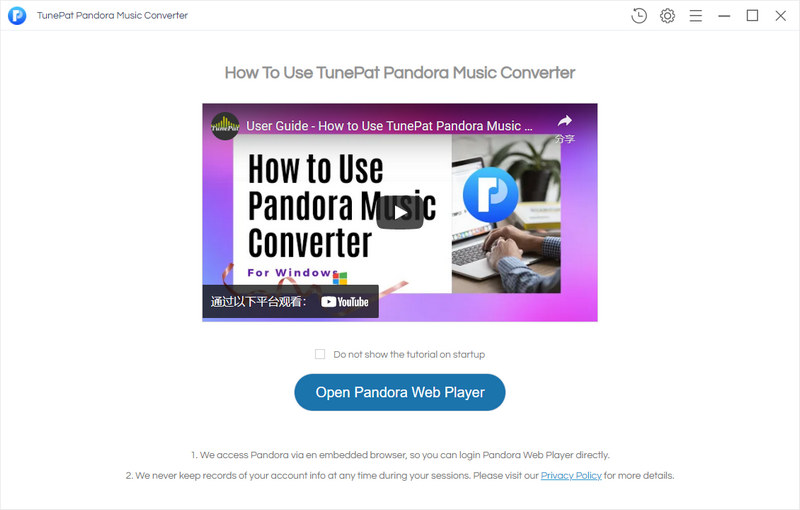
After the installation of the TunePat Pandora Music Converter on the corresponding operating system, you just need to launch this program. There is an "Open Pandora Music Web Player" button on the start-up interface. Click the button to open the built-in Pandora Music Web Player. You don't need to install the Pandora Music app additionally. Log in to Pandora Music with Pandora Music Free, Plus, or Premium. You are permitted to get access to the Pandora Music library after logging in.
Step 2 Customize the Output Parameters
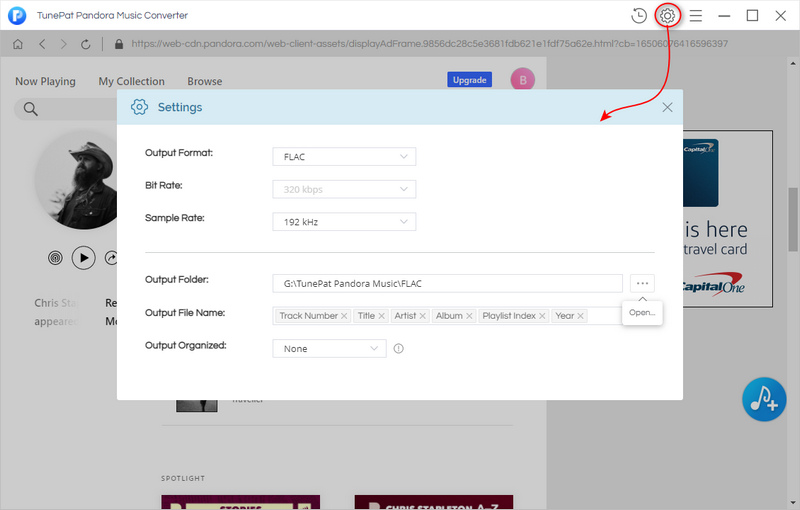
In the upper right, click the "Settings" button. On the pop-up setting window, you are enabled to change the output format, output quality, output folder, and other options accordingly. When you demand an original order of a playlist after the conversion, you should select "Playlist Index" in the Output File Name setting and "None" in the Output Organized setting. To download lossless FLAC Pandora songs, set "FLAC" in the Output Format and "192kHz" in the Sample Rate.
Step 3 Download Pandora Music Tracks to Lossless FLAC Songs
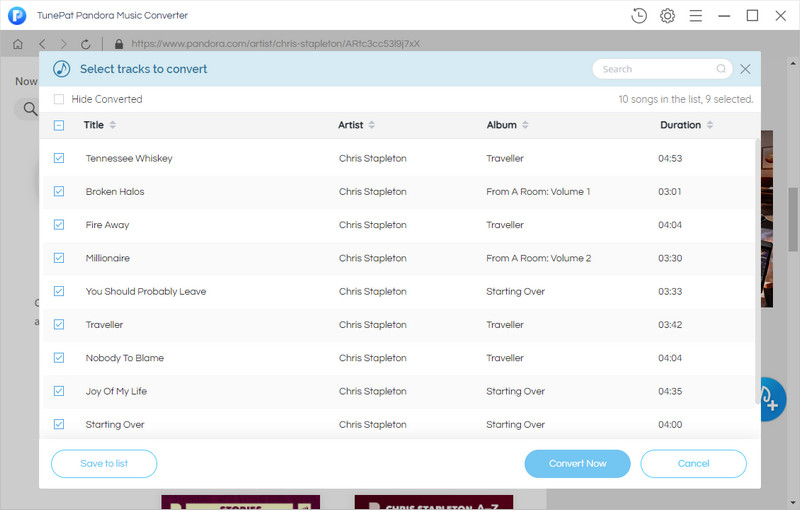
When you want to play Pandora music via this built-in web player directly, you are allowed. To download songs, open any playlist or album, then click the "Add to List" button that hovers in the lower right. Soon after, all songs from the opened playlist or album are loaded. You can tick off the songs you desired.
1. Click the Convert Now button to start the conversion of the selected songs immediately.
2. Click the "Add More" button to add the selected songs to a "task list". Afterward, you can repeat the same steps to add songs from other preferred playlists. Then tap on the "task list" button in the upper right to download all added songs at once.
Step 4 Make Full Use of the Downloaded Pandora Music Tracks
After a while, the selected Pandora Music tracks are converted to FLAC songs without quality loss. Have you seen the effectiveness and usefulness of TunePat? If you are still curious about what these downloaded FLAC Pandora Music tracks can do, here is a list for you:
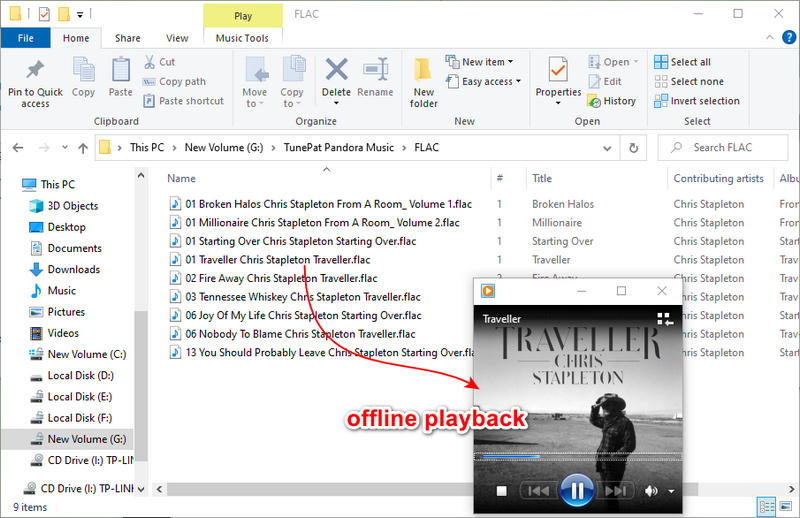
Going through all steps in this article, you can simply download and convert all preferred Pandora Music tracks to lossless FLAC formats. Since all types of Pandora Music plans are feasible, why not have a free trial right now? TunePat Pandora Music Converter is reliable all the time. To save your time and avoid more expenses, you should bring it into action right now.


