ReVanced Spotify: Unlocking Premium Features for Free
 By Olivia Anderson
Spotify Tips
Updated on 9/18/2026
By Olivia Anderson
Spotify Tips
Updated on 9/18/2026
Spotify is one of the leading music streaming services globally. It offers a vast library of music and podcasts, but many desirable features, such as offline listening and ad-free streaming, are locked behind a subscription. And ReVanced Spotify is playing a key role in this. But what exactly is ReVanced Spotify, and why has it gained such traction among music enthusiasts? What features does ReVanced Spotify have, and what can you do if it doesn't work? Are there any alternatives? This article has everything you need to know. Read on!
Part 1: Introduction to ReVanced Spotify
1.1 What is ReVanced Spotify?
In the ever-evolving world of music streaming, ReVanced Spotify has emerged as a popular alternative for users seeking premium features without the associated costs. ReVanced Spotify is a modified version of the official Spotify app. It's essentially a "modded" app that unlocks many of the premium features typically reserved for paying subscribers. This means you can potentially enjoy ad-free listening, unlimited skips, and higher audio quality without shelling out for a monthly subscription.
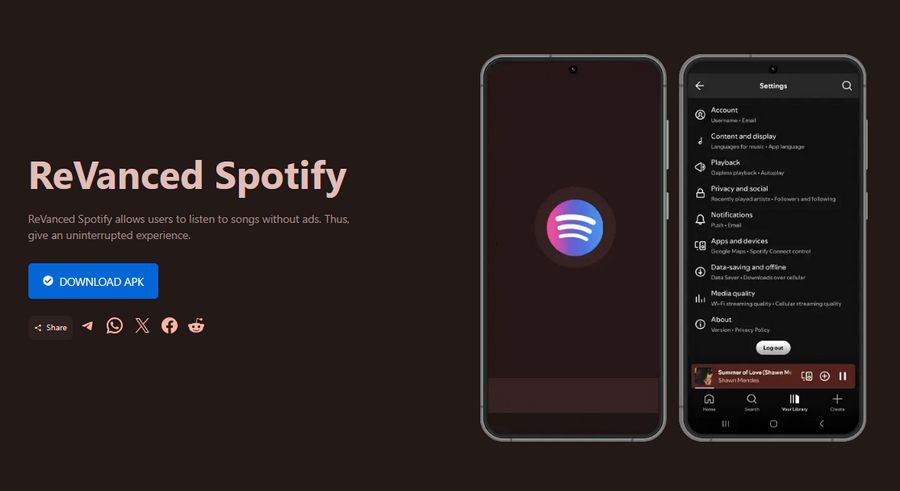
Please note that modified versions of the Spotify app downloaded from untrusted websites may pose security risks. If you are looking for a safe and green tool to get Spotify music, the following Spotify Converter is the best alternative (Available for Android, Windows, and macOS.):
1.2 Key Features of ReVanced Spotify
Let's dive into some of the key features that make ReVanced Spotify so appealing to users:
1. User interface and navigation
Once you've successfully installed ReVanced Spotify, you'll find that the user interface is largely similar to the official app. This intentional familiarity allows users to jump right in without a learning curve. You'll still have your Home, Search, and Library tabs, and navigation should feel intuitive if you're already a Spotify user.
However, you might notice some subtle differences. For example, there might be additional options in the settings menu related to the modded features.
2. Ad-free listening
In addition to helping users discover new music like the Spotify official app, one of the biggest draws of ReVanced Spotify is the promise of ad-free listening. If you've ever had your favorite playlist interrupted by a sudden ad break, you know how jarring it can be.
3. Unlimited skips
With the free version of Spotify, users are limited in how many times they can skip tracks. ReVanced Spotify removes this restriction, allowing you to browse through playlists freely.
4. High-quality audio streaming
ReVanced Spotify often unlocks the ability to stream music at higher bit rates, potentially offering better audio quality (get Spotify in 320 kbps). For audiophiles or anyone with a good set of headphones, this is a piece of good news.
5. Offline playback
One of Spotify Premium's most valuable features is the ability to download tracks for offline listening. ReVanced Spotify typically includes this functionality, allowing users to save their favorite songs and playlists for those times when an internet connection isn't available. But if you wish to output real audio files from Spotify, you need these free online Spotify downloaders for help.
Part 2: Step-by-Step Installation Guide of ReVanced Spotify
2.1 System requirements
Before you dive into installing ReVanced Spotify, it's crucial to ensure your device meets the requirements. Generally, ReVanced Spotify will run on most Android devices, but here are some basic guidelines:
It's worth noting that ReVanced Spotify is typically only available for Android devices. If you're an iOS user, you're out of luck, the closed nature of Apple's ecosystem makes it much more difficult to install modded apps. You can consider using the best alternative, TunePat Spotify Converter. After downloading your favorite Spotify songs, you can transfer them to any device, including your iPhone, iPad, MP3 player, etc.
2.2 How to Install ReVanced Spotify
Installing ReVanced Spotify isn't as straightforward as downloading an app from the Google Play Store. Here's a detailed guide to the process:
Step 1 Download ReVanced Manager
ReVanced Manager is a tool necessary for patching the Spotify APK. You can find it through various online sources. Make sure you download from a reliable site.
Step 2 Download Spotify APK
Obtain the latest version of Spotify APK from a reliable source. Ensure it is the same version that ReVanced patches support.
Next, open your File Manager and navigate to the Downloads folder. Locate the downloaded APK file. Tap on the Install option and wait (takes ~1-2 minutes).
Step 3 Install ReVanced Manager
Once downloaded, install the ReVanced Manager APK on your device. If you have not installed apps from unknown sources before, you will need to enable this option in your settings.
Step 4 Patch Spotify APK
Open ReVanced Manager, select the downloaded Spotify APK and apply the necessary patches. The software will guide you through the process step by step.
Step 5 Install Patched Spotify APK
After patching, install the modified Spotify APK on your device.
⚠ Important Notes: While ReVanced Spotify can be useful, it's distributed as an APK, downloading it from unofficial sources may expose your device to malware or spyware. If security is important to you, consider safe alternatives like this Spotify Downloader APK that developed by reputable team. Or if you are a new Spotify user, you can get Spotify Premium for free.
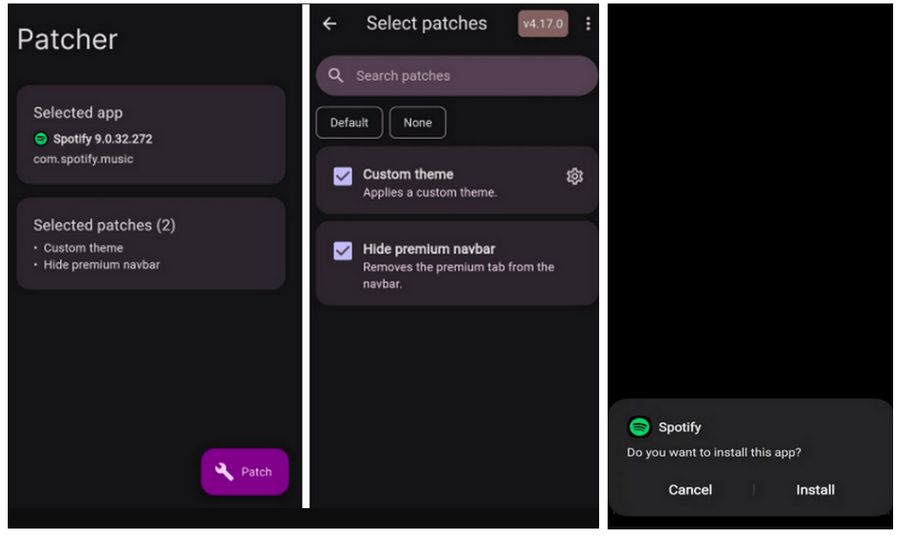
Now, after a successful installation, you can open the patched Spotify app and enjoy the premium features without subscribing.
2.3 ReVanced Spotify vs. Spotify Premium
While ReVanced Spotify aims to replicate many of Spotify Premium's features, it's not an exact match. Here's a comparison of key features:
| Feature | Spotify Free | Spotify Premium | ReVanced Spotify |
|---|---|---|---|
| Ad-free listening | ❌ | ✅ | ✅ |
| Offline playback | ❌ | ✅ | ✅ |
| Unlimited skips | ❌ | ✅ | ✅ |
| High-quality audio | ❌ | ✅ | ✅ |
| Spotify Connect | Limited | Full | Varies |
| Podcast support | ✅ | ✅ | ✅ |
| Regular updates | ✅ | ✅ | Delayed |
| Export Music (MP3) | ❌ | ❌ | ❌ |
As you can see, ReVanced Spotify offers many of the same benefits as Spotify Premium. However, there are some areas where it may fall short or where functionality can vary depending on the specific version you're using. If you want to find a more stable option to enjoy Spotify songs free or wish to get Spotify songs in MP3 format, click to browse this best ReVanced Spotify alternative.
Part 3: How to Fix ReVanced Spotify Not Working?
Even with a step-by-step guide, you might encounter some hiccups during the installation. Here are the common issues and how to address them:
3.1. "App not installed" error:
If you have the official Spotify app installed. Try uninstalling it before installing ReVanced Spotify.
3.2. Patching fails:
Ensure you have a stable internet connection and enough storage space. If the problem persists, try using a different version of the Spotify APK.
3.3. Login issues:
Some users report problems logging in after installation. Clearing the app data and cache can often resolve this.
Consider the following alternatives if you've tried everything and ReVanced Spotify still isn't working for you. For example, subscribing to Spotify Premium. If you have a limited budget, you can also consider other modded Spotify versions, or use the safer and more effective TunePat Spotify Converter, which will be introduced in detail in the following sections.
Part 4: Alternatives to ReVanced Spotify
4.1 TunePat Spotify Converter
When choosing the best alternative to ReVanced Spotify, prioritizing security and stability will naturally lead you to the secure and efficient TunePat Spotify Converter. Why is TunePat Spotify Converter the ultimate ReVanced Spotify alternative? As a stable, high-speed, and feature-rich Spotify audio converter, TunePat not only safeguards user privacy through regular updates and maintenance but also ensures rapid batch conversion of Spotify songs while preserving up to Lossless audio quality.
It supports exporting a wide range of Spotify content, including albums, playlists, podcasts, audiobooks, and radio. The converted audio files can be played offline on any device or media player outside the Spotify app. Users no longer need to endure ads from free accounts or worry about losing playlists due to expired Premium subscriptions. Below are the detailed operation steps.
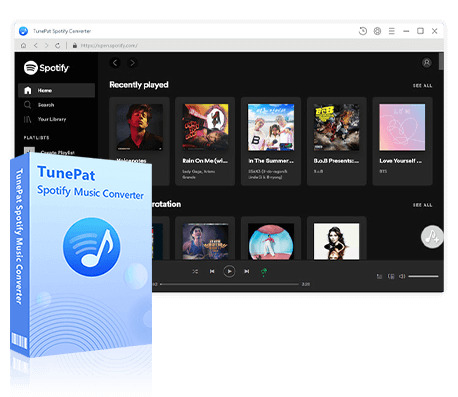
TunePat Spotify Converter
TunePat Spotify Converter enables users to convert and get Spotify songs, albums, playlists, podcasts, radio, and audiobooks from the Spotify app or web player and then save them permanently.
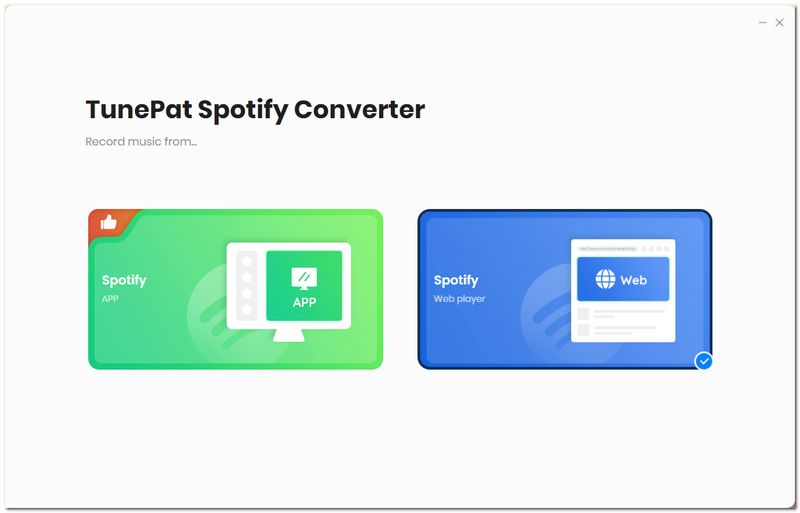
Step 1 Open TunePat Spotify Converter. On the main screen, switch between the "Spotify App" and the "Spotify web player". If you choose the Spotify web player, you can use the embedded player or open it in a separate window. Then, sign in to your Spotify account as prompted.
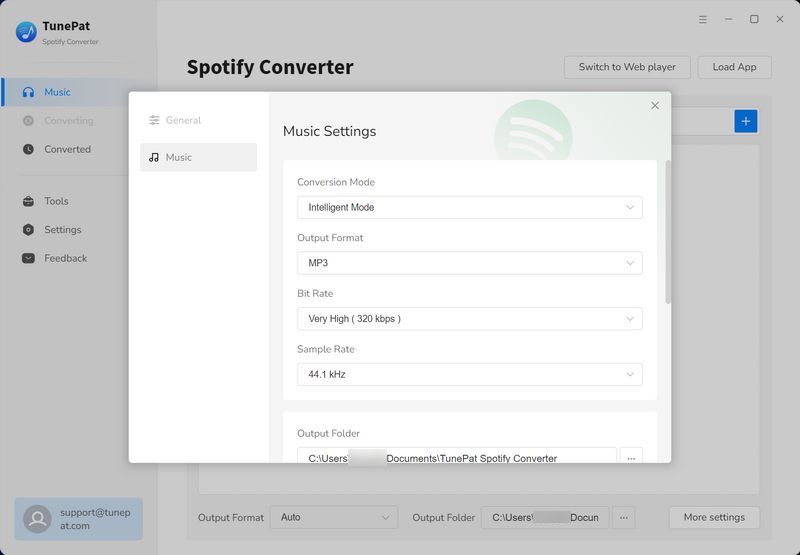
Step 2 Click the "Settings" button on the left menu bar, and then customize the conversion parameters. You can change the conversion mode, output format (MP3, AAC, FLAC, WAV, AIFF, ALAC), bit rate, sample rate, output folder, output file name, etc. Be sure to choose a format that's compatible with the devices where you'll listen.
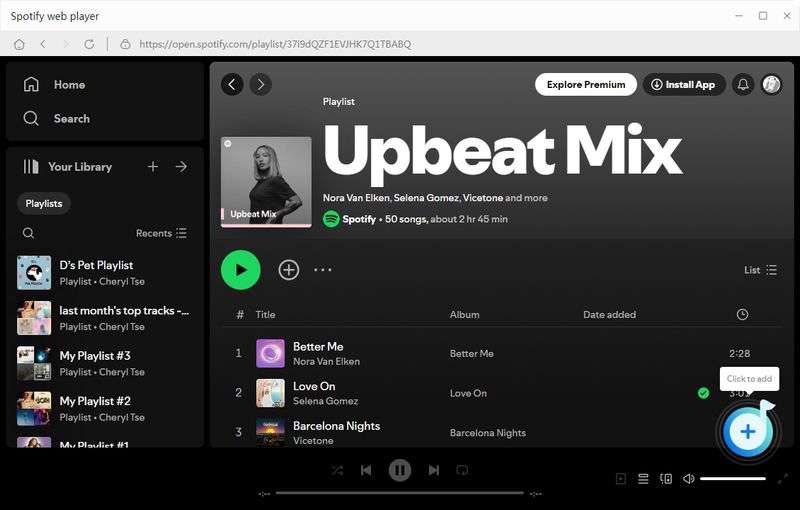
Step 3 Navigate back to your Spotify library and open the track, album, or playlist you want to convert. Click the "+" button at the bottom-right corner to let TunePat parse the selection.
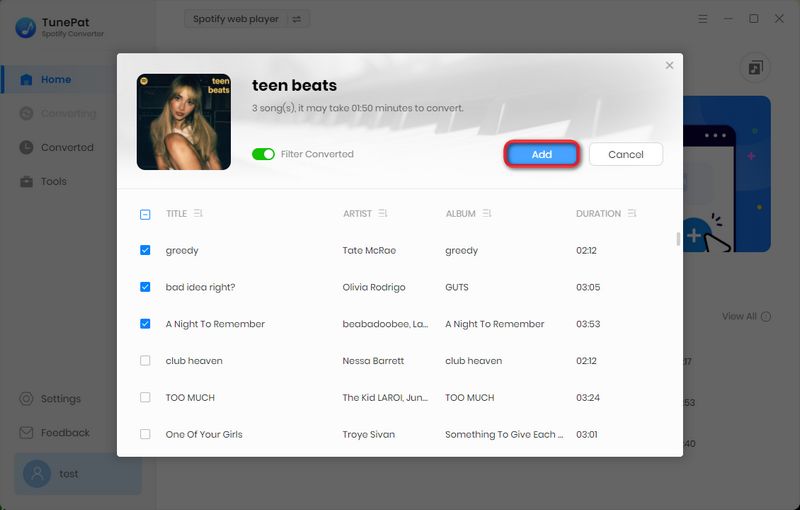
Step 4 After parsing, a pop-up will display all the detected Spotify songs (all pre-checked). Uncheck any tracks you don't wish to include, then hit "Add" to queue up your chosen files.
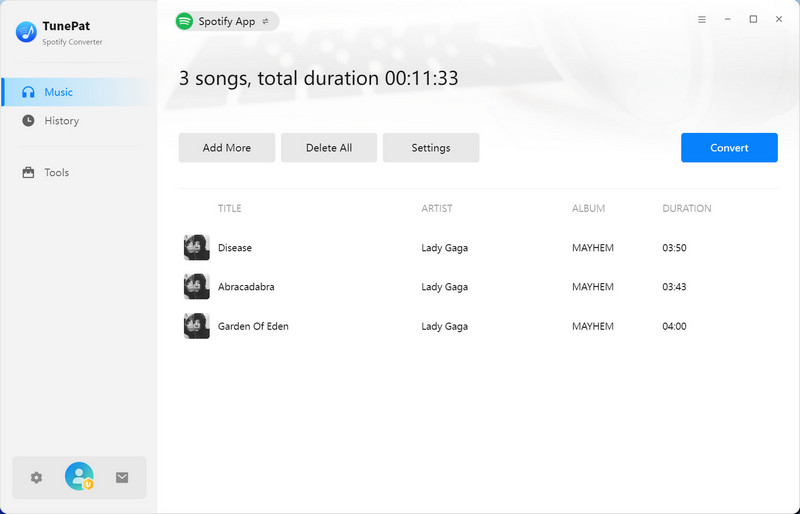
Step 5 If you need to include more Spotify music tracks, use "Add More"; otherwise, click "Convert". The conversion will begin immediately. Once finished, you can view and manage all past conversions in the "History" tab.
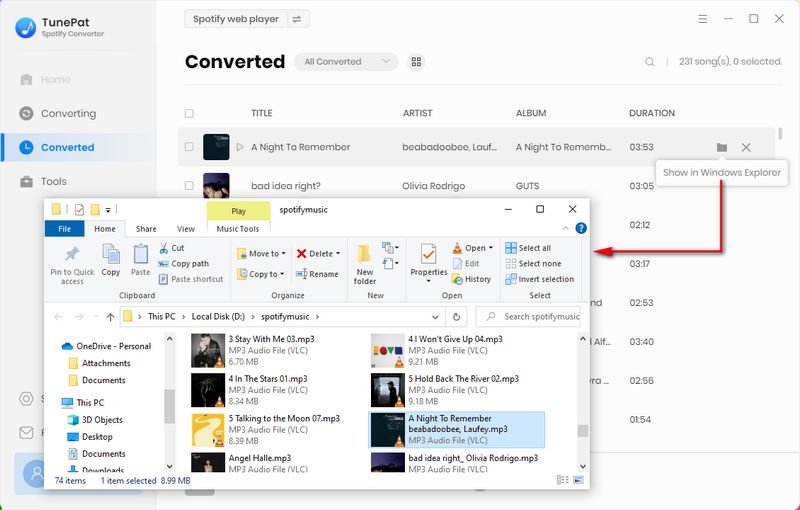
4.2 Safe Spotify Downloader APK
For Android users, no need to worry. While we've just introduced a ReVanced Spotify alternative for desktop, now we'll cover a Spotify Downloader APK tailored for Android devices. Just like its desktop counterpart, this APK is safe, ad-free, and developed and maintained by a professional team. It enables users to quickly and efficiently export Spotify playlists, albums, and more in batches for permanent storage on their phones. Here are the detailed steps to use it:
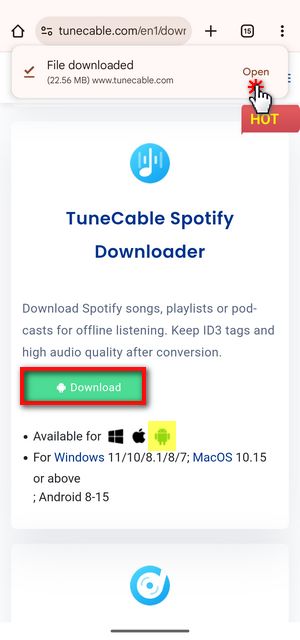
Step 1 To get started with TuneCable Spotify Downloader APK for Android, begin by tapping the download button to obtain the installation file.
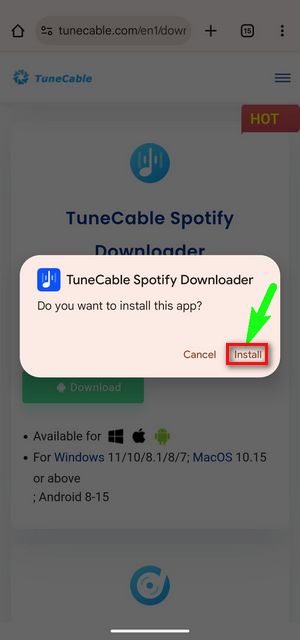
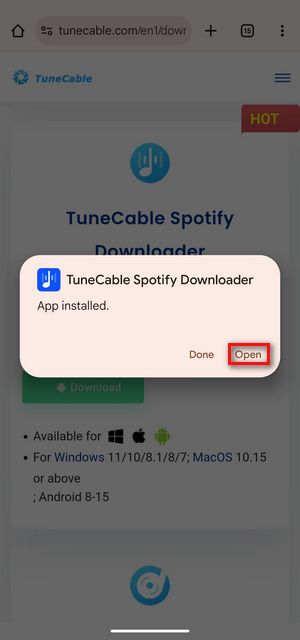
Once the download is complete, tap "Open" in the top-right corner. When prompted with "Do you want to install this app?", select "Install". If a security scan message appears, choose "Install without scanning" to continue. After the app is installed, tap "Open" to launch it. The first time you use the app, you may be asked to allow notifications, simply tap "Allow" to proceed.
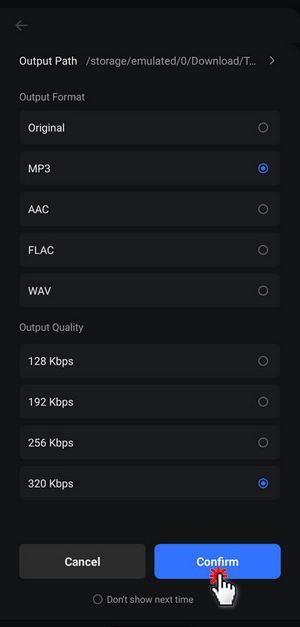
Step 2 After launching the app, sign in to your Spotify account by tapping "Login Spotify" from the top menu. Then, navigate to the "Profile" tab at the bottom and open "Download Settings" to customize your preferences. Here, you can adjust the output format, output quality, and the storage path.
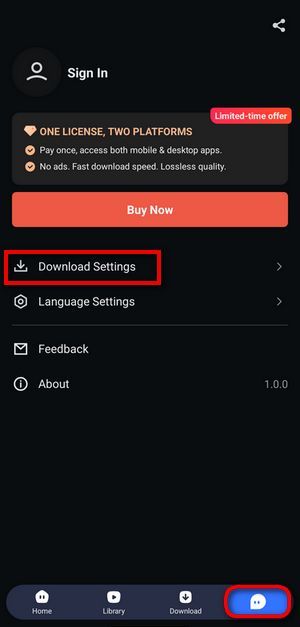
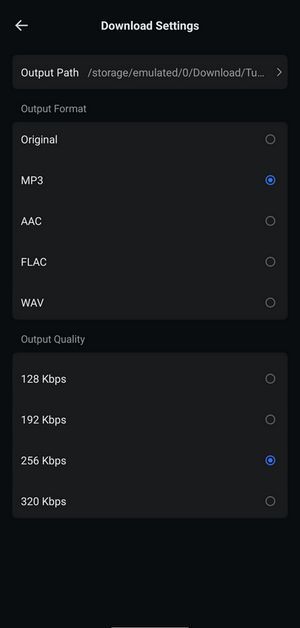
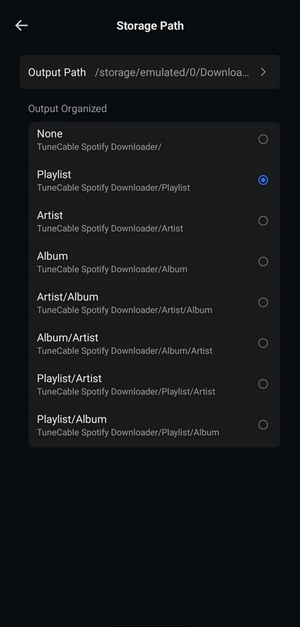
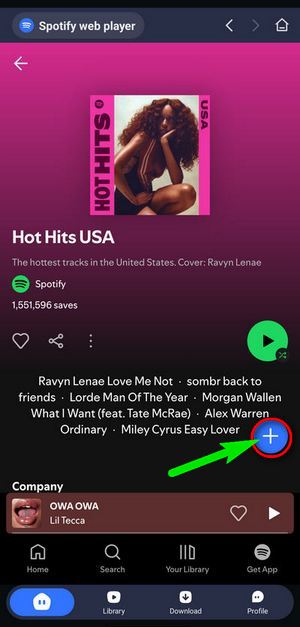
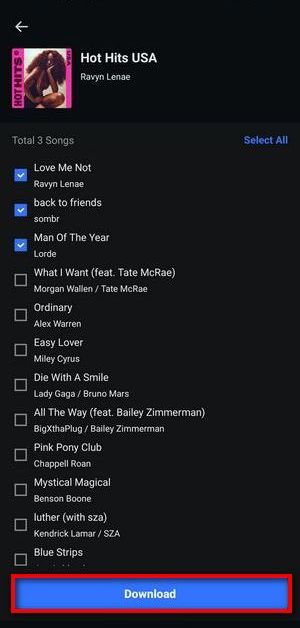
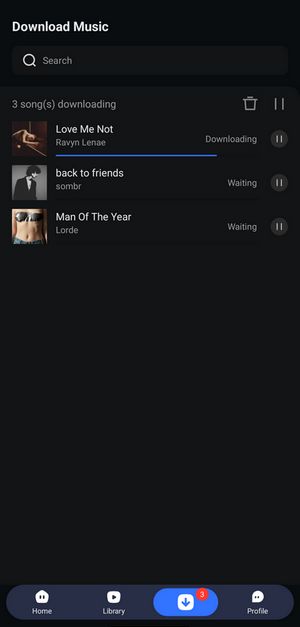
Step 3 To download your desired Spotify tracks, go back to the "Home" page and locate your target playlist or album. Tap the blue "+" icon to load the available Spotify tracks, then select the songs you want to save and tap "Download". Before proceeding, make sure your output settings are correctly configured. Once everything is set, tap "Confirm" to begin the download process.
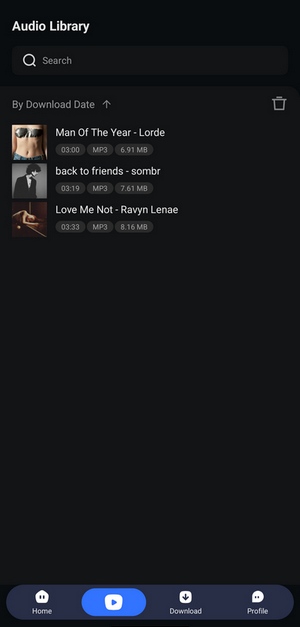
When the download is complete, head to the "Library" tab where you can find and instantly play your saved Spotify music tracks.
4.3 Spotify++
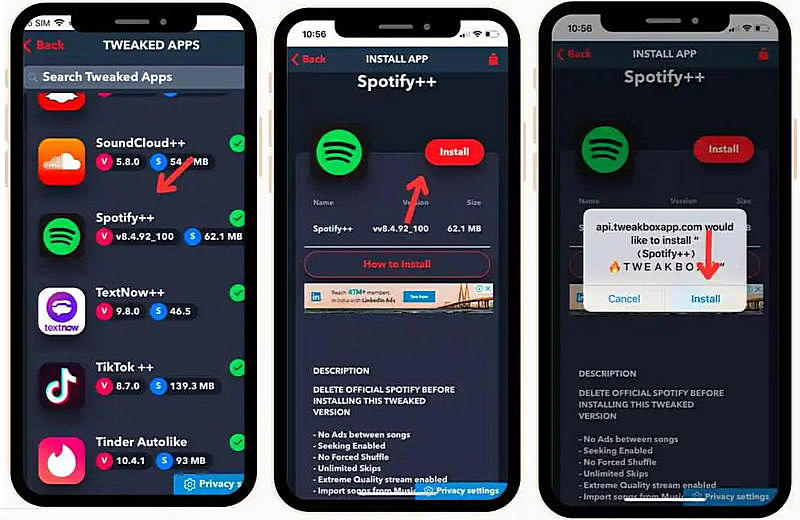
In addition to the above-mentioned Spotify converters, you can also look for other modified Spotify apps besides ReVanced Spotify as alternatives, such as Spotify++. Spotify++ is an unofficial, modified version of the official Spotify mobile app that unlocks features normally reserved for paid Premium subscribers. By sideloading or installing it through third-party app stores (e.g., TweakBox, TopStore, or AppValley), users gain access to Premium features for free.
4.4 xManager
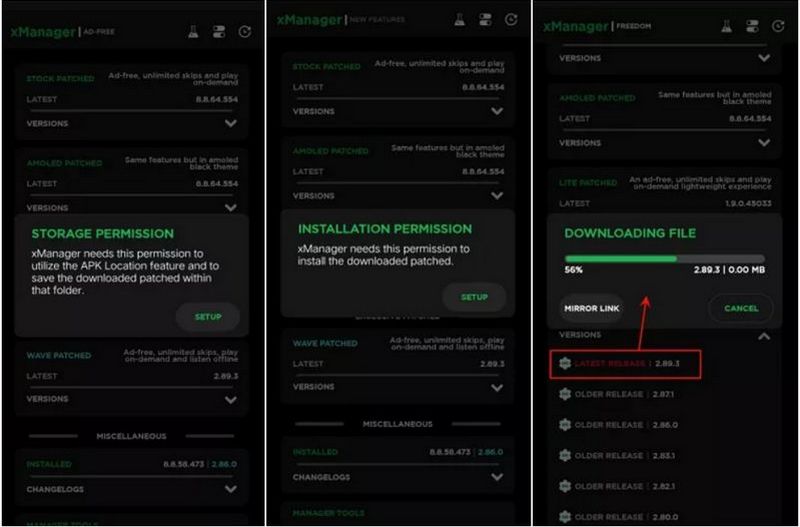
xManager is also one of the most popular ReVanced Spotify alternatives. xManager is an unofficial Android application designed to let users manage, install, and switch between different versions of the Spotify app, including modified builds that unlock premium-only features such as ad-free listening, unlimited skips, background playback, and offline downloads. Unlike straight sideloads of a single patched APK, xManager provides a built-in repository of Spotify versions (both official and modded), so you can choose the one that best fits your device and avoid compatibility issues.
📕 You might also be interested in: Detailed Steps to Download and Use xManager Spotify
4.5 Jojoy Spotify Premium MOD APK
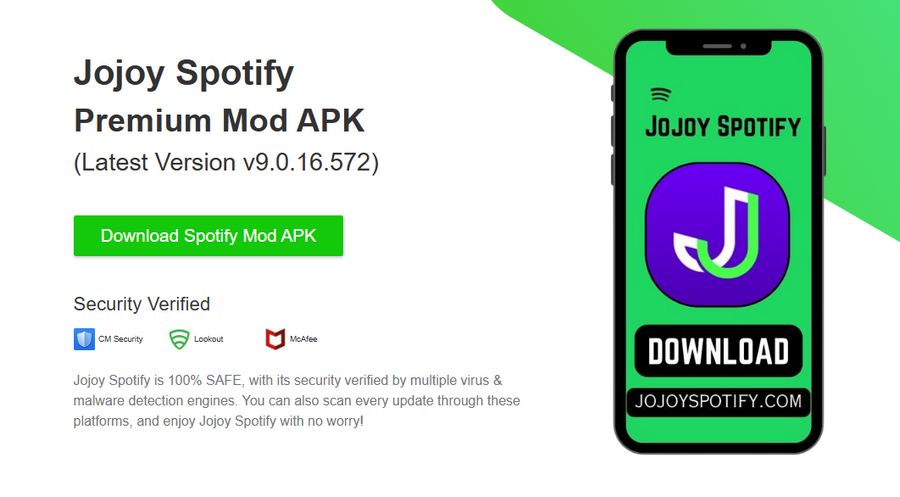
Speaking of ReVanced Spotify, many people will immediately think of Jojoy Spotify Premium MOD APK. Jojoy Spotify Premium MOD APK is an unofficial, modified build of the Spotify Android app, distributed through the Jojoy platform (a third-party app store for modded APKs) that unlocks all paid-only Spotify Premium features at no cost. Instead of installing Spotify from Google Play, users download the Jojoy APK and then choose and install the "Spotify Premium" variant directly within Jojoy. This MOD APK removes ads, enables unlimited skips, allows background play, unlocks offline downloads (with 320 kbps Ogg Vorbis quality), and even restores Spotify Connect support and social sharing feature.
📕 You might also be interested in: How to Get Spotify from Jojoy?
4.6 SpotiFlyer
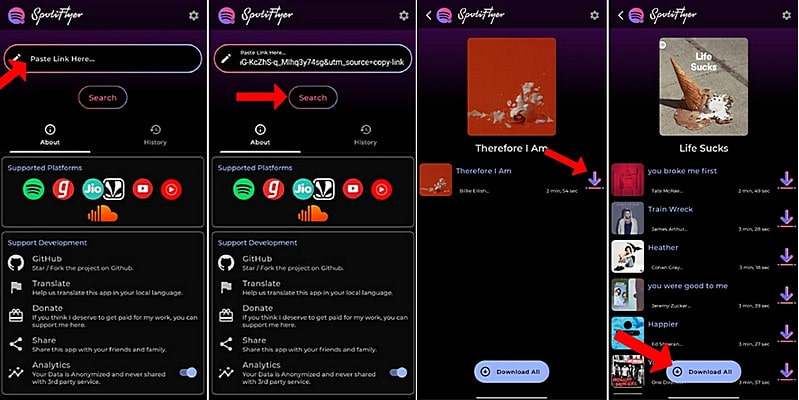
SpotiFlyer is also a viable alternative to the reVanced Spotify. SpotiFlyer is a free, open-source music downloader that lets you grab tracks, albums, playlists (and even podcasts) from a variety of streaming services, most notably Spotify, but also YouTube, YouTube Music, SoundCloud, Gaana, and JioSaavn. It's built in Kotlin Multiplatform and released under the GPL-3.0 license, so anyone can inspect or contribute to its source code.
📕 You might also be interested in: How to Use SpotiFlyer for Free Spotify Downloads?
Part 5: FAQs about ReVanced Spotify
Q1: Is ReVanced Spotify legal and safe to use?
A: No, using ReVanced Spotify or any modified version of Spotify violates the app's terms of service and may be considered copyright infringement. Not only that, the modified version of the Spotify app may also have potential security risks. Please try to choose a safe download source, or switch to the more secure TunePat Spotify Converter.
Q2: Does ReVanced Spotify work on iOS devices?
A: No, ReVanced Spotify is typically only available for Android devices due to iOS's stricter app policies. But you can use TunePat Spotify Converter to bulk download Spotify songs to your iPhone or iPad.
Q3: How often is ReVanced Spotify updated?
A: Updates depend on the developers and can be less frequent than official Spotify updates. You may need to manually check for and install updates.
Q4: Can I use my regular Spotify account with Advanced Spotify?
A: Yes, you can log in with your regular Spotify account, but be aware of the potential risks to your account.
Q5: Will ReVanced Spotify work with my Chromecast or other streaming devices?
A: Casting functionality may be limited or non-functional in modded Spotify apps due to DRM restrictions. To enjoy Spotify on any device you like, TunePat Spotify Converter is the better choice.
Conclusion:
After exploring every aspect of ReVanced Spotify, you now have a clear sense of whether it's right for you. If you're comfortable handling the technical steps of installing and maintaining a modded app, ReVanced Spotify can deliver a near-Premium experience at no extra cost. And whenever it refuses to cooperate, you can follow the troubleshooting tips outlined, or, if all else fails, switch to another modded client such as Spotify++ or xManager.
On the other hand, if long-term stability and reliability are your top priorities but you'd rather avoid a recurring Spotify Premium bill, TunePat Spotify Converter offers the perfect compromise. It lets you export your favorite playlists as MP3 files for permanent offline listening, with no subscription required. So why wait? Download TunePat today and start building your ad-free, forever-accessible music library!

Olivia Anderson
Senior Writer