How to Export Spotify Playlists to MP3 (2026 Guide)
 By Delilah Rene
Spotify Music Tips
Updated on 9/20/2026
By Delilah Rene
Spotify Music Tips
Updated on 9/20/2026
Many music lovers, content creators, and DJs often want to export Spotify playlists to MP3 for offline mixing or video editing. However, since Spotify encodes its music library in the DRM-protected Ogg Vorbis format, you cannot directly save Spotify songs as MP3 on your local drive, even with a Premium subscription.
If you are struggling with this issue, you are not alone. Recently, we received this query from one of our readers:
How can I import my Spotify playlists into Serato DJ? It seems impossible. Can’t I export my playlists from Spotify onto the computer as MP3 files? Can you share the detailed steps?
The good news is that converting Spotify tracks to MP3 is much easier than you might think. Whether you want to use a professional Spotify playlist converter for lossless quality or you are looking for a free Spotify playlist downloader, we've got you covered. In this ultimate guide, we will share the most effective method and review free alternatives with real test data.
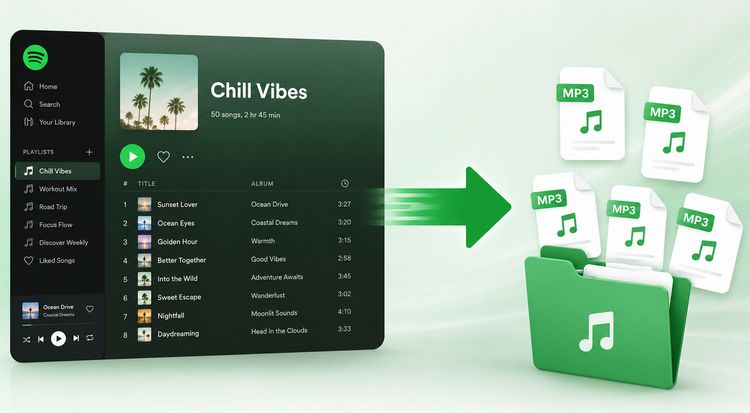
Part 1: Why Do You Need to Convert Spotify Playlists to MP3?
While Spotify is an incredible music streaming service with millions of tracks, it limits how and where you can listen to your music. Many users need to export Spotify playlists to MP3 for various practical reasons:
- For DJ Software: Importing tracks into professional DJ programs like Serato DJ, Virtual DJ, or Rekordbox.
- For Video Editing: Adding favorite songs as background music in CapCut, Premiere Pro, or iMovie.
- For Offline Devices: Playing Spotify music on MP3 players, iPods, Garmin watches, or older car audio systems that don't support the Spotify app.
Part 2: Can You Directly Download Spotify Playlists as MP3?
The short answer is No.
Even if you are a Spotify Premium subscriber and turn on the "Offline Mode", you aren't downloading actual audio files like MP3s. Instead, Spotify downloads encrypted cache files. These files are protected by DRM (Digital Rights Management), meaning:
- They can only be played inside the official Spotify app.
- They will become unplayable if your subscription expires.
- You cannot transfer, edit, or burn them to a CD.
To break these limits and get real MP3 files on your computer, you need a reliable third-party tool. That’s where TunePat Spotify Converter comes in.
Part 3: Best Way to Convert Spotify Playlists to MP3
To extract playlists from spotify without losing any quality, you need a stable and effective converter. We highly recommend TunePat Spotify Converter. It is an industry-leading software that enables both Spotify Free and Premium users to download and convert Spotify songs directly from the Spotify app or web player.
TunePat Spotify Converter
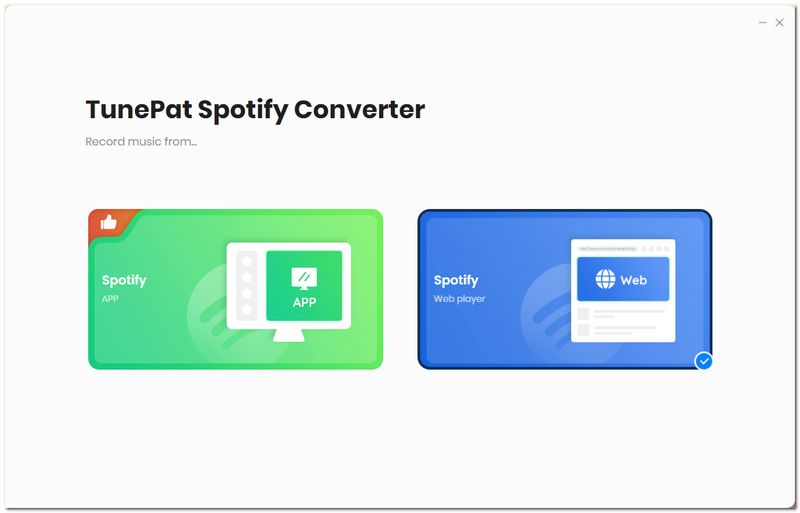
Step 1Run TunePat Spotify Converter and you will see the interface below. You can choose a conversion mode by clicking "Spotify App" or "Spotify web player". Then log in to your Spotify account to browse the Spotify library.
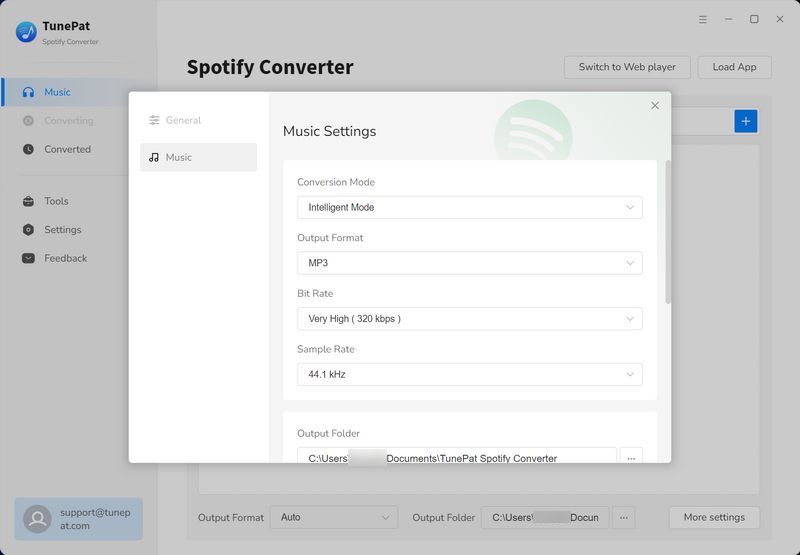
Step 2Click the "Settings" icon (gear button) to set up the output parameters. Select "MP3" as the output format. You can also customize the bit rate (up to 320kbps), sample rate, output file name, and how you want the output files organized.
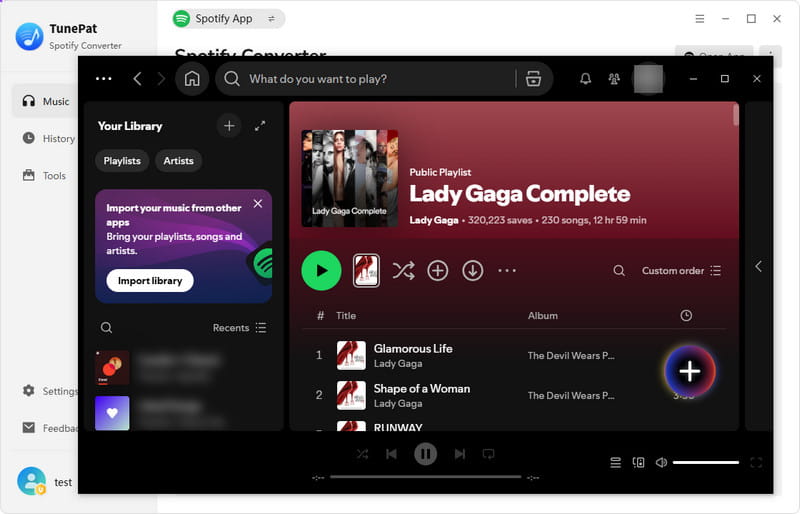
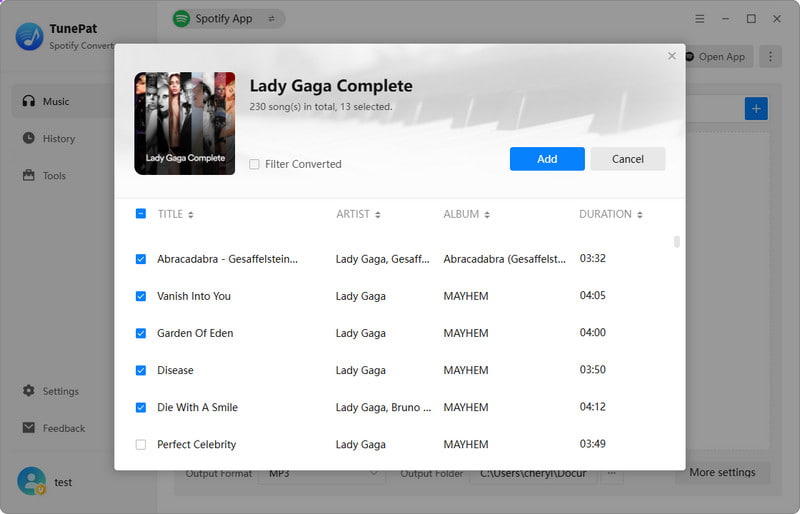
Step 3Open the Spotify playlist you want to download within the built-in Spotify window or the Spotify app. Click on the blue "+" button to load the playlist. Check the items you want to convert and click "Add".
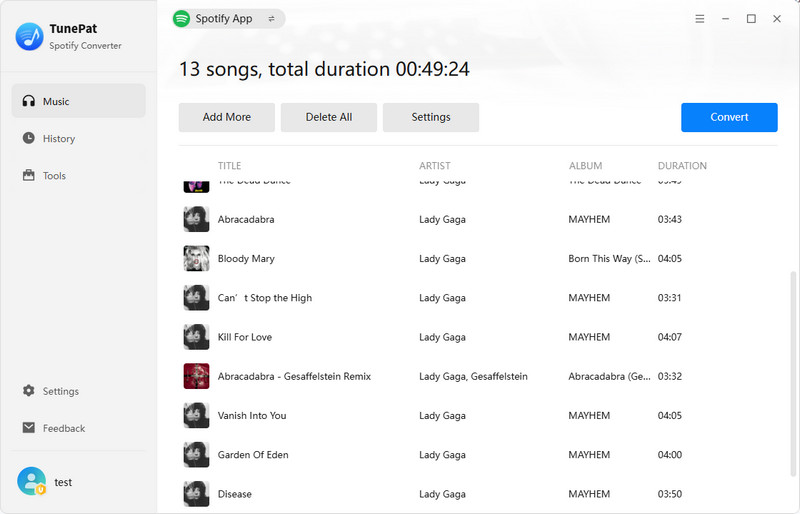
Step 4Click "Convert" to start the process immediately. If you want to add songs from other Spotify playlists to convert simultaneously, click "Add More" instead.
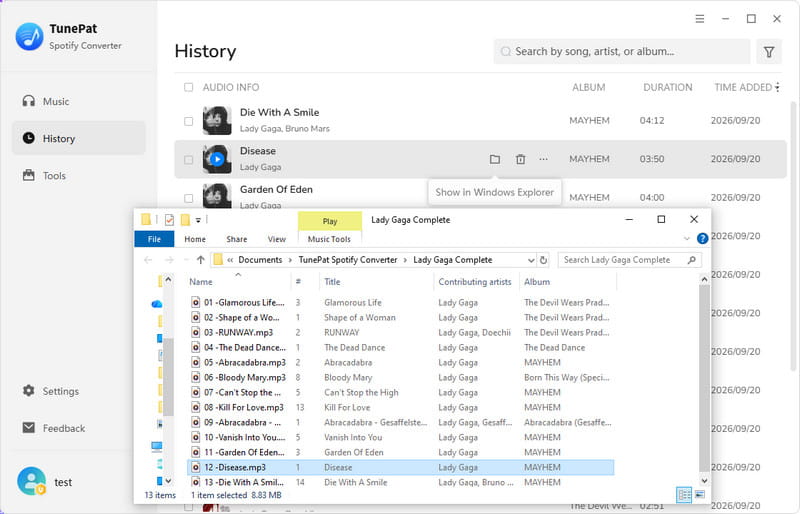
Step 5Once finished, you can check the converted MP3 songs in your local folder or manage them in the "History" module within TunePat. Now, these files are completely DRM-free and ready to be imported into any other platform you like!
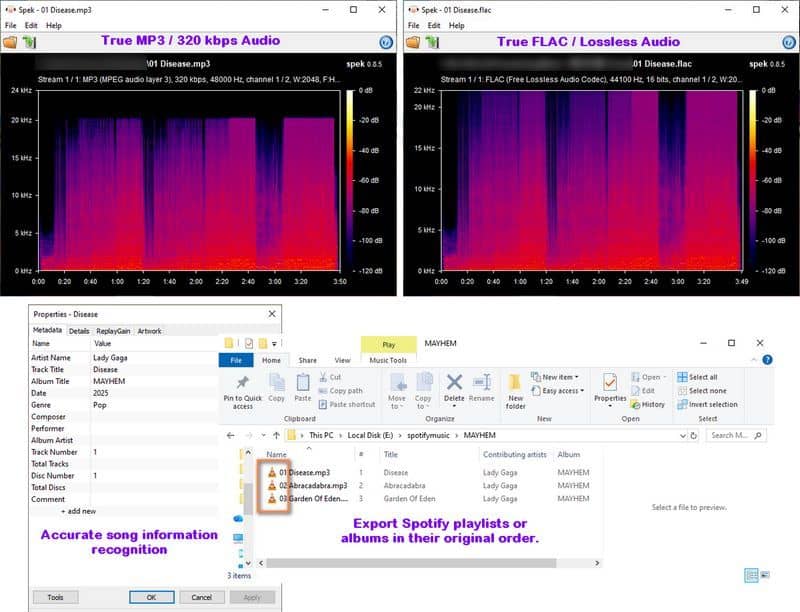
📊 TunePat Spotify Converter Test Results:
Part 4: Are There Any Free Spotify to MP3 Converters? (Tested)
If you are on a tight budget and don't mind a few trade-offs, there are some free tools available. To give you an objective view, we tested 3 popular free methods using a standard Spotify album or playlist. Here is our real testing data and review:
#1: SpotiDownloader
SpotiDownloader is a free online spotify playlist downloader for converting music links. Users can easily paste a Spotify URL to download spotify playlist to mp3, albums, or single tracks for quick offline listening.
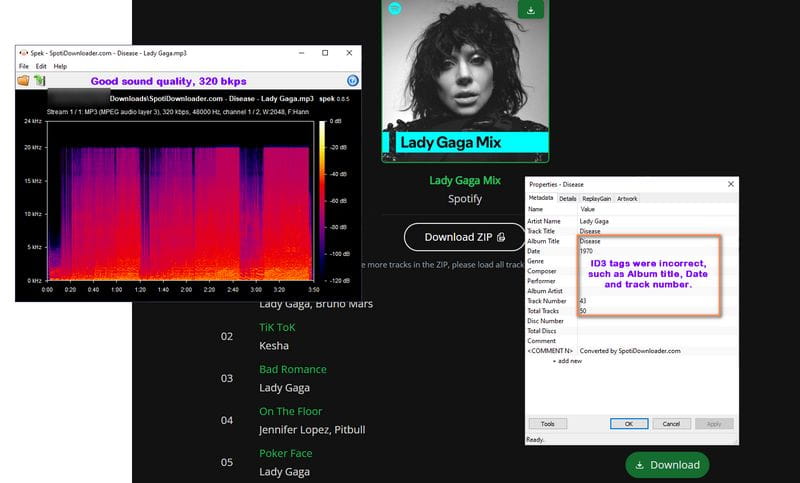
📊 SpotiDownloader Test Results:
- Want to know more? Read our full SpotiDownloader review.
#2: SPOTISAVER Spotify Playlist Downloader
SPOTISAVER is a convenient tool to extract audio from spotify by pasting a music link. It lets you save spotify songs as mp3 and supports exporting full albums or playlists as a ZIP file. The downloaded high-quality files retain original metadata like cover art and artist names, making it easy to organize your library.
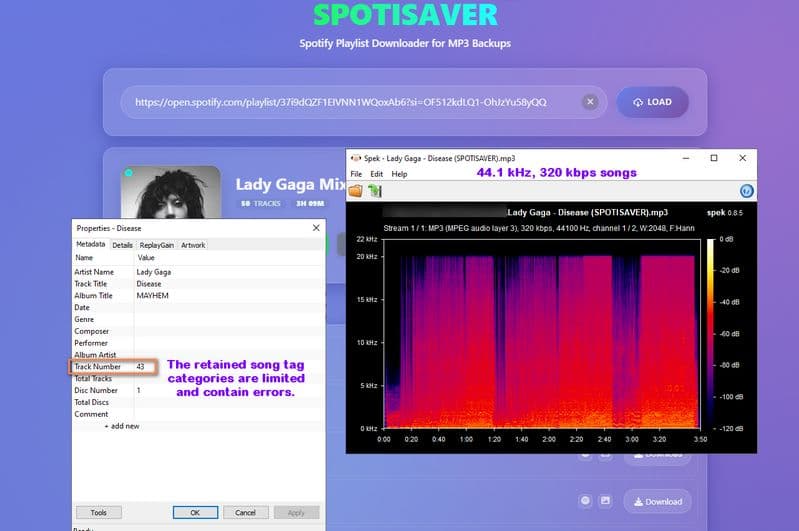
📊 SPOTISAVER Test Results:
#3: SpotifyDownloader
SpotiSongDownloader is a free web-based tool that helps you convert spotify tracks to mp3. By pasting a Spotify link, you can download songs, albums, or entire playlists. It works smoothly on all major browsers for fast offline playback.
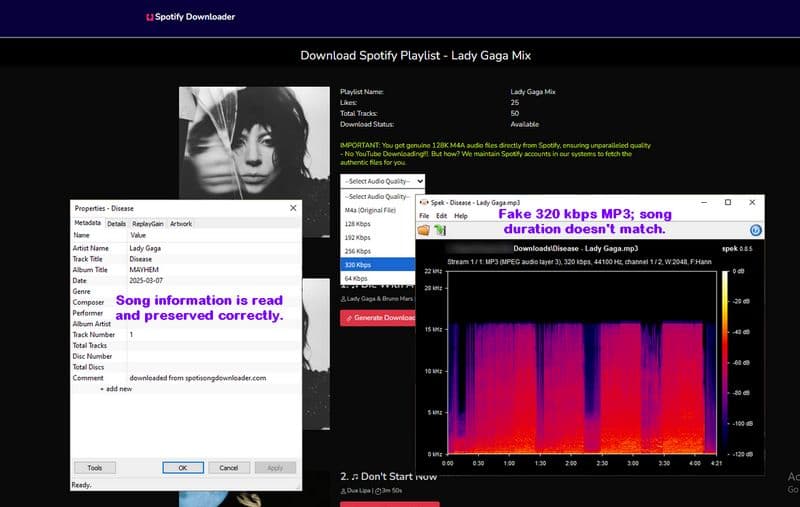
📊 SpotifyDownloader Test Results:
Part 5: FAQs About Exporting Spotify Playlists to MP3
Q1: Can I get true 320kbps audio from free online downloaders?
A: Most fail, but a few can. Many tools use "upscaling" to fake 320kbps using 128kbps sources. However, our hands-on testing proved that select capable tools do deliver true 320kbps. You can verify this via Spek: fake files cut off abruptly at 16 kHz, while the legitimate tools we recommended successfully reach the true 20 kHz cutoff.
Q2: Is it safe to use free online Spotify converters?
A: It varies significantly by platform. Truly free sites often rely on aggressive ad networks, leading to malicious pop-ups and redirects that risk malware or privacy leaks. On the other hand, some premium online platforms offer clean, ad-free interfaces but restrict full features behind a paywall.
Q3: Why do online tools often fail when downloading a full playlist?
A: Server overload and hard limits. Free servers have strict traffic caps. Pasting large playlists often crashes the server and causes failed downloads. Additionally, many free sites intentionally limit downloads to force paid upgrades, such as capping at 50 tracks or only parsing the first 3 songs.
Q4: Why can't I just use Spotify Premium's offline downloads?
A: DRM restrictions. Spotify's official downloads are encrypted cache files in Ogg Vorbis format. They are split into fragments and locked inside the official app. To get standard MP3 files for external local media players or car stereos, third-party tools are required.
Q5: Is there a more stable alternative if online tools keep failing?
A: Yes, desktop software is much better. If you are tired of pop-up ads and failed batch downloads, we highly recommend using a professional tool like TunePat Spotify Converter. It runs locally on your computer to bypass server instability, guarantees true 320kbps quality, and preserves all ID3 metadata tags perfectly.
Conclusion
Converting Spotify playlists to MP3 is simple with the right approach. While online tools work for quick tracks, they fall short for large-scale tasks. For the best experience, I highly recommend TunePat Spotify Converter. It delivers what online tools cannot: one-click batch conversion for multiple playlists, customizable file renaming, and the ability to preserve true 320kbps MP3 or lossless FLAC quality. Pick your preferred tool today and start building your perfect offline music library.
Delilah Rene
Senior Writer